Testing an RGB Led Strip - Non data driven

Thread Starter

Lumenosity

Joined Mar 1, 2017
614
Hello,
I just want to verify that each of the LEDs is working for each color. I want to do that by powering the entire LED strip so that all the REDs come on, then test all the BLUE and then all the Green.

One video on YouTube shows the person in the video connecting the positive power source directly to the marked 12v pin on the Led strip then touching the Negative lead to the 'R', 'G' and 'B' pins one by one to light them.

Another video says you have to use resistors and transistors.

Usually, I just use a 220 ohm resistor with LEDs and other wise apply the related power directly. Is there a reason I can't do that with an RGB LED strip containing multiple LED's ?
 

Reloadron

Joined Jan 15, 2015
7,870
All of this depends on the LED strip itself. If the strip is a common anode then yes, you tie in your + voltage and touch each cathode with the common (negative). If the strip is common cathode then the negative is connected and each color touched with the positive. Many strips have the series resistances built in so external resistors are not needed or used. Got a part number for the specific strip?

Ron
 

Thread Starter

Lumenosity

Joined Mar 1, 2017
614
Hello Ron!
Thanks for replying :)

It's out of a 3D printer and the only part number is "RGBBoard v1.2 (which probably doesn't help)

However, it has 12 RGB LED's and 12 SMD resistors on the board.

I did try it and only the BLUE worked. RED was super faint (barely visible) and no GREEN at all.

What's odd is that there are 12 LEDs and the RED is equally dim on all of them and the Green is out on ALL of them? Seems like some of them should work? Maybe they're like Christmas lights and if the first "bulb" is bad it affects all the rest?
 

ebeowulf17

Joined Aug 12, 2014
3,307
Hello Ron!
Thanks for replying :)

It's out of a 3D printer and the only part number is "RGBBoard v1.2 (which probably doesn't help)

However, it has 12 RGB LED's and 12 SMD resistors on the board.

I did try it and only the BLUE worked. RED was super faint (barely visible) and no GREEN at all.

What's odd is that there are 12 LEDs and the RED is equally dim on all of them and the Green is out on ALL of them? Seems like some of them should work? Maybe they're like Christmas lights and if the first "bulb" is bad it affects all the rest?
This description doesn't match what I pictured from your first description. Could you share a picture of it?
 

Reloadron

Joined Jan 15, 2015
7,870
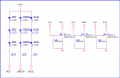
I can give you an example. I have one of these strips laying here. The LEDs are standard part number 5050 LEDs. They are in groups of 3 EA. and each group of three uses a resistor mounted on the strip. The strip voltage is 12 volts and the LEDs are configured common anode.

5050 LED String.png

The LEDs are shown on the left. The right is just a MOSFET driver solution.

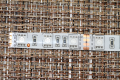
The strip looks like this:
RGB Strip.png

Looking at your board you should hopefully be able to see how things are configured. I am not sure why you would see the effect you saw but you don't mention what your test voltage was.

Ron
 

Thread Starter

Lumenosity

Joined Mar 1, 2017
614
The board says 24v next to the RGB so I only tried 24v

It has 12 LEDs and 12 resistors.

The 12 LEDs are obviously 3 in 1 LEDS that have 3 integrated LEDS in each housing.

Here's a photo

MonopriceLEDStrip.jpg

Blue is the only color that lights up bright.
RED is very faint and flickers a bit.
GREEN - nothing at all.

24v DC applied - CC/CV power supply

When it's connected in the Printer that's the same result. No red, no green.

Seems to me they're wired such that if the 1st LED in the series is bad, they all suffer.
I wonder if I move the first RED and first GREEN LED to last position if all the others would start working?

Looking closely (microscopically) at the first LED, it does appear to have taken the most heat. It looks a bit scorched compared to the last ones.

So does anyone know if it's possible that the first LED went bad and is affecting the rest?
 
Last edited by a moderator:

Reloadron

Joined Jan 15, 2015
7,870
Something you can try if you have not already tried it would be to connect the +24 volts and as you probe each color have a DMM connected across power and measure the voltage. The idea being if for example Blue works you will continue seeing 24 volts when the negative is touched to blue. See if the voltage drops or remains constant when touching green and red or if the 24 volts sags and drops. The effect of one failing is hard to guess less seeing a circuit of exactly how they are wired. Looking at the board you may be able to draw the circuit. As labeled they look to be common anode.

Ron
 

ebeowulf17

Joined Aug 12, 2014
3,307
So does anyone know if it's possible that the first LED went bad and is affecting the rest?
Thanks for sharing the pic! I'm not sure why I got mixed up by a few of the previous comments, but I'm all caught up now.

Even with the pic, I can't trace out exactly how it all feeds together. Still, I seriously doubt that you've got a series wiring arrangement that would allow one LED to knock them all out. If all the LEDs were in series, you would only need three resistors, one for each color. As it is, you've got 12, which would perfectly fit the pattern in @Reloadron's post. So, I'm guessing you've got banks of three LEDs in series, and that four such banks of LEDs are in parallel with each other. So, one LED failing would knock out two more LEDs, not all 12. The other logical argument against it being 12 in series is that the Vf values wouldn't add up - the blue LEDs almost certainly have Vf greater than 2, meaning a string of 12 in series would require more than 24V.

Having said all that, I wonder if the LED could've failed shorted to ground as opposed to failing open, in which case maybe it's pulling the 24V down through the short. Can you measure current while providing 24V to one of the bad legs?
 

Thread Starter

Lumenosity

Joined Mar 1, 2017
614


Ok,
If you look at the photo above.....on this board, referring to the LED's themselves, the top two pins are for Blue, the center pins for Red and the bottom pair of pins are for Green

Powering the BLUE LED circuit.....(top 2 pins)
I'm getting 27mA at the first 6 LEDs (Blue) and the first 6 blue LEDs light up brightly.
However, Blue LED 7 does not pull any current UNLESS......I skip it and go to the 8th LED (from left to right)
When I put the test leads across the 8th LED, suddenly LEDs 9,10,11&12 come on full brightness


Powering the RED LED Circuit....(Center 2 pins)
They light up VERY dimly when the circuit is powered normally
But, if I use my VOM to check the current across them, I find that when I place the leads across LED #9, then RED LEDs 7,8,9,10,11,12 Light up fully bright but Red LEDs 1,2,3,4,5,6 remain dim.
The current through RED LEDs is 50u ohms (50 micro-ohms, not milli-ohms)
But when I place the leads across RED LED #9, the current across RED LEDs 7,8,9,10,11,12 jumps to 20mA


Powering the GREEN LED Circuit....(Left & Right pins at the bottom of the LED)
Basically this circuit is dead, except that when I place the test leads across the 11th LED, it flickers, sometimes will flash bright for an instant then go back out. As if there is a bad connection on the pins at Green LED 11. But I reflowed the solder and it did not improve. ALL the resistors test correct resistance values.

Note that "sometimes" (rarely) I have twisted the mainboard and "some" of the light would flicker......I think indicating there must be some bad connections somewhere.....or the LEDS could be bad internally. I reflowed ALL the connections and it didn't make any noticeable differences.

My best guess at this point is that I have a number of shorted or just "bad" LEDs. Diodes blown or something like that maybe?
Particularly #9 ? But maybe a number of them? I guess I could power each one individually on each color, one by one to isolate the bad ones?
 
Last edited:

Thread Starter

Lumenosity

Joined Mar 1, 2017
614
Last edited:

Reloadron

Joined Jan 15, 2015
7,870
Using a 5050 LED as an example, the string picture I posted earlier take a look at the linked data sheet. The forward current is about 20 mA . The forward voltages at that current are R = 1.8 to 2.4, G = 2.8 to 3.6 and B = 2.8 to 3.6 volts. The LED strip using the 5050 LEDs has a working voltage of 12 Volts. Note the resistor values in the image I posted. Red = 331 Ohms while both Green & Blue are the same 151 Ohms. Using the red as an example we have 3 red in series so if we use an average forward voltage drop of 2.1 V and multiply * 3 = 6.3 volts. So we take 12 V - 6.3 V = 5.7 Volts / 20 mA = 285 Ohms. My series resistors for Red were 331 Ohms, so pretty close and just means the forward current would be further limited. The current limiting resistors are built into the board and that looks to be what you have but rather than 12 volts you have a 24 volt board.

Forget the connector pins and just look at the board. Apply 24 volts (+) where your board is labeled 24V. Next apply the 24 volts (-) to the board pads labeled G, B, and R.

Also, rather than try and repair what you have if you just want a section of LED strip to experiment with I will cut a section off the spool I have and send it to you if you are in the US making for easy mailing.

Ron
 

Reloadron

Joined Jan 15, 2015
7,870
Those should work out fine for you. What motivated me to play around with some was my neighbor bought an entire kit for his motorcycle. The controller offers several options for colors, fade in and out and assorted effects. I used the driver circuit I posted earlier coupled with an Arduino micro-controller and got some pretty cool effects. You can start with RGB and then mix colors, for example G&B will give you a Yellow. While it was all amusing I had no desire to place a light show on my own bike. :) If you get into playing around with the color schemes and some PWM you may find this interesting. Anyway, have a good time with them.

Ron
 

Thread Starter

Lumenosity

Joined Mar 1, 2017
614
I'm waist deep into Arduino projects too :)

That one sounds cool. I wish I could see it but that site won't open for me.

I'll try it from my phone or another PC.
 

Reloadron

Joined Jan 15, 2015
7,870
I'm waist deep into Arduino projects too :)

That one sounds cool. I wish I could see it but that site won't open for me.

I'll try it from my phone or another PC.
The link works for me but a simple google of RGB Color Code Chart will get you any of the dozens out there. While my neighbors bike had a real nice look with the LED light show and I have seen other bikes with the look I didn't want it for my own bike. :) It was amusing playing around with PWM on an Arduino but not on my bike.

Ron
 

ebeowulf17

Joined Aug 12, 2014
3,307
Drifting off topic a bit here, but I had a lot of fun a while back with an RGB LED, Arduino, and PWM. I called it the color Theremin. It was a silly gift for my wife. The capacitive sensors are the bottoms of soda cans.

In the first video, you can see my hands, and the capacitive sensing in action, but the colors oversaturate. In the second video, the colors are accurate, but you can't see the background. I couldn't get the exposure and lighting right in one video, so I made two:

https://m.youtube.com/watch?list=FL-FbjMkDiUi3lHDJNLV7Lhw&v=tO5m1a98xDo

https://m.youtube.com/watch?list=FL-FbjMkDiUi3lHDJNLV7Lhw&v=GmMkZciW_Ec
 

ebeowulf17

Joined Aug 12, 2014
3,307
That was nothing short of really cool. Thanks for sharing it.

Ron
Thanks!

It's kind of like playing with a magical crystal ball (my original concept, which was beyond my mechanical/electrical abilities to pull off) that responds to your hand movements, except the ball is a ping pong ball, and you've only got an inch or two of proximity to work with. Takes practice to achieve any particular effect, but it's fun!
 

Reloadron

Joined Jan 15, 2015
7,870
Thanks!

It's kind of like playing with a magical crystal ball (my original concept, which was beyond my mechanical/electrical abilities to pull off) that responds to your hand movements, except the ball is a ping pong ball, and you've only got an inch or two of proximity to work with. Takes practice to achieve any particular effect, but it's fun!
Got me to thinking I may put something like that together. We have a 13 year old grandson who is a really good kid. While I don't try and steer the kid he has shown interest in programming and seems to enjoy technology. Maybe something like that would interest him. Proximity sense in itself can be cool for a kid his age and a scheme like that would be pretty captivating. Takes practice and some work to get the effects because as you mentioned, it gets tricky and you don't have much distance to work with. Thanks again for sharing that.

Ron
 

ebeowulf17

Joined Aug 12, 2014
3,307
Got me to thinking I may put something like that together. We have a 13 year old grandson who is a really good kid. While I don't try and steer the kid he has shown interest in programming and seems to enjoy technology. Maybe something like that would interest him. Proximity sense in itself can be cool for a kid his age and a scheme like that would be pretty captivating. Takes practice and some work to get the effects because as you mentioned, it gets tricky and you don't have much distance to work with. Thanks again for sharing that.

Ron
I never know what kids will like, but it sounds like a good idea to me, especially if he's shown previous interest in code or electronics!

I'm thinking I'll gather a few old files before I lose track of them and post it as a completed project. At that point you'll have code, theory, diagrams, etc. if you want them.
 
Top