Can anyone recommend a free open source async terminal software for Windows 10? I had something a while back that worked fairly well but but sure what happened to it. and I can't remember what it was called.
Another program you could try is Tera Term. This is what I use with windows 7. I have just tried downloading it and installing it on a windows 10 system and it worked. (The version I installed is 4.100) During the install it did complain about not being able to replace a file but I clicked on the ignore option and the installation completed and worked. It found the FTDI FT232RL un the USB and worked stright away.
Can anyone recommend a free open source async terminal software for Windows 10? I had something a while back that worked fairly well but but sure what happened to it. and I can't remember what it was called.
I still use the old Hyperterminal (Microsoft) which can still be found and if you want it let me know I'll toss it out on my domain so you can download it. I also have used Tera Term which works fine. Either is a good terminal emulator.
I just wish Win10 would play nicer with my bluetooth USB dongle. I need to repair every time I shut power off to the HC-05. Or maybe it is the HC-05 that is at fault? Either way it is a pian.
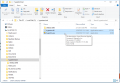
If you want to give Hyperterminal a try you can download it here. The link is my domain and it's clean. The file will be in a zip folder so just extract the contents which are two small files. there is a .exe and a .dll file. Place both files in a folder, they need to be together on for example your C:\\ drive and create a desktop shortcut to the .exe file.
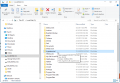
Hers is what things look like on my system:
The Omega DRN is just something else I use and has nothing to do with Hyper Terminal. The only thing important is that both the .EXE and .DLL are in the same folder, you can place them wherever you want.

 Facebook
 Google
 GitHub
 Linkedin