Technics SX-PR603 Digital Piano

MrChips

Joined Oct 2, 2009
34,832
You do know that you can “watch” a thread so that an email alert is sent to you when someone posts a reply to a thread.
 

Thread Starter

emmet422

Joined Sep 1, 2024
58
New speakers installed and working after replacing all the power transistors at the output stage. Also added a ground wire to terminal 3 of the connector that goes from the main volume control resistor VR2 to the Main circuit board, because the volume control did not work well.

this allows volume control, but wasn’t the source of the high frequency noise (sort of crackling, both output channels) that is present in the demo mode, and even worse when i try to use the piano in keyboard mode.
https://www.dropbox.com/scl/fi/hn3u...ey=24uvyfcz1ol79hwt64dwr2s5v&st=38spt7dp&dl=0
is a crude video i made so you can hear the sound. I’ll try to get an oscilloscope trace soon.
The headphones are still noise-free and
did not find any shorted transistors on the ASUB board. though not entirely sure if all have been checked
 
Last edited:

MrChips

Joined Oct 2, 2009
34,832
Ok, I am back at home base. I listened to the audio clip. Before we go any further, we need to take a couple steps back.

1) Disconnect all loudspeakers. Do not connect loudspeakers until you know it is safe to do so.
When working with power amplifiers with direct coupling to the speakers you need to check that the outputs are at 0 V.

2) Confirm that the sound from headphones are clear and not distorted. If that is the case, we can be confident at the audio signal is good up to this stage.

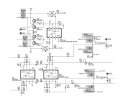
3) Now we need to focus on the four signals driving the gates of the power MOSFETs, Q16, Q17, Q18, Q19.
Technics SX PR603 power amp outputs.jpg

Firstly, measure the voltages at the capacitors C51 and C52 using a DMM and also with your oscilloscope.
Look for clean DC voltage (while playing music content at 1/4 volume level).

The next step following that would be to get screen shots of the signals at the gates, GATE-A1, GATE-A2, GATE-B1, GATE-B2.
Look for similar signals between channels. Look for symmetry.

Also, see if you can lay your hands on a powered PC speaker.
 

Thread Starter

emmet422

Joined Sep 1, 2024
58
welcome home…

Headphones are perfect.
I will disconnect speakers
I have an AC powered speaker set that i planned to plug into the headphone jack (this weekend, when I am co-located with piano again).
I will make the measurements you suggest and get back to you.
 

MrChips

Joined Oct 2, 2009
34,832
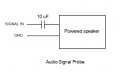
Let us be sure that we understand the purpose of the PC powered speakers. The purpose of the powered speakers is to use it as an audio signal tracer. We need to trace where the signal is good and clean and where it becomes distorted. We do not need stereo (2 channels). One channel is good enough.

Audio signal probe.jpg

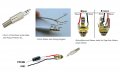
If you don't want to destroy the cable into the speaker, you can build an adapater to the stereo jack.
Audio probe.jpg

We know that the signals to the headphones are good. There is no need to go there.
Instead, your first test points for probing a clean audio signal should be at resistors R62 and R71 in the schematics show in post #107.
 

Thread Starter

emmet422

Joined Sep 1, 2024
58
Wish I had clearer results- had a devil of a time contacting R62 and R71-
When I did, I was able to get a good sound out of the speakers.
But then it might get noisy for a while- made me wonder if my probe connections were bad, except the noisy sections seemed to be a bit repeatable . Or if the pc board was flexing and messing with some other connection??
Tried with different speakers, probes etc, still no consistent results. Sometimes fine, sometimes not. Holding as steady as possible- maybe better, but probably pushing harder trying for good contact.

Looking back at post #107, I think I found C51 and C52, but don't know how I would contact them with the board plugged in. Jumper 94 and 99?
Between those there was a sawtooth of maybe .5 v, 10ms period. ( but had not heard hum on speaker ever)
Haven't figured out where to find 3rd hand to push run/stop on oscilloscope to get a trace i can. send. my probes don't grab the wires well enough.
Didn't see much across1 J16 and J94 which looks like it might be C52
AC coupling on scope ?

DMM on those points gave maybe 1.3 VAC, so maybe the contact was bad on the one with no scope trace.

With instrument off, I tried putting a DVM (in DC volts mode) across C46 and C50; each of those showed a gradually rising voltage, suggesting they are ok
 
Last edited:

Thread Starter

emmet422

Joined Sep 1, 2024
58
Hope all is well with you!
I’m back with the piano, and will try to get you a screen shot of the oscilloscope.
I will try to see if the noise is different for different frequencies using the keyboard.
 
Last edited:
Top