Tapco Thump TH-15A Amplifier repair

Thread Starter

Roque

Joined Sep 16, 2014
158
With the POWER OFF and AC cord unplugged, measure the resistance of R131 (33kΩ) and R132 (4.75kΩ). Measure in-circuit for now.
Check 1N4007 diode for proper forward pn junction.
Check C138 (10μF) for short.

Hi Mr Chips ..sorry to hijack this thread ...i have a similar speaker exactly the same...powers up but no sound...checked voltages on conn11 get -15. , +15, 3.3 and on mute pin i get -26v is that normal i am confused..thank you.and sorry again ..cheers.
 

Thread Starter

Roque

Joined Sep 16, 2014
158

MrChips

Joined Oct 2, 2009
34,646
Hi Mr. Chips any help be much appreciated..the Mackie th15a does power up but no sound...there is a very very faint hiss from speakers i gotta put my ears real close to hear the hiss...the voltages seem normal that is +28 and -28v dc also getting +15 and -15v dc ...i get 3.28dc also on mute pin i get -28v dc not sure if that mute voltage is correct..
I'd be happy to lend a hand. Just need a bit of time to assess your situation.
 

MrChips

Joined Oct 2, 2009
34,646
How are your electronics skills? Can you read circuit diagrams?
How experienced are you with unsoldering and soldering?

Have you read through the posts in the previous thread on repairing the TH-15A?

Measure the voltage on both ends of R204, each time with respect to GND.
 

Thread Starter

Roque

Joined Sep 16, 2014
158
How are your electronics skills? Can you read circuit diagrams?
How experienced are you with unsoldering and soldering?

Have you read through the posts in the previous thread on repairing the TH-15A?

Measure the voltage on both ends of R204, each time with respect to GND.
Yes my soldering skills are good and i have read the previous thread will measure the voltages and update you ..its just that i am in Australia and our time zones are different ...at work at the moment but when i get home will test it out ...thank you for your reply cheers.
 

Thread Starter

Roque

Joined Sep 16, 2014
158
Yes my soldering skills are good and i have read the previous thread will measure the voltages and update you ..its just that i am in Australia and our time zones are different ...at work at the moment but when i get home will test it out ...thank you for your reply cheers.
I do remember that i tested the voltages at both ends of r204 with respect to gnd ..and got 5v at both ends...yes i can read schematics...thanks again..☺
 

MrChips

Joined Oct 2, 2009
34,646
I do remember that i tested the voltages at both ends of r204 with respect to gnd ..and got 5v at both ends...yes i can read schematics...thanks again..☺
5V on the MODE pin of the TDA8942 chip is correct for ON operation.

Now we have to step back and do the traditional input/output style of audio testing.
For this you will need a signal source such as a music player, radio, mp3 device etc. or a signal generator.
For output, you will need either an oscilloscope or a simple PC-style speaker.

What equipment as above do you have that will enable you to do audio tracing?
 

Thread Starter

Roque

Joined Sep 16, 2014
158
5V on the MODE pin of the TDA8942 chip is correct for ON operation.

Now we have to step back and do the traditional input/output style of audio testing.
For this you will need a signal source such as a music player, radio, mp3 device etc. or a signal generator.
For output, you will need either an oscilloscope or a simple PC-style speaker.

What equipment as above do you have that will enable you to do audio tracing?
I do have my phone through which i connect to my amps ..also have a test 10inch speaker by itself not in a cabinet would that help? Also i have tried disconnecting the preamp board and tested the lf and hf input at the connector of the power amp module by touching it to see if i get any audio ..but seems quiet.
 

Thread Starter

Roque

Joined Sep 16, 2014
158
I do have my phone through which i connect to my amps ..also have a test 10inch speaker by itself not in a cabinet would that help? Also i have tried disconnecting the preamp board and tested the lf and hf input at the connector of the power amp module by touching it to see if i get any audio ..but seems quiet.
Got a radio that i can use too...cheers ..how do i go about using these instruments.
 

MrChips

Joined Oct 2, 2009
34,646
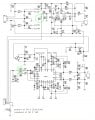
If you look at the output section (page 1), there are two amplifiers, one for the high frequencies and the second for the bass.
Locate R213 on the circuit board.
You are going to use a music source and inject the signal at the junction between R213 and C243.
Start off with zero volume from the music source and gradually increase the level.
If that section of the amp is working you ought to get sound from the upper horn speaker.

Do the same with the lower amp by injecting a signal at the junction between R202 and C204.


TAPCO MACKIE TH-15A Main Amp_R202_R213.jpg
 

Thread Starter

Roque

Joined Sep 16, 2014
158
If you look at the output section (page 1), there are two amplifiers, one for the high frequencies and the second for the bass.
Locate R213 on the circuit board.
You are going to use a music source and inject the signal at the junction between R213 and C243.
Start off with zero volume from the music source and gradually increase the level.
If that section of the amp is working you ought to get sound from the upper horn speaker.

Do the same with the lower amp by injecting a signal at the junction between R202 and C204.

View attachment 131615
If you look at the output section (page 1), there are two amplifiers, one for the high frequencies and the second for the bass.
Locate R213 on the circuit board.
You are going to use a music source and inject the signal at the junction between R213 and C243.
Start off with zero volume from the music source and gradually increase the level.
If that section of the amp is working you ought to get sound from the upper horn speaker.

Do the same with the lower amp by injecting a signal at the junction between R202 and C204.


View attachment 131615
Yes sir. Did that ran a signal at the connector point of hf and there is audio also at resistor 202 there is audio...but i cant get a continuity from the connector pin of lo to the resistor r202...also noticed that c203 shows a short on my dmm..??? I guess one is earth the other side is ground ...its a little smd capacitor...not sure if i need to unsolder to test or maybe will wait for your response...cheers.
 

Thread Starter

Roque

Joined Sep 16, 2014
158
Yes sir. Did that ran a signal at the connector point of hf and there is audio also at resistor 202 there is audio...but i cant get a continuity from the connector pin of lo to the resistor r202...also noticed that c203 shows a short on my dmm..??? I guess one is earth the other side is ground ...its a little smd capacitor...not sure if i need to unsolder to test or maybe will wait for your response...cheers.
Tried putting a jumper from r202 to lo pin on connector but no sound...
 

MrChips

Joined Oct 2, 2009
34,646
Tried putting a jumper from r202 to lo pin on connector but no sound...
Not sure what you mean by "lo pin on connector". What is the pin number on which connector?

Short on C203 is not a problem.

The fact that you are getting sound is good (and bad). Bad, because trouble shooting becomes more difficult because we have to look into the DSP section.

I am in and out today. Response will be sporadic.
 

Thread Starter

Roque

Joined Sep 16, 2014
158
Not sure what you mean by "lo pin on connector". What is the pin number on which connector?

Short on C203 is not a problem.

The fact that you are getting sound is good (and bad). Bad, because trouble shooting becomes more difficult because we have to look into the DSP section.

I am in and out today. Response will be sporadic.
Lo on conn 10. Pin number 2. Cheers.
 

MrChips

Joined Oct 2, 2009
34,646
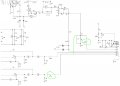
In this next test we are going to bypass the DSP (digital signal processor).
This will verify the preamp and main amp sections. The preamp is on Page 3 of the schematics.

Locate C29 and C34.

Unsolder and remove C34.

Locate the common node with R15, R19, C29.
Take a short piece of fine hookup wire and solder it from this node to the node with R30, R33, C34.

If you have a 10μF capacitor, use this as your jumper between the two nodes stated above.

Input a sound signal into the Thump 15. Start with zero volume and slowly increase the sound level.

If you get proper sound from the main amp woofer then the fault lies in the digital section. You will need an oscilloscope to do any further trouble shooting.


TAPCO MACKIE TH-15A DSP bypass.jpg
 

Thread Starter

Roque

Joined Sep 16, 2014
158
In this next test we are going to bypass the DSP (digital signal processor).
This will verify the preamp and main amp sections. The preamp is on Page 3 of the schematics.

Locate C29 and C34.

Unsolder and remove C34.

Locate the common node with R15, R19, C29.
Take a short piece of fine hookup wire and solder it from this node to the node with R30, R33, C34.

If you have a 10μF capacitor, use this as your jumper between the two nodes stated above.

Input a sound signal into the Thump 15. Start with zero volume and slowly increase the sound level.

If you get proper sound from the main amp woofer then the fault lies in the digital section. You will need an oscilloscope to do any further trouble shooting.


View attachment 131642
Thanks mr Chips will try that this evening ....i am off to work..will keep you posted. Cheers.
 

MrChips

Joined Oct 2, 2009
34,646
Done that ....no sound from woofer..
That would suggest that the fault lies on that area of the circuit and that would be delightful news.

What sound source did you use to plug in into the amp?
How did you jumper across the two nodes? Did you use a jumper wire or a capacitor?

Using the sound source that you used to test in post #13, inject a signal at the node with R30, R33, C34.
 
Top