Taking a Drawing and Creating a PCB Gerber File

Thread Starter

sydcomebak

Joined Dec 13, 2011
69
Here is the sch file.

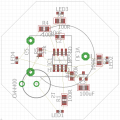
To make the octagonal board, start at:
0.45,0.00 to
1.05.0.00 to
1.50,0.45 to
1.50,1.05 to
1.05,1.50 to
0.45,1.50 to
0.00,1.05 to
0.00,0.45 to
end.

This file has all the lines I think it's supposed to on the schematic.
 

Attachments

SLK001

Joined Nov 29, 2011
1,549
Yes, and being that they are side-mounted LEDs, I don't know how to tell if they are facing in the outward direction which is a problem!
I see that you are using Eagle. If you cannot find a premade library for this part, then you'll have to create your own. Like most PCB packages, Eagle works with layers. The pads, mask, place, origin, silk are all on different layers.

To put a part on the other side, use the command MIRROR.

To change the width of your lines, you can type the desired width in the command line and hit ENTER. Also, there is a pulldown menu with different widths that you can select. For your OUTLINE layer (layer 20), use WIDTH=0. This will put a thin line (visible, but zero width) as your outline.
 

Lestraveled

Joined May 19, 2014
1,946
@sydcomebak

I would like to add to what John said about schematic capture.

Schematic capture is not just a CADD program tailored to drawing schematics. It creates a file called a "net list" that tells the PCB program which pins are connected. When you are laying out the PCB, you can ask the program to show what parts are connected to pin 1 of U1, and it will show you. You can also ask the program if there are any connections that have not been connected, and it will show you. Some PCB programs can look at your net list and get the component foot prints for you. Having the schematic linked to the PCB via a net list is a very powerful tool that will help you a lot in laying out a PCB. Don't ignore this feature.
 

Thread Starter

sydcomebak

Joined Dec 13, 2011
69
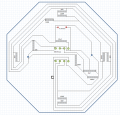
OK, I decreased the thickness of the board edges & set the switch and the battery case to "mirrored" and rotated them:

Gerber.PNG
now I'm scooting components around to try and keep any blue lines from showing up in the autorouter.
 

jpanhalt

Joined Jan 18, 2008
11,087
I didn't realize you were routing too. Are you using Eagle, KiCad or what?

Here is a pdf of a very rough EAGLE board. Ignore the routing. I usually make a sloppy routing just to get component locations that work and allow a single layer without having to route between pins. The SOIC size is big enough to allow easy routing between pins, but I still try to avoid it when practical.

I was about to recommend the battery on the back side, and see you have done that. Maybe this pdf will still help. Another thing I do is hide all of the GND airwires so as to reduce clutter. I checked a ground plane/copper pour, and it was OK for the ground.

The LED's are set 1/2" from the octagon sides. That seems a bit far, but it was what I estimated from your earlier post.

John
 

Attachments

Thread Starter

sydcomebak

Joined Dec 13, 2011
69
@jpanhalt In order to reduce costs, I am trying to do this through a single-side, single layer board, so I don't think a ground plane/copper pour is outside that goal.
 

SLK001

Joined Nov 29, 2011
1,549
I set mine to 0.254mm, and use it as a guide to cut the size of the PCB.
I don't use the OUTLINE layer for anything other than setting the size of the board. It minimizes confusion when placing parts. I created two additional layers for EXTERNAL ROUT and INTERNAL ROUT where I specified the routs of the board.

However, my PCB house now uses the OUTLINE layer Gerber (with line width=0) as their guide for board cutout.
 

Thread Starter

sydcomebak

Joined Dec 13, 2011
69
OK, I got most of it done, but I'm completely frustrated at this point.

I need to walk away.

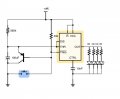
Everything in this:
Capture_SM.PNG
matches this:
image.jpg
Now I've been shaking my fist at the screen for an hour because these damned airwaves won't go away!
 

Attachments

djsfantasi

Joined Apr 11, 2010
9,237
OK, I got most of it done, but I'm completely frustrated at this point.

I need to walk away.

Everything in this:
View attachment 98120
matches this:
View attachment 98121
Now I've been shaking my fist at the screen for an hour because these damned airwaves won't go away!
What damned airwaves? I am not familiar with Eagle, but I'd layout the leftmost LED and its resistor identically to the other three. Also, it looks to me as if the rightmost and leftmost resistor/LED pairs have their resistance shorted out. This is where my lack of Eagle experience will show, but I don't see any pads for the components.
 

Thread Starter

sydcomebak

Joined Dec 13, 2011
69
@djsfantasi

The picture you were looking at was made in Excel. I'm working in Eagle right now where I'm getting the yellow airwave lines showing where connections need to be made.
 

Thread Starter

sydcomebak

Joined Dec 13, 2011
69
OK, I'm going to rebuild the Schematic and then place it on a board that is 10" x 10" and then I'll have enough room to make connections. Then it's just a matter of squeezing it together into the space I need.
 

SLK001

Joined Nov 29, 2011
1,549
You mean UNROUTED lines. In Eagle (as in most packages), the wire starts and terminates in the exact center of the pad. You can connect the wire to the pad, but if it doesn't terminate at the exact center, you will be not connected in Eagle's eye. Since the pads of the SOIC-8 are not on your grid, you have to start a short wire from the center of the pad. When you START a wire, Eagle will always snap from the nearest connection point, be end of a wire, or a pad center.

So, delete the wire at the pad and START a new one from the center of the pad. There is a setting for the SNAP which may help you with these problems.
 

SLK001

Joined Nov 29, 2011
1,549
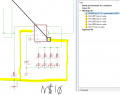
The ERROR that you point to is just a WARNING. You can APPROVE the condition and it won't show as a WARNING again.
 
Top