Symbols Configuration for PCB Libraries

Thread Starter

Juan David DIaz 1

Joined Oct 23, 2018
2
Hi everyone !, I would like to know what kind of symbol configuration most of engineers or pcb designers use or what standards follow to create the symbols.

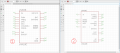
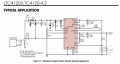
I found some recommendations and i have two examples of symbol configurations , In the "Image #1" i created the symbol placing inputs and pasive pins on left side and outputs on the right side and in the "Image #2" i followed the symbol configuration of the typical application of the datasheet.

Which of the two configurations is better to use and why?

Thank you.
 

Attachments

dl324

Joined Mar 30, 2015
18,326
Welcome to AAC!
Which of the two configurations is better to use and why?
Better is subjective. Since we prefer for the flow in a schematic to be primarily left to right and top to bottom, having inputs on the left and outputs on the right makes more sense.

Unless you plan to create your own library, I'd suggest you choose the software you want to use and tweak things that don't work for you.

It looks like you're using Eagle. I disliked the CMOS 40xx library OR gates so much that I redrew them. I also didn't like the 555 timer so I redrew it too. Ditto for the inductor symbol and a few others.
 

Thread Starter

Juan David DIaz 1

Joined Oct 23, 2018
2
Welcome to AAC!
Better is subjective. Since we prefer for the flow in a schematic to be primarily left to right and top to bottom, having inputs on the left and outputs on the right makes more sense.

Unless you plan to create your own library, I'd suggest you choose the software you want to use and tweak things that don't work for you.

It looks like you're using Eagle. I disliked the CMOS 40xx library OR gates so much that I redrew them. I also didn't like the 555 timer so I redrew it too. Ditto for the inductor symbol and a few others.
Thank you for your feedback.
 

MrChips

Joined Oct 2, 2009
34,807
As @dl324 says, inputs on the left and outputs on the right. However, if you have an application circuit example, I would go with the example since it is easier to follow.

Invariably, you will find a library layout that you don't like or that is non-existent. Learn how to make your own device/symbol/package.
 

ebp

Joined Feb 8, 2018
2,332
I liked to arrange symbols for parts like that so that the external components would fit nicely. For example, if a crystal was required, I'd space the oscillator pins to match those of my crystal symbol. Input would go where they were logical, even if that meant on the right. For example, the current sense pin for a switcher controller would go on the same side as the output pin to the switch, and I'd try to arrange them spaced so that (e.g. with a FET) the gate drive output in would go straight to the gate (or via a resistor) and the current sense pin would line up with the end of the source pin. This often meant the symbols were moderately large, but the overall schematic could actually be more compact because less space was required for jogs and crossovers in "wires." For the 555 time, I think I had four variants, each to suit circuit configurations I commonly used. I think I also had four variants each for PNP and NPN transistors - collector and emitter up & down, emitter down, collector right, e right c up, e & c right. Similarly for dual diodes - both anodes left for paralleling the diodes in one symbol, one horizontal diode one vertical for forward converter. I made a new pin arrangement for just about every microprocessor circuit I ever designed so the pins were logically grouped and carried only the names applicable to the function I was actually using (instead of a great long string of slash-delimited function names). I had a big collection of transformer symbols because I designed switch mode power supplies and every one would have a custom transformer.

I doubt if even 5% of either my schematic symbols or PCB footprints were actually as-supplied with the libraries.

I often designed circuits that had many functional blocks. I liked to try to get a whole block on a single sheet if I could and still have it clean and easy to read. Using custom symbol variants helped with that - though sometimes I needed to spread things out to get the necessary component references and values positioned neatly or to allow space for signal names to be placed on "wires."

That Linear Tech ap circuit example is the way I think schematics should be - all the connections between the IC and surrounding parts clean and direct. You can't always accomplish that, but I think it is a worthwhile objective to try for.
 

MaxHeadRoom

Joined Jul 18, 2013
30,655
I think for small device symbols it is relatively easy to keep inputs on the L.H. side and output R.H. etc, but there are devices such as microprocessors where the pins are multi-use, I/O combined, so this convention doesn't make sense.
Max.
 
Top