Strange Problem

Thread Starter

Formingus

Joined Nov 19, 2014
37
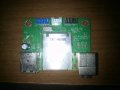
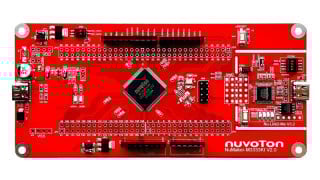
I got a strange problem with this PCB but i will mention it later. Before i ask some advanced users for help i want to try it by mine self.

Question for now is how to found diagram for this PCB ? I try couple of names but seem to have no results

Thank you guys in advance
 

Attachments

Papabravo

Joined Feb 24, 2006
22,082
"...how to found diagram for this PCB...."
I'm guessing you are asking if it is possible to find a schematic diagram for this board. Is that correct?

In order to find a schematic diagram for this PCB I need to ask a few more questions

Why do you need the schematic diagram?
What is the name of the manufacturer?
What is the purpose of the board?
Are there any identifying marks on the QFP on the solder side of the board?​
 

Thread Starter

Formingus

Joined Nov 19, 2014
37
Why do i need : There is very strange problem.

Multimerter on diode mode (beep) and there is no circuit from 5v IN to USB Out , but when is PCB connected to mobo Voltage out is 5v. How is possible when there is beep between Voltage In and Out ?

Manufacturer name is Packard bell iMedia s2870 PC and it is front PCB part of 2 usb out , mmc reader , and audio + microphone

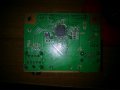
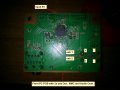
Please check second image, is normal that ground of both usb are in short? (red half square on right on image )

Thank You
 

Attachments

Papabravo

Joined Feb 24, 2006
22,082
I don't know what 5V IN and USB Out refer to. Are they pins on the USB connector? I'm not aware of ANY valid measurements you can make on a USB port with a multimeter. BTW the USB data lines are called D+ and D-. Have you accounted for pullup resistors?

AFAIK Packard Bell is a defunct company so your chances of getting a schematic appear slim.
 

kubeek

Joined Sep 20, 2005
5,796
Why do i need : There is very strange problem.
Multimerter on diode mode (beep) and there is no circuit from 5v IN to USB Out , but when is PCB connected to mobo Voltage out is 5v. How is possible when there is beep between Voltage In and Out ?
I dont see anything strange about that. There are three completely unrelated circuits on that board, one is a card reader that is likely connected via one usb cable, then you have two usb ports connected to another connector, and then you have the audio jack connected to yet another connecter. What is your actual question?
 

Thread Starter

Formingus

Joined Nov 19, 2014
37
I don't know what 5V IN and USB Out refer to. Are they pins on the USB connector? I'm not aware of ANY valid measurements you can make on a USB port with a multimeter. BTW the USB data lines are called D+ and D-. Have you accounted for pullup resistors?

AFAIK Packard Bell is a defunct company so your chances of getting a schematic appear slim.
Yes , i saw nothing from packard bell :(.
About D+ and D- those are data transfer and they dont work properly.

Thank you friend

I dont see anything strange about that. There are three completely unrelated circuits on that board, one is a card reader that is likely connected via one usb cable, then you have two usb ports connected to another connector, and then you have the audio jack connected to yet another connecter. What is your actual question?
Kubest, yes you do have right. There are three completely unrelated circuits on that board. The one that confuse me was middle connector with 4 pins that didnt have short to usb voltage on front panel. but the middle one was power IN for card reader thats why.

Then we have USB and Audio connector left
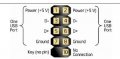
So i checked USB connection from schematic ( check attached image - USB PCB 2.0 Header.jpg) and seem to be fine including 5V out to USB Front panel and Data + and Data -.

But i still dont get Data when i connect mine usb at front panel ?? This is mine problem.

BTW There are some elements on board thats gives me no value at all. Is this normal ? Check Attached image for detailed Info called Values.
Marked with Red Circle that has no values at all . And with green circle they gives me some proper values. PCB is not connected.

Thank You
 

Attachments

Thread Starter

Formingus

Joined Nov 19, 2014
37
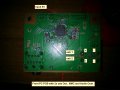
Connected all 3 connectors from Mainboart to PCB - CArd Reader - Audio and USB and i got following :

Red circles has no values at all and
blue circles making beep while checking on diode mode.
Any one that can help me in this case. Sorry i am not so skilled thats why need full explanations

Thank You
 

Attachments

Thread Starter

Formingus

Joined Nov 19, 2014
37
Is there a card in the reader? Something that old, you might not be able to use usb and reader at same time.
No friend its empty, please check post #8 there i describe whats happening when i connect all connectors to panel.
Why some of them making beep (they are in short) while checking them ?

Thank you
 

Thread Starter

Formingus

Joined Nov 19, 2014
37
thank you guys for trying to help
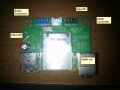
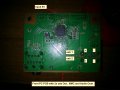
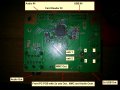
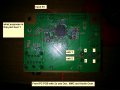
I made PCB Description to clarify things

This is front PCB Panel of Packard Bell Imedia s2870 with Audio Out + Card Reader + 2x USB
Problem is when i connect USB i cant read data but device is recognized (Windows USB Plug in sound notification)

Measuring while PCB Is connected to main board and getting following values
Red Circles - No values at all 0
Blue circles will beep as short while measuring them
And the rest non marked ones gives me values.

Checked ways from main board till pcb front panel seems to be OK.
Thank You
 

Attachments

kubeek

Joined Sep 20, 2005
5,796
What values do you expect from those red circles? Do you have a capacitance meter?
Why do you bother with the card interface when a minute ago you wanted to make the two front panel USB ports work?
You should check your motherboard manual and see how is the wire connected on both ends.
 

Thread Starter

Formingus

Joined Nov 19, 2014
37
What values do you expect from those red circles? Do you have a capacitance meter?
Why do you bother with the card interface when a minute ago you wanted to make the two front panel USB ports work?
You should check your motherboard manual and see how is the wire connected on both ends.
If i do know what values , i will not ask.
Yes i do have capacitance meter but i dont have manual for values - reason why i want to check them is i think there maybe a problem , i dont know
MMC Card interface was only for full description , i mention clearly that problem is after i connect USB i can't read mine data even device is recognized.
Checked wire connection for both ends and it seems to be fine
So only problem hear is that when i connect USB device is recognized but data will not appear on Windows Explorer.

Thank you
 

Thread Starter

Formingus

Joined Nov 19, 2014
37
Have you got your windows usb port DRIVER set for usb V1 and V2 and not V2 only?
Didn't understand this

Also look on windows bios and set for legacy hardware enable.
Its new bios and everything is enabled by default, they works fine a week ago

You could try swapping D+ and D-.
No you cant do that, 10 pin connectors have 1 dummy pin for only 1 directions plug to avoid mistakes. Please check image

How do i check what is wrong with this front pane ? SMD capacitors or whatever . Thank you
 

Attachments

kubeek

Joined Sep 20, 2005
5,796
I said swap just the D+ and D-, not the whole connector. Or at least check that D+ on your motherboard is really connected to D+ on the usb port.
 

Thread Starter

Formingus

Joined Nov 19, 2014
37
I said swap just the D+ and D-, not the whole connector. Or at least check that D+ on your motherboard is really connected to D+ on the usb port.
Friend checked and its connected , i say before when you ask me to check end and end of wire
Sorry for mine bad english. Any other idea ? There is some U2 component looks like voltage regulator or what purposes it does. Maybe it has something with that ?

Thank you
 

Attachments

kubeek

Joined Sep 20, 2005
5,796
Yes, it looks like a voltage regulator. But it is completely not related to the right side of the circuit, which you said is the part that you have trouble with.
 

Thread Starter

Formingus

Joined Nov 19, 2014
37
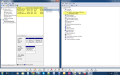
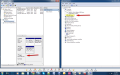
If you see attachments there is clearly USB Recognized by the PC but cant read data
If i connect USB stick 8gb any where it will work. Tested with few USB all the same.
Very strange situation .... !!!
Forgot to mention .. if i connect mine usb mouse wifi receiver it work as well - i know there is nothing to do with data reading but just for more info. Same think with BT. Bluetooth will receive and send data as well from same usb that will not read mine usb stick.

Thank you
 

Attachments

Top