Starting Arduino, but no micro-controller programming skills

Thread Starter

Terrypin

Joined Feb 5, 2016
113
I think the CD had 1.8.0. I went to the Elegoo site and installed 1.8.8 and then when I ran it I got a message that 1.8.9 was available. So that’s what I installed on the Win 10 PC. But on the XP machine it was 1.8.8. However I don’t think I’m going to see this issue resolve itself when I try 1.8.9 tomorrow. Web research just now possibly implies special steps over the drivers are needed. More complicated than I’d hoped...
 

djsfantasi

Joined Apr 11, 2010
9,237
Actually you don't. The IDE is supposed to be able to do that for you. Havn't tried it yet, but it is there to use.
I haven’t used that feature yet. My point is unrelated, however.

Whether or not the boot loader is pre-installed or you use the IDE or some other tool to load it, if you aren’t aware of the need for the boot loader then you may or may not have success with a bare chip.

If you are a μp noob, have only used prepackaged Arduino UNOs and aren’t familiar with programming nor concepts such as a boot loader...

Then you might run into an unanticipated “bump in the road”.
 

SamR

Joined Mar 19, 2019
5,487
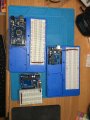
I haven't fried one yet and damned if I know why I haven't. I sure abused them a few times. I have half a dozen R3 variants and a Mega. One has a surface mount LED that doesn't work and it otherwise works fine. One variant is persnickety about being recognized by the IDE as a "genuine UNO" but otherwise works fine. It has the surface mount IC and not the 28 pin dip chip. Another heads up for Terry is baseboards. Handy little gadgets to hold both the card and breadboard. Don't use the big one much. Most exercises will fit on the small one. The small ones are cheap from China out of plexiglass. Also note the power rail jumpers I like to use tying both rails to the power supply.

IMG_0463.JPG
 
I was playing around with my arduino for a couple of months and I could not come up with something that would challenge me enough to really dig deep and learn the code.
My engineering instructor gave me one for a class project.
build a device that will move with a light source in at least one degree of rotation.
It took me weeks of research and writing code to get it to work but I learned so much of what can be done.
I used 4 light sensors to create a boolean argument to drive 4 steppers motors, 2 for up and down and two for left and right and did eventually get movement in both directions at once.
Final code ended up being about 100 lines.
Now I need another project to find.
 

Wolframore

Joined Jan 21, 2019
2,619
I'll try to get some pictures of my set up. It's taken me years to figure out but it's really small and I can have multiple projects going at once...

Terry did you get your program to work?
 

dendad

Joined Feb 20, 2016
4,637
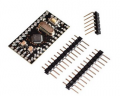
I use Arduino Pro Mini boards as a component instead of buying the chip, regulator, crystal.....
ArduinoProMini.png
This is just one variant.

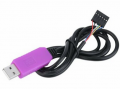
It is cheaper that way. Under $3AU, and then a USB to serial cable for programming. My boards do not need USB connectivity so why include that permanently?
ProgramingCable.png
I've not bothered with a DIP part as these boards do it all for me and are ready made with most of what is needed.
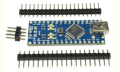
Another Arduino board, with the USB installed, is the Nano.
Arduino Nano.png
And these are only a little bit more. Just under $4AU.

Unless you really want to go that way, I would not bother with a DIP part itself.
 

Thread Starter

Terrypin

Joined Feb 5, 2016
113
I'll try to get some pictures of my set up. It's taken me years to figure out but it's really small and I can have multiple projects going at once...

Terry did you get your program to work?
Yes, but wow, it was hard work.

I tried again with version 1.06 which I'd read was used successfully with XP by several others. And this time I followed the detailed instructions here:
http://www.hobbytronics.co.uk/arduino-installation

But that gave me the same disappointing result.

Then I recalled reading someone had succeeded only by running in Windows 2000 compatibility mode. I tried that - and bingo!

I then ran the 'Blink' program (sorry, 'sketch') and was never before so pleased to see an LED flashing :)

Then I saved that Blink.ino file with a new name after changing just one line in the code, so that the last part was now:

// the loop function runs over and over again forever
void loop() {
digitalWrite(13, HIGH); // turn the LED on (HIGH is the voltage level)
delay(500); // wait for 500 ms
digitalWrite(13, LOW); // turn the LED off by making the voltage LOW
delay(1000); // wait for a second
}

So now I expected it to be ON for 500 ms instead of 1000 ms. But when I ran it ('uploaded' it), it flashed rapidly briefly (probalby ON for more like 100 than 500 ms), then Rx (whatever that is) flashed a couple of times, then the LED resumed flashing at the original 1000/1000.

What did I do wrong in my first excursion into coding please?!

Terry, East Grinstead, UK
 

dendad

Joined Feb 20, 2016
4,637
Try ....
delay(100);
just to make sure as a much shorter pulse will be easier to see the difference.
It should be working ok. But maybe you are still using the original BLINK program and not BLINK2 (or whatever it is now called)?
 

SamR

Joined Mar 19, 2019
5,487
Congrats! Just to be sure you did reload the program after the change? The IDE edits on the computer, not directly on the Arduino. Rx is receive from the USB.
 

Thread Starter

Terrypin

Joined Feb 5, 2016
113
Try ....
delay(100);
just to make sure as a much shorter pulse will be easier to see the difference.
It should be working ok. But maybe you are still using the original BLINK program and not BLINK2 (or whatever it is now called)?
Definitely running Blink-Terry-01.ino. I assume you just open the file then use Upload?

With the code I showed it was delaying much less than half a second, so 100 might be even faster? But I’ll try anything. Seemed such a trivial change. I’ll test again in the morning.
 

djsfantasi

Joined Apr 11, 2010
9,237
Does the version of the Arduino IDE that you have compile when you click on upload?

And do you get two status messages? Compile Done and Upload Complete?
 

Thread Starter

Terrypin

Joined Feb 5, 2016
113
Congrats! Just to be sure you did reload the program after the change? The IDE edits on the computer, not directly on the Arduino. Rx is receive from the USB.
Yes, I’m pretty sure. And if I hadn’t, I assume the LED would have just continued as before, instead of that strange mixture? Also, why the Rx flashing? Maybe someone could spell out the steps they make after editing an .ino file and I might spot my mistake?

I also wanted to ask you what are those nice blue ‘bases’ on which you’ve neatly mounted your Arduino? What do most users do by way of supporting the board while experimenting?

BTW, the kit looks great, but the USB cable is impractically short, at about 50 cm. Ok for a laptop I suppose but I needed an extension to connect it to my PC under the bench.
 

SamR

Joined Mar 19, 2019
5,487
The chinese have gone big into Arduino development since it is open source and very popular. IE profitable for them to make and sell cheap for a profit.
 

djsfantasi

Joined Apr 11, 2010
9,237
Not sure, how do I know if it’s compiling? I think it briefly showed a progress bar.


No, dont recall any message.
There is a status bar on the lower part of the IDE. Your code is on top in a white window, and compilation progress is in a black window on the bottom. The status bar is in the middle.

The RX led flashes while your sketch is uploading. That may give a hint as to what’s going on.

The IDE also has a habit of opening multiple windows when you open a new sketch. It’s been known to happen that you think you’re working on one sketch while actually working on another. If you click on Upload in the wrong window, the wrong sketch is uploaded. Full disclosure: it’s happened to me more than once. I make a habit of closing everything but the sketch I’m working on.

My questions were to determine if the original sketch was accidentally uploaded.

One other thing I’d like to point out.

The way sketches are structured, all code in the setup() routine is executed once, until the processor is reset (usually a manual operation).

However, the code in the loop() routine does exactly that. When the code is done, it starts over from the beginning of the loop() routine. If you don’t realize this, you can be surprised at how it executes.
 
Top