[SOLVED] Counter IC does not count

Thread Starter

gelzky

Joined Dec 7, 2021
86
hi,
Look at this image , note the state of segments a thru g.
E
yes, thanks I understand the state of the segments but since I do not have a 4-input AND gate I'm still looking for possible solution:>. And I'm still trying to process the circuit you posted a while ago">>
 

djsfantasi

Joined Apr 11, 2010
9,237
yes, thanks I understand the state of the segments but since I do not have a 4-input AND gate I'm still looking for possible solution:>. And I'm still trying to process the circuit you posted a while ago">>
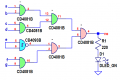
Since you don’t have a 4 input AND gate, do you have 2 input AND gates? Feed the 4 inputs into two 2 input gates. Then take their outputs and feed them into another 2 input AND gate. It’s output is then identical to a 4 input AND gate.
 

Thread Starter

gelzky

Joined Dec 7, 2021
86
I’m not sure that the TS is sure. As I read it initially, the requirement was to stop after 10 pulses from the sensor.
The numbers from 0 to 9 take 4 bits to represent in binary. However, with 4 bits you can represent the numbers from 0 to 16. What?

The CD4026 is a special type of counter called a “decade counter”. It only counts the first 10 (decade) digits.

So what happens when it counts to 10? First, it starts over at 0. But if we want to represent the numbers from 0 to 99, we need two decade counters. And a way to count the number of “tens”. To do this, we connect two decade counters together. This connection is called “daisy chaining”.

CO, carry out or count out is used to count the numbers of tens. It is connected to the count or clock input of the second decade counter. Similarly, if we wanted to count hundreds, we’d add a third decade counter clocked by the CO of the second. And so on..,

So, in your circuit, CO indicates that the counter has counted ten numbers. 0-9.

Someone mentioned that you wanted to count to 9. I thought the original requirement was to stop after 10 pulses from the sensor. Stopping at 9 isn’t 10 pulses. It’s only 9.

If you have anymore questions, just ask.
wow that's a lot of information, thank you so much:>. yes I understand the carry out but I thought that the pin 5 of 4026 is supposed to divide 10 and it will have high logic level at ranges 0-5 and low at 6-9 that is why I used inverter so that when it reaches 5 the buzzer will alarm (well that is my back up plan if ever I will not be able to do the original project). Also, I'm really not following on what you are suggesting, where will I connect the pin5?
 

Thread Starter

gelzky

Joined Dec 7, 2021
86
Since you don’t have a 4 input AND gate, do you have 2 input AND gates? Feed the 4 inputs into two 2 input gates. Then take their outputs and feed them into another 2 input AND gate. It’s output is then identical to a 4 input AND gate.
yes, that is what am trying to do with the earlier and with photos I posted but they did not work because maybe I'm doing something wrong:<
 

ericgibbs

Joined Jan 29, 2010
21,439
hi,
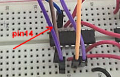
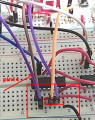
Is there a +5V wire in pin #14.?
E


Update:
What type are those two bottom IC's ie: model number....

EG 1125.png
 
Last edited:

ericgibbs

Joined Jan 29, 2010
21,439
turns on when the counter is 8 or 9?
hi,
That suggests that you have a wire wrong or missing.
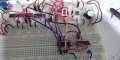
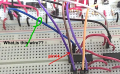
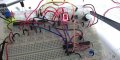
Please post a drawing of your circuit, it is difficult to follow the wiring, also what type of IC are those two at the bottom right.??
E
 

Thread Starter

gelzky

Joined Dec 7, 2021
86
hi,
That suggests that you have a wire wrong or missing.
Please post a drawing of your circuit, it is difficult to follow the wiring, also what type of IC are those two at the bottom right.??
E
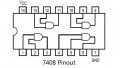
oh no..:< I'll recheck the wirings first then I'll post it :). Those IC at the bottom right are the AND gates:> the breadboard I have are small and adding two more ICs will not fit:> so I just attached another breadboard:)
 

djsfantasi

Joined Apr 11, 2010
9,237
I have AND, NAND,OR,NOR,XOR & Inverter gate:>
So you can make a 4 input or an 8 input AND gate from these. Take another look at my post for a 4 input AND gate. You can use the same technique to make an 8 input AND gate. (And by combining two inputs or tying one input to HIGH, you can make a 7 input AND gate).

By putting an invertor before an segments input that is off or LOW, you can match any number your heart desires.
 

ericgibbs

Joined Jan 29, 2010
21,439
hi
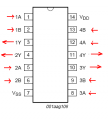
This looks wrong, you have pins 4 and 5 as inputs.
E


You must post a drawing with pin numbers, else it is not possible to help you.

EG 1129.png
 

Thread Starter

gelzky

Joined Dec 7, 2021
86
So you can make a 4 input or an 8 input AND gate from these. Take another look at my post for a 4 input AND gate. You can use the same technique to make an 8 input AND gate. (And by combining two inputs or tying one input to HIGH, you can make a 7 input AND gate).

By putting an invertor before an segments input that is off or LOW, you can match any number your heart desires.
thank you so much for your suggestion:) I will also try this:>
 
Top