Software I2c using xc8 mplab x

Thread Starter

be80be

Joined Jul 5, 2008
2,395
I been trying to use a appnote I found not much luck I think Mplab x with xc8 is hexed LOL
Dose anyone have a sample they don't care to share.
I'm just needing how to send the commands
I added my mplab X files may some one can point me to why it's not working It should but I get this and I'm sure I put them in the main c But why it keeps saying it's not using them is be on me.
Code:
./main.c:146: warning: (520) function "_ini_gpio" is never called
../WI2C.c:12: warning: (520) function "_i2c_start" is never called
../WI2C.c:28: warning: (520) function "_i2c_stop" is never called
../WI2C.c:99: warning: (520) function "_i2c_rd" is never called
../WI2C.c:118: warning: (520) function "_ack_poll" is never called
And as you can see I'm using them
Code:
  i2c_start;
    i2c_wr(0x38);
    i2c_wr(0x00);
    i2c_wr(0xFF);
    i2c_stop;
 

Attachments

Picbuster

Joined Dec 2, 2013
1,058
Difficult to identify problem.
This was written for old xc8 compiler changes did take place especially in the usart and eusart libs.
If you are using above 1.34 you could face that problem.
I will dive into my own libs and try to find a working program for the pic16.
SPI I do have for Pic16 that's for sure but uncertain about I2c.
Picbuster
 

AlbertHall

Joined Jun 4, 2014
12,625
Which processor are you compiling this code for?
Which version of MPLABX and XC8 are you using?

The header comments say PIC16LF1947, the config header says PIC16F876A but either of these give me a LOT of 'unknown configuration setting' errors.
 

Thread Starter

be80be

Joined Jul 5, 2008
2,395
It's software I2c I didn't think about saying what chip cause it dose that when you open it in mplab x
Im using a 18f1220 I think it's just xc8 I need to use the one the appnote used.
 

AlbertHall

Joined Jun 4, 2014
12,625
There are no config errors when compiling for PIC18F1220 but I do the unused routine warnings.
You need to add empty brackets to I2Cstart and I2Cstop, as below. I haven't checked whether this code actually executes I2C correctly.
Code:
[*]  i2c_start();
[*]    i2c_wr(0x38);
[*]    i2c_wr(0x00);
[*]    i2c_wr(0xFF);
[*]  i2c_stop();
 

Thread Starter

be80be

Joined Jul 5, 2008
2,395
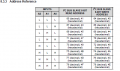
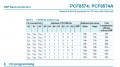
Well I wish the data sheet for the PCF8574 was a little more clear cause there not
the address is 0x38 for my PCF8574 I no some of the commands work but I can't get my head around the R/W bit
That's what I playing with a PCF8574
I wanted to port some arduino code to a 18f1220 and make a sniffer but bit bang I2C is not as easy Is I figured.
So here's my read of the datasheet I send start then the 7 bit address then set the 8 bit to W
Then I set the port all high which turns off the 8 leds I have on it.
Then to toggle the leds I set them low.
 

Thread Starter

be80be

Joined Jul 5, 2008
2,395
It's 0x38 PCF8574AP It took me a day to find it the data sheet where I got the chips was wrong I use a arduino program to find it.
This on a uno I want do the same with a pic 18f1220 I'm close but no joy with the pic 18f1220.
This is the code for arduino you can see it's 0x38
Code:
#include "Wire.h"
#define redchip 0x38 // device addresses for PCF8547Ns on each LED colour bank

int dd=20; // used for delay timing
void setup()
{
Wire.begin();
allOff(); // the PCF8574N defaults to high, so this functions turns all outputs off
}
// remember that the IC "sinks" current, that is current runs fro +5v through the LED and then to I/O pin
// this means that 'high' = off, 'low' = on.
void testfunc()
{
Wire.beginTransmission(redchip);
Wire.write(0);
Wire.endTransmission();
delay(dd+50);
Wire.beginTransmission(redchip);
Wire.write(255);
Wire.endTransmission();
delay(dd+50);
}
void testfunc2()
{
for (int y=1; y<256; y*=2)
{
Wire.beginTransmission(redchip);
Wire.write(255-y); // we need the inverse, that is high = off
Wire.endTransmission();
delay(dd);
Wire.beginTransmission(redchip);
Wire.write(255);
Wire.endTransmission();
delay(dd);
}
}
void testfunc3()
{
Wire.beginTransmission(redchip);
Wire.write(0);
Wire.endTransmission();
delay(dd+50);
allOff();
delay(dd+50);
}
void allOff()
{
Wire.beginTransmission(redchip);
Wire.write(255);
Wire.endTransmission();
}
void loop()
{
for (int z=0; z<10; z++)
{
testfunc();
}
for (int z=0; z<10; z++)
{
testfunc2();
}
for (int z=0; z<10; z++)
{
testfunc3();
}
}
 

AlbertHall

Joined Jun 4, 2014
12,625
Both tables are correct. The 7-bit address is 0x38 but this needs the LSB for read/write added forming the 8-bit address before being sent on I2C.
 

Thread Starter

be80be

Joined Jul 5, 2008
2,395
Well it's sending just not right looks like the clock line is not working right.
I sent 0x70 plus the command nothing happened.
The arduino code looks like it sends 38 then shifts in a 0 then the command.
Code:
void main(void)
{
     ini_gpio();
     i2c_start();
     i2c_wr(0x70);
     i2c_wr(0x0);
     i2c_stop();


while(1)
    {
        // loop forever
        }
}
 

AlbertHall

Joined Jun 4, 2014
12,625
Looking at the code, i2c_wr assumes its argument is the full 8-bits, so you will need to pass 0x70 if you are going to write to the chip or 0x71 if you want to read from the chip.
 

Thread Starter

be80be

Joined Jul 5, 2008
2,395
Well I figured out one thing the osc was to fast I slowed it down I think I got use the bit write function and clock it all in at once.
 

jayanthd

Joined Jul 4, 2015
945
@be80be

Interested in using mikroC PRO PIC Compiler ? I have one extra licence and I am willing it give it to you.

mikroC PRO PIC has I2C and Sift_I2C libraries but mikroE doesn't provide source code of libraries. They provide compiled libraries.

If you are interested then PM me.

Also there are examples of PCF8574 and libstock.com and also libraries.
 
Top