Smoothing 'jagged saw-like' patterns of a model

Thread Starter

Eric007

Joined Aug 5, 2011
1,158
Hi All,

As my title says, I am trying to make the curve (right side) of the attached red object smooth.
I created this object with Blender and using points as shown attached. The right side of the object has the following data:

x = [ -0.98438 -0.97396 -0.96094 -0.94271 -0.92188 -0.90104 -0.88542 -0.875];
y = [0.7 0.6 0.5 0.4 0.3 0.2 0.1 0];

The above data have been chosen to match the design. I managed to draw it in my Android app successfully using OpenGl. The actual process is very complicated but that's not the question here.

I am interested in the range y = [0.7 0] because for y >= 0.7, x = -0.98438 and this is why for y >= 0.7 the curve is constant and smooth. I thought adding more points might help achieve this. Now the question is how many 'x' points need to be added for each interval, ie [0.7 0.6], [0.6 0.5], ... to have a smooth curve? I was thinking to start with 10 points.

My plan is to use Matlab and plot "plot (x, y, 'o');" then using the tool 'Basic Fitting' to get y = f(x). I think 7th or 6th degree polynomial will do given 8 coefficients.

Any comment/guidance will be appreciated!

[Edited] Attachment removed!!!

Eric
 
Last edited:

Thread Starter

Eric007

Joined Aug 5, 2011
1,158
Using Matlab, for the [0.7 0.6] interval I get:

>> x = linspace(-0.98438, -0.97396, 10);
>> x

x =

-0.9844 -0.9832 -0.9821 -0.9809 -0.9797 -0.9786 -0.9774 -0.9763 -0.9751 -0.9740

Now I need to plug this into y = f(x)
 

Thread Starter

Eric007

Joined Aug 5, 2011
1,158
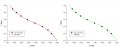
Using Basic fitting and 6th degree polynomial, I get this (see attached). Is 6th degree ok or it won't make much difference if I choose 7th? but looks like it gives correct value for x = -0.98438.
 

Attachments

WBahn

Joined Mar 31, 2012
32,935
What constitutes a "smooth curve"? Or, perhaps more to the point, how "smooth" is smooth enough?

In particular, you need to consider things like how it behaves at the end points relative to what is on the other side of those end points. There are lots of curve fitting algorithms out there, each with advantages and disadvantages.
 

Thread Starter

Eric007

Joined Aug 5, 2011
1,158
What constitutes a "smooth curve"? Or, perhaps more to the point, how "smooth" is smooth enough?
...
Smooth enough not to see these sharp things! Will try using Matlab first and will see if it's good enough if not will use @joeyd999's but I think it's all about adding more points but well let's see...
 
Using Basic fitting and 6th degree polynomial, I get this (see attached). Is 6th degree ok or it won't make much difference if I choose 7th? but looks like it gives correct value for x = -0.98438.
I have done my share of curve fitting, although in a different field. I would echo the sentiments of @WBahn and add a little bit.

When I thing of "smoothing", I think of adjusting the data. Seems like you want to describe the data, as it is, using a function that will then be used to generate more data (interpolated or extrapolated).

You have 8 data points in your original post, so the highest order polynomial that you can use is 7 (n-1). It also seems like you are asking if it is necessary to go to a 7th degree polynomial or if "a 6th degree is ok or it won't make much difference if I choose 7th?"

A 7th degree polynomial will be different than a 6th degree polynomial. If you use a measure like R2 (R-squared) to evaluate how well the function fits the data (based on least-squared error), yes, it will produce a larger R2. Given your data, a 4th degree polynomial and higher will produce an R2 > .9999. So, it becomes a question of how much of a difference matters.

If you look at graphs (attached) of the two functions, you don't see a difference.

If you look at predicted values between the two polynomials (see attached), you can see very small differences.

I would say that if those difference can be represented AND you don't have much care about calculating cost, go ahead and use a 7th degree.

As an aside, if I saw this (7th degree fit) used to describe a biological process, I would be inclined to laugh, because I don't know about too many of those that look like that, but, you are trying to draw something as accurately as you can - a completely different scenario.

Finally, I used software that is referred to in the thread reference from @joeyd999 - it makes these kinds of evaluations very easy, although my guess is that it does not have the precision of Matlab.

7th and 6th.jpg
 

Attachments

Thread Starter

Eric007

Joined Aug 5, 2011
1,158
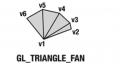
It's weird! I have added 10 points in the interval [0.7 0.6] but no change! Btw, I am using a triangle fan (see attached) to draw it.

I am now thinking of @WBahn statement "In particular, you need to consider things like how it behaves at the end points relative to what is on the other side of those end points." Oh let me read and try @raymond post.
 

Attachments

WBahn

Joined Mar 31, 2012
32,935
Smooth enough not to see these sharp things! Will try using Matlab first and will see if it's good enough if not will use @joeyd999's but I think it's all about adding more points but well let's see...
What "sharp things"?

What constitutes "not seeing" whatever those sharp things are?

If you are talking about the stair steps in the red curve, those are due to the pixel quantization in a raster image. To make them go away you would have to be able to draw sub-sized pixels at sub-pixel resolution.

What you can do is use a dithering algorithm to soften the sharp points in order to encourage the human eye to do a better job of blending them in the mind.

Is something like this what you are looking for:
Screenshot_2017-03-21-13-08-05.png

Note that I did this by hand in Paint, so it is far from optimal. But I think the idea gets across.
 

Thread Starter

Eric007

Joined Aug 5, 2011
1,158
What "sharp things"?

What constitutes "not seeing" whatever those sharp things are?

If you are talking about the stair steps in the red curve, those are due to the pixel quantization in a raster image. To make them go away you would have to be able to draw sub-sized pixels at sub-pixel resolution.

What you can do is use a dithering algorithm to soften the sharp points in order to encourage the human eye to do a better job of blending them in the mind.

Is something like this what you are looking for:
View attachment 122982

Note that I did this by hand in Paint, so it is far from optimal. But I think the idea gets across.
Yes! That's the idea and I have attached the design done in Photoshop! and yes I don't want to see these sharp things/stair steps. it should be as smooth as the one I just attached.
@raymond I tried yours and still getting these stair steps. Looks like the solution is in "...
those are due to the pixel quantization in a raster image. To make them go away you would have to be able to draw sub-sized pixels at sub-pixel resolution.
"
 

Attachments

Thread Starter

Eric007

Joined Aug 5, 2011
1,158
Another thing to remember is that I am not displaying a picture but drawing it in code using the above points and one of the reason is so that it looks good for any screen resolutions. It is screen independant.
 

WBahn

Joined Mar 31, 2012
32,935
The phenomenon you are trying to deal with is often known as "jaggies" and it really has nothing to do with curve fitting. Zoom in on your Photoshopped image and you will see that you still have jaggies:

upload_2017-3-21_15-40-53.png

But that the pixel colors are chosen to have them change over a long span of pixels.

upload_2017-3-21_15-42-32.png

But this requires that there be a lot of pixels in the first place.

Use your existing algorithm but increase the pixel density of the image that is produced. Then view it so that it is the same overall size on the screen as the original image and it will look a lot less jagged, too.
 

WBahn

Joined Mar 31, 2012
32,935
Another thing to remember is that I am not displaying a picture but drawing it in code using the above points and one of the reason is so that it looks good for any screen resolutions. It is screen independant.
Well, if you draw a curved line on a screen that has 10 times the pixels in each direction, you can make it look a lot smoother than on one that doesn't. So your results are NOT going to be independent of screen resolution (unless you opt to have it look equally bad on all screens using the lowest resolution screen as your basis).
 

Thread Starter

Eric007

Joined Aug 5, 2011
1,158
...it really has nothing to do with curve fitting. Zoom in on your Photoshopped image and you will see that you still...
I have now realized that, as you said, it has nothing to do with curve fitting. I first thought that adding more point would solve the problem but looks like no!

Use your existing algorithm but increase the pixel density of the image that is produced. Then view it so that it is the same overall size on the screen as the original image and it will look a lot less jagged, too.
I will have to figure out how this can be done in OpenGL.

Thanks for the help
 
I have now realized that, as you said, it has nothing to do with curve fitting. I first thought that adding more point would solve the problem but looks like no!


I will have to figure out how this can be done in OpenGL.

Thanks for the help
Seems like you are getting some good input and, yep, it does not seem to have anything to do with curve fitting. Not sure how relevant it is here, but some systems will use a virtual resolution that is above the highest anticipated screen size. Then scale it appropriately to the current screen resolution.
 

Thread Starter

Eric007

Joined Aug 5, 2011
1,158
...
Not sure how relevant it is here, but some systems will use a virtual resolution that is above the highest anticipated screen size. Then scale it appropriately to the current screen resolution.
Well I am already doing that with the details I am adding on the screen using *texture* when rendering some texts. I am scaling an image, on which I append text, to the device screen resolution to avoid squashing/stretching of the texts...
Btw , I am displaying lots of things and most are dynamic, like the above red object moves vertically and in sync with some other object. I still think there's a solution to it. Will try the suggestions above.
 

MrAl

Joined Jun 17, 2014
13,722
Hi,

What exactly are you trying to achieve?

Whenever you display on a screen you will always get pixelation. This is because the pixels themselves are visible to the eye from short viewing distances (in your case).

The only way around this is to taper the edges, which i think you are doing. This creates the illusion of smoothness. This has to be varied with zoom level though.
 

Thread Starter

Eric007

Joined Aug 5, 2011
1,158
Hi,

What exactly are you trying to achieve?
The above! :)

Whenever you display on a screen you will always get pixelation. This is because the pixels themselves are visible to the eye from short viewing distances (in your case).

The only way around this is to taper the edges, which i think you are doing. This creates the illusion of smoothness. This has to be varied with zoom level though.
Alright!
Thanks
 
Top