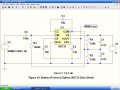
Attached is the model of AD736 auto generated. Not sure of the proper way to add the text to my ASC file. Would I just type it onto the schematic diagram?
As I plan to construct an adapter using AD737, I wanted to simulate circuits with the AD736 which I believe is virtually the same.
As you may know I have limited knowledge/ experience with simulations, so thanks for bearing with me. I was not able to find a model file for AD736 with the extension .lib or .sub. I got the model file by doing the following.
1. Downloaded AD736.cir from the Analog Devices website.
2. Opened that file in LTspice, file> open.
3. Right-clicked on the line in the netlist file (AD736.cir) containing the name of the subcircuit, and selected "create symbol".
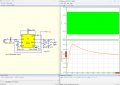
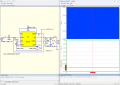
Would you agree that Bordodynov's two simulations demonstrate that the input signal (sine wave produced by V1) should be referenced to the voltage taken at the output of the voltage divider R2/ R3 and not the negative terminal of the supply voltage V2?
Would you agree that Bordodynov's two simulations demonstrate that the input signal (sine wave produced by V1) should be referenced to the voltage taken at the output of the voltage divider R2/ R3 and not the negative terminal of the supply voltage V2?
Makes no real difference as its AC coupled through C1 so the DC offset is irrelevant. Connecting to the virtual ground (VG, ie junction of R2/R3) would inject the input signal onto the relatively high impedance (at low frequencies) voltage splitter which might impact the operation of the IC, or would necessitate the decoupling capacitors C5/C6 needing larger values at lower frequencies. This can be addressed by using an opamp buffer to provide a lower impedance for the VG. Either way, the DC output is always relative to the VG. These devices are best used with a differential-input ADC; the VG is one side of the input, ie -ve side for AD736, +ve side for AD737. With a single-ended input ADC it would be best to use a differential amplifier to remove the DC offset (and invert the signal in the case of the AD737) and add a little gain to better use ADC resolution. With a basic Arduino on 5v directly connected to an AD767, for example, you would only get values of 512 - 553 of the possible 0 - 1023 range.
Do you mean in the component library of the LTspice program? I looked for it in LTspice IV and could not find AD8436. I think that I successfully added AD736 to my component library using auto generation, because I was able to get the simulation running, but very slowly, and then clicking on VRMS-out gave me a bogus result. I haven't had any difficulty running simpler simulations with my copy of LTspice.
I'm running LTspice in Windows XP on an older computer, so I wonder if maybe the computer doesn't have adequate processing capability to run a more complex simulation with AD736. I've read that the AD736 is basically an analog computer.
Makes no real difference as its AC coupled through C1 so the DC offset is irrelevant. Connecting to the virtual ground (VG, ie junction of R2/R3) would inject the input signal onto the relatively high impedance (at low frequencies) voltage splitter which might impact the operation of the IC, or would necessitate the decoupling capacitors C5/C6 needing larger values at lower frequencies. This can be addressed by using an opamp buffer to provide a lower impedance for the VG. Either way, the DC output is always relative to the VG. These devices are best used with a differential-input ADC; the VG is one side of the input, ie -ve side for AD736, +ve side for AD737. With a single-ended input ADC it would be best to use a differential amplifier to remove the DC offset (and invert the signal in the case of the AD737) and add a little gain to better use ADC resolution. With a basic Arduino on 5v directly connected to an AD767, for example, you would only get values of 512 - 553 of the possible 0 - 1023 range.
One difference that I noticed in his two simulations is that in the first one, the output voltage is positive and in the second one is negative. On p. 8 of the AD737 data sheet, pin 6 output is said to be a negative going polarity.
That's correct, The AD736 the output is +ve going wrt REF/COM ie full scale is 0 -> +200mV or +2.5 -> +2.7 wrt to batt- for the single supply battery example, whereas the 737 its -ve going wrt to REF/COM, ie full scale is 0 -> -200mV or +2.5v -> +2.3v wrt to batt-. The use of 2 resistors to provide a virtual ground is simple but it makes interfacing a little trickier. Unless ultimate low power consumption is key I wouldn't do it that way. I'd use a TC7660 charge pump to generate -5v from +5v (or -3.3 from +3) and that would give me a 0 - 200mV out wrt batt- and I'd add a low-power precision instrumentation amp, eg AD8226 on the output to amplify that by 25 (15) to give 0 - 5v (0 - 3v) to maximise ADC resolution. The AD736 is a fairly expensive device; it would be silly to compromise its functionality.
Alternatively, dump the AD736 and do the whole thing in software, its surprisingly easy.
That's correct, The AD736 the output is +ve going wrt REF/COM ie full scale is 0 -> +200mV or +2.5 -> +2.7 wrt to batt- for the single supply battery example, whereas the 737 its -ve going wrt to REF/COM, ie full scale is 0 -> -200mV or +2.5v -> +2.3v wrt to batt-. The use of 2 resistors to provide a virtual ground is simple but it makes interfacing a little trickier. Unless ultimate low power consumption is key I wouldn't do it that way. I'd use a TC7660 charge pump to generate -5v from +5v (or -3.3 from +3) and that would give me a 0 - 200mV out wrt batt- and I'd add a low-power precision instrumentation amp, eg AD8226 on the output to amplify that by 25 (15) to give 0 - 5v (0 - 3v) to maximise ADC resolution. The AD736 is a fairly expensive device; it would be silly to compromise its functionality.
Alternatively, dump the AD736 and do the whole thing in software, its surprisingly easy.
Thanks for that explanation. But it didn't register with me that one simulation is with the 736 and the other one is with the 737. I was assuming that both simulations were with the 736.

 Facebook
 Google
 GitHub
 Linkedin