Facebook
 Google
 GitHub
 Linkedin

Not a question, but a little project I wanted to share.
For a while I have been a follower of ShrimpingIt (http://start.shrimping.it/) and their incredibly simple design for using and programming an Atmel 328p, from the Arduino IDE.
I'd used genuine Arduinos previously, but was looking for something more light-weight in order to build into and around other prototypes. The ShrimpingIt design was simple and reliable, with only a handful of components and a schematic that any newcomer electronics engineer / hobbyist / maker could understand (http://shrimping.it/blog/shrimp/shrimpduino_schem/).
Building this circuit on breadboard was easy, and using an usbasp programmer I could quickly program the microcontroller 'core' for whatever I was creating. However, creating and tearing down a breadboard circuit many times can get annoying, and I wanted something more permanent on a PCB.
Note: I have *never* designed a PCB before.
My first task was to look at which software package could help me. I tried Fritzing for a while but found that while it was easy to use, the Export functions were largely tied into their own fabrication processes. And I didn't want to be tied into a single manufacturer. This is when I turned to Eagle.
Eagle is a commercial design package, make by Autodesk (https://www.autodesk.com/products/eagle/overview). At first, I found it a bit overwhelming, but after a few YouTube videos (
) I set about designing my own PCB for my ShrimpingIt clone.
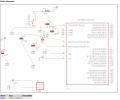
I learned all about 'nets', 'connections', and other things that come with moving a schematic from paper onto a PC.
From this I was able to create my PCB layout:
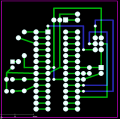
Yes, I know now that it's not perfect... but I am / was still learning.
From Eagle I was able to easily export the Gerber files and put them into a zip file ready to send to a manufacturer. I'd also recommend getting yourself a Gerber Viewer from somewhere too (lots of free ones around) so that you can check the files / layers / dimensions / drill-holes before you submit it!
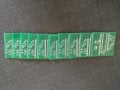
I chose PCBWay, based in China for my fabrication. They offer cheap postage and 10 pieces of 100mmx100mm board for only $5. It was simple to get an account (no credit necessary!), and upoad the Gerber files to them. There were lots of choices for holes / vias / silkscreens / soldermask etc - but I chose the most simple options, as this was my first ever PCB.
Customer Service was excellent - PCBWay quickly reviewed by design, and came back with a few questions (not surprising!) and I refined it and got my final design approved. My design was only 50mmx50mm, so I could have got 4 times as many done really. The nice thing about their customer service is that you get to speak with a real person, and they can Skype you too if you need it.
I'm based in the UK, and chose HK Post for my postal method (it was the cheapest, as I was in no hurry)!
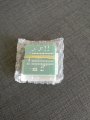
PCBWay keep you updated along the way, and manufacture was very quick:
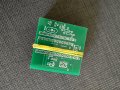
The PCBs themselves are good quality, solder easily, vias (connections through the board to the second layer) and pads are easy to solder onto, and I've already soldered one of them together with components to test - IT WORKS PERFECTLY!
Using the usbasp programmer plugged straight into the board and the Arduino IDE, I quickly uploaded "Blink" (the Arduino version of "Hello World") and was very pleased.
I've already done a 'version 2' of my design, applying what I've learned, and it is being manufactured by PCBWay now (very excited about this one arriving).
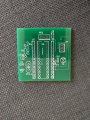
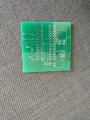
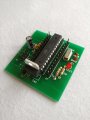
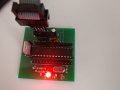
Thumbnails of my PCB and assembled circuit below:
For a while I have been a follower of ShrimpingIt (http://start.shrimping.it/) and their incredibly simple design for using and programming an Atmel 328p, from the Arduino IDE.
I'd used genuine Arduinos previously, but was looking for something more light-weight in order to build into and around other prototypes. The ShrimpingIt design was simple and reliable, with only a handful of components and a schematic that any newcomer electronics engineer / hobbyist / maker could understand (http://shrimping.it/blog/shrimp/shrimpduino_schem/).
Building this circuit on breadboard was easy, and using an usbasp programmer I could quickly program the microcontroller 'core' for whatever I was creating. However, creating and tearing down a breadboard circuit many times can get annoying, and I wanted something more permanent on a PCB.
Note: I have *never* designed a PCB before.
My first task was to look at which software package could help me. I tried Fritzing for a while but found that while it was easy to use, the Export functions were largely tied into their own fabrication processes. And I didn't want to be tied into a single manufacturer. This is when I turned to Eagle.
Eagle is a commercial design package, make by Autodesk (https://www.autodesk.com/products/eagle/overview). At first, I found it a bit overwhelming, but after a few YouTube videos (
I learned all about 'nets', 'connections', and other things that come with moving a schematic from paper onto a PC.
From this I was able to create my PCB layout:
Yes, I know now that it's not perfect... but I am / was still learning.
From Eagle I was able to easily export the Gerber files and put them into a zip file ready to send to a manufacturer. I'd also recommend getting yourself a Gerber Viewer from somewhere too (lots of free ones around) so that you can check the files / layers / dimensions / drill-holes before you submit it!
I chose PCBWay, based in China for my fabrication. They offer cheap postage and 10 pieces of 100mmx100mm board for only $5. It was simple to get an account (no credit necessary!), and upoad the Gerber files to them. There were lots of choices for holes / vias / silkscreens / soldermask etc - but I chose the most simple options, as this was my first ever PCB.
Customer Service was excellent - PCBWay quickly reviewed by design, and came back with a few questions (not surprising!) and I refined it and got my final design approved. My design was only 50mmx50mm, so I could have got 4 times as many done really. The nice thing about their customer service is that you get to speak with a real person, and they can Skype you too if you need it.
I'm based in the UK, and chose HK Post for my postal method (it was the cheapest, as I was in no hurry)!
PCBWay keep you updated along the way, and manufacture was very quick:
- MI (Manufacture Instruction)
5/28/2017 4:04:18 PM

- Cut Lamination
5/28/2017 4:31:02 PM
- Drill
5/28/2017 7:48:20 PM
- Plated Through Hole
5/28/2017 10:45:56 PM
- Circuit
5/29/2017 12:18:11 AM
- Etching
5/29/2017 2:11:49 AM
- AOI
5/29/2017 2:37:06 AM
- Solder Mask
5/29/2017 3:47:34 AM
- Silkscreen
5/29/2017 6:37:39 AM
- Surface Treatment
5/29/2017 7:24:10 AM
- Double Drilling
5/29/2017 9:24:58 AM
- Routing
5/29/2017 9:25:17 AM
- Testing
5/29/2017 4:49:44 PM
- Package
5/29/2017 6:07:57 PM
- Delivery Ready
5/29/2017 6:26:32 PM
The PCBs themselves are good quality, solder easily, vias (connections through the board to the second layer) and pads are easy to solder onto, and I've already soldered one of them together with components to test - IT WORKS PERFECTLY!
Using the usbasp programmer plugged straight into the board and the Arduino IDE, I quickly uploaded "Blink" (the Arduino version of "Hello World") and was very pleased.
I've already done a 'version 2' of my design, applying what I've learned, and it is being manufactured by PCBWay now (very excited about this one arriving).
Thumbnails of my PCB and assembled circuit below: