Facebook
 Google
 GitHub
 Linkedin

What is the best way to rotate a component in LTSpice?
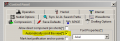
The only way I know how to do it is to select it with the drag tool then use the rotate button on the command bar. But then the damn component gets dragged all the way up to the top of the screen. Is there a better way?
And can it be rotated at angles other than 45 degree increments?
The only way I know how to do it is to select it with the drag tool then use the rotate button on the command bar. But then the damn component gets dragged all the way up to the top of the screen. Is there a better way?
And can it be rotated at angles other than 45 degree increments?