Resistor maths - some basic help

Tesla23

Joined May 10, 2009
560
AlainB,

Are you thinking this method would be a general solution suitable for every case with a total resistance range changes less than the range of the POT?

It turns out if the required range change is less than some 20~30% of the total range of the POT, the circuit would not perform satisfactorily and there is a higher than wanted resistance before dropping back to the wanted value.

The mathematical solution above only produces a solution that fits the two extreme end points of the target range but there could be a maxima in between those two points.
It's not too hard to show that the deviation from linearity at the midpoint setting of the pot is

\($$\frac{{Rp}^{2}}{4\,\left( R2+R1+Rp\right) }$$\)

This can help work out where this configuration is useful. Clearly using a 1M pot to get a 9Ω to 10Ω range is going to give problems.

In the example we were discussing the midpoint deviation is 9Ω.
 

Tesla23

Joined May 10, 2009
560
Thank you Tesla23!

All this I must say is "foreign language" to me.:)

What I would like to do ultimately is an Excel sheet to compute the values and give answers for differents scenarios.

something like this:

Inputs:
VR.................500
Low..............1520
High..............1660

Result:
R1................2249
R2................4189

Not as easy as I thought it would be!
Alain, what you can try to do in Excel is use the Solve function. This is a good thing to learn about for other problems too.

Setup a spreadsheet with the following entries:
Inputs:
VR.................500
Low..............1520
High..............1660

Result:
R1................2249
R2................4189

Calculations:
LowCalc = R1||(R2+VR)
HighCalc = R2||(R1+VR)
Error = (LowCalc-Low)^2+(HighCalc-High)^2

and tell Solve to adjust R1 and R2 to minimise Error. You can start with R1 and R2 as guesses, e.g. Low and High would probably do. LowCalc and HighCalc are the calculated values of Low and High with the current values of R1 and R2, and Error is simply a value that gets big the bigger the error (the squares simply make negative errors positive). Minimising Error makes LowCalc equal to Low and HighCalc equal to High.

The Solve function may not be installed by default, I think you add the package from the Tools menu (see Help).

This general procedure can be used for many non-linear problems, Excel will alter the values of R1 and R2 to minimize the error. If you converge to the wrong solution you should start with different values of R1 and R2.
 

Thread Starter

axeman22

Joined Jun 8, 2009
54
gents.. I'm aware of a quadratic etc but they do my head in and I'm as confused as anything but I will bookmark this thread so please do go on! .. and thanks for all input!
 

AlainB

Joined Apr 12, 2009
39
Hi,

I will have to declare forfeit on that one. It is too complicated for me, not wanting to use Solver or another Algebra software.

This formula looked promising but I can not translate the R1 in a way that I can use and the R2 portion gives me a result of 2380.71923828125 while it should give around 2249 or 4189.


Rp=500
Rmin=1520
Rmax=1660


Thank you all! (very much)

Alain
 
Last edited:

Tesla23

Joined May 10, 2009
560
It is too complicated for me, not wanting to use Solver or another Algebra software.
Alain, sorry if I've overloaded you with the algebra, but I'd encourage you to give Solver a chance as it avoids the algebra. Let me explain with an example:

You can make a spreadsheet to calculate the result of two resistors in parallel.
R1 100
R2 100
Rp 50

where Rp changes automatically as you change R1 and R2. If you want to find the value you put across 100Ω to get 60Ω and you don't want to solve the equations, you could just fiddle R1 until Rp was 60. As you got close you would reduce the steps, and would try to adjust the change you needed to get to 60. This is what Solver will do for you, automatically.

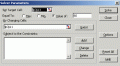
To use Solver in this case, highlight the value of Rp and select Tools / Solver from the menu.


and tell Solver to set the target cell (C13 in my case) to equal 60 by altering R1 (C11 in my case). Click Solve and solver will work out automatically that by setting R1 = 150 makes Rp = 60 . You don't have to do anything else or do any algebra.

Solver is great, it lets you find solutions to problems that you can't, or can't be bothered, doing the algebra for. I could do the algebra for this problem but couldn't be bothered, I used solver to solve it. I only did the algebra when people started asking for formulas, and even then I was lazy and used the computer.

If you get this far let me know and I'll explain further how to use it in this problem.
 

Attachments

AlainB

Joined Apr 12, 2009
39
I have Solver from Excel 97. I am aware of it's abilities, at least for the basic.

I would be glad to see how you do it with solver but your description must be elaborated at the KISS level and as clear as a clear schematic, for instance:

You put this value in A1
and this value in A2 and so long
and then you invoke solver and you do this and that
and you will have this result.

Then we will change this value and this value and we will get this result.

All this being tested by you before posting to be sure it is working as expected. This will help to debug if my results are not the same.

But the algebra formula would be a much better way if it had been tested as good. Would be very nice if someone could test it and confirm it's validity. It could then be used in one or a few cells of Excel without using Solver or with a programation language (I use a few forms of Basic). That is wy I prefer the algebra way.


Thanks!

Alain
 
Last edited:

Tesla23

Joined May 10, 2009
560
Alain,

I've simplified the R1 expression, these do evaluate to R1=2248.446 and R2=4191.682 for Rmin=1520, Rmax=1660, Rp=500.

\($$R1=\frac{Rp\,\sqrt{{Rp}^{2}+4\,Rmax\,Rmin}-{Rp}^{2}+2\,Rmin\,Rp}{2\,Rp+2\,Rmax-2\,Rmin}$$\)

\($$R2=\frac{Rp\,\sqrt{{Rp}^{2}+4\,Rmax\,Rmin}-{Rp}^{2}+2\,Rmax\,Rp}{2\,Rp+2\,Rmin-2\,Rmax}$$\)
 

AlainB

Joined Apr 12, 2009
39
So then it is my mistake!

Let's see:


Rp=500
Rmin=1520
Rmax=1660

The lower section divide all the upper section including the first Rp and is equal to 720.

On the upper section, on the right side of the sqr sign the sum of Rp^2 + 4 * Rmax * Rmin - Rp^2 + 2 * Rmax * Rp should equal to 11752800 and the square root of that number is 3428.235595.

I hope I am I right up to there!

Now, how to deal with the left Rp (the first one) in relation with the found square root and before deviding everything by 720, I don't know.

My nearest result is 2380.71916 if I multiply it.

Alain
 

Tesla23

Joined May 10, 2009
560
So then it is my mistake!

Let's see:


Rp=500
Rmin=1520
Rmax=1660

The lower section divide all the upper section including the first Rp and is equal to 720.

On the upper section, on the right side of the sqr sign the sum of Rp^2 + 4 * Rmax * Rmin - Rp^2 + 2 * Rmax * Rp should equal to 11752800 and the square root of that number is 3428.235595.

I hope I am I right up to there!

Now, how to deal with the left Rp (the first one) in relation with the found square root and before deviding everything by 720, I don't know.

My nearest result is 2380.71916 if I multiply it.

Alain
Denominator = 720 OK

square root = 3216.0224 note the square root sign only covers the first few terms. Maybe if I give you the formulae in programming format:

R2 = (Rp*sqrt(Rp^2+4*Rmax*Rmin)-Rp^2+2*Rmax*Rp)/(2*Rp+2*Rmin-2*Rmax)

R1 = (Rp*sqrt(Rp^2+4*Rmax*Rmin)-Rp^2+2*Rmin*Rp)/(2*Rp+2*Rmax-2*Rmin)
 

AlainB

Joined Apr 12, 2009
39
Hey You! My little Devil!:):):):):)

That is what I was looking for from the beginning!

Thank you very much!

So with a 5K pot if I want a range from 2K5 to 3K Ohms I will need one resistor of 3371 Ohms and another one of 4676 Ohms, that is providing the linearity is acceptable as noted by L. Chung.

Edit: The linearity of this combinaison has been later proven to be completely unacceptable!

But how one is suppose to know that the square root sign only covers the first few terms?

Edit: Oh! I see!...,I did not understand your sentence the right way at first:

The horizontal line of the square root symbol finish just at the end of Rmin value indicating that all the values up to there are used to do the square root calculation, but not the following ones.

You would not beleive how much energy I spent on that problem trying to understand how to solve it. I learned a lot, specially the quadratic formula and what is a quadratic equation and how to solve it, and I am a little bit better at simplifying equations.

Even learned about Solver!:)

Alain
 
Last edited:

AlainB

Joined Apr 12, 2009
39
Alain, sorry if I've overloaded you with the algebra, but I'd encourage you to give Solver a chance as it avoids the algebra. Let me explain with an example:

You can make a spreadsheet to calculate the result of two resistors in parallel.
R1 100
R2 100
Rp 50

where Rp changes automatically as you change R1 and R2. If you want to find the value you put across 100Ω to get 60Ω and you don't want to solve the equations, you could just fiddle R1 until Rp was 60. As you got close you would reduce the steps, and would try to adjust the change you needed to get to 60. This is what Solver will do for you, automatically.

To use Solver in this case, highlight the value of Rp and select Tools / Solver from the menu.


and tell Solver to set the target cell (C13 in my case) to equal 60 by altering R1 (C11 in my case). Click Solve and solver will work out automatically that by setting R1 = 150 makes Rp = 60 . You don't have to do anything else or do any algebra.

Solver is great, it lets you find solutions to problems that you can't, or can't be bothered, doing the algebra for. I could do the algebra for this problem but couldn't be bothered, I used solver to solve it. I only did the algebra when people started asking for formulas, and even then I was lazy and used the computer.

If you get this far let me know and I'll explain further how to use it in this problem.

I did try that and I can't replicate it.

A1 100
A2 100
A3 50

Solver

Set target cell $A$3
Value of 60
By changing cell $A$1
Solve

Excel stop and tell me that A3 must be a formula and frankly this make sense to me.

So I have to put the formula that gives 50 in A3, not the number 50. I did that and now it is working.

Solver is finally, in that case, a kind of reverse engineered calculator.

Alain
 
Last edited:

AlainB

Joined Apr 12, 2009
39
Hi Tesla23,

Could you tell me what represent the 2 vertical lines || and what calculations are they generally doing in an equation?

Thanks!

Alain

Calculations:
LowCalc = R1||(R2+VR)
HighCalc = R2||(R1+VR)
Error = (LowCalc-Low)^2+(HighCalc-High)^2
 

Tesla23

Joined May 10, 2009
560
Hi Tesla23,

Could you tell me what represent the 2 vertical lines || and what calculations are they generally doing in an equation?

Thanks!

Alain

Calculations:
LowCalc = R1||(R2+VR)
HighCalc = R2||(R1+VR)
Error = (LowCalc-Low)^2+(HighCalc-High)^2
shorthand for parallel resistors:

\($$R1||R2=\frac{R1\,R2}{R1+R2}$$\)
 

AlainB

Joined Apr 12, 2009
39
AlainB,

Are you thinking this method would be a general solution suitable for every case with a total resistance range changes less than the range of the POT?

It turns out if the required range change is less than some 20~30% of the total range of the POT, the circuit would not perform satisfactorily and there is a higher than wanted resistance before dropping back to the wanted value.

The mathematical solution above only produces a solution that fits the two extreme end points of the target range but there could be a maxima in between those two points.

Therefore the implementation should be checked in Excel before using it in your application.

I will illustrate this with an example.


Hi L. Chung,

This is a pretty cool spreadsheet. Did you made it by yourself?

Is there a chance that you could make it available? If so, saved in Excel 97 version?

Thanks!

Alain
 

AlainB

Joined Apr 12, 2009
39
Thank you L. Chung!

On my copy of your worksheet I included the formulas given by Tesla23. This way the result for different scenarios is available instantly and the graph is modified accordingly. No need to use the solver.

Since this is your worksheet, I can not post my modified version. I just made a small block at the bottom of the sheet to input the values, make the calculations for the resistors R1 and R2 and then input those values into the normal fields.

But I will be happy to send it to you if you like to have a look at it.

Thanks again!

Alain
 
Top