Require help with LEDs and some PCB design

MrSalts

Joined Apr 2, 2020
2,767
You may not be completely happy with the final appearance of this LED design. If you really want to put this much effort into such a project, you should start with a bit of lighting design/effect "research".

First, some modern LEDs are extremely bright and become blinding at 20mA as @Yaakov suggests so you should connect a small group and test them at currents down to 1 to 5 mA range (less blinding). At 1mA , your power supply can be a very manageable 2 amps instead of 40 amps as yaakov feared.

next, you should build a small section of a stripe. You may (likely?) find that your rows of rows design does not suffficently distribute night. LEDs are point sources and intense. They will not look like a red stripe. You may have much better effect by distributing your red LEDs in the whole area of the red stripe. Looking at your design without the red or blue infill will give a better approximation of the final result. Finally, you may want to look into light diffusing films or resins. You can fire the LEDs sideways into a light diffusing resin (hot glue or casting polymer with some TiO2 blended in.

23653785-C4BC-40B6-BF32-5300B5CA1482.jpeg
 

MrSalts

Joined Apr 2, 2020
2,767
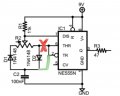
I don't know if that video ever showed a proper schematic, but I'd stay away from any content that draws schematics like the one you referenced. It's very difficult to discern circuit function, whereas it can be discerned with a glance with a conventional schematic. I'll redraw more conventionally later.

EDIT: better schematic. I think I got pot rotation correct but looking at that "schematic" was tedious.
View attachment 259869
@dl324 Looking at the OPs schematic may have been tedious to look at but at least it was drawn correctly. Your schematic has an error that renders your re-design useless. Do you see your error? Click to see...
657E84EF-DFA4-45C3-ADA7-ECDF9548AEAD.jpeg
 

Thread Starter

William A Rose

Joined Feb 5, 2022
45
You may not be completely happy with the final appearance of this LED design. If you really want to put this much effort into such a project, you should start with a bit of lighting design/effect "research".

First, some modern LEDs are extremely bright and become blinding at 20mA as @Yaakov suggests so you should connect a small group and test them at currents down to 1 to 5 mA range (less blinding). At 1mA , your power supply can be a very manageable 2 amps instead of 40 amps as yaakov feared.

next, you should build a small section of a stripe. You may (likely?) find that your rows of rows design does not suffficently distribute night. LEDs are point sources and intense. They will not look like a red stripe. You may have much better effect by distributing your red LEDs in the whole area of the red stripe. Looking at your design without the red or blue infill will give a better approximation of the final result. Finally, you may want to look into light diffusing films or resins. You can fire the LEDs sideways into a light diffusing resin (hot glue or casting polymer with some TiO2 blended in.
View attachment 259974
Hello! I have selected diffused LEDs for the project. I have built a smaller circuit on my breadboard and it seems to be alright. I have a Trimpot in it for now so I can adjust the intensity. Once I have it where I want it, I am going to measure the resistance value and use an axial resistor of an appropriate wattage in the circuit. I am in no hurry. I fiddle with it when I feel up to it. Heart problems get in the way. A lot.
 

dl324

Joined Mar 30, 2015
18,376
It is nice to the actual components laid out alongside a proper schematic. It helps me immensely.
You won't need them once you have more experience wiring components. The only thing wiring diagram type schematics are good for is showing routing congestion. If you want to understand what the circuit does, it's much better to have a schematic like the one I drew. To create it, I had to keep analyzing the function of that wiring diagram.

If I want a wiring diagram, I use my schematic editor (old freeware version of Eagle) to create a PCB layout with an optimized component layout. Even if I end up wiring point to point on vector board, I can use uninsulated wire where there are no short risks.

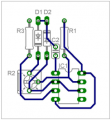
EDIT: Example board layout:
1644255457826.png
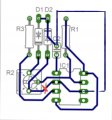
EDIT 2: I had a wiring in the schematic; the board is no longer correct.

This wiring diagram shows a decent component placement, but you can't tell what circuit function is at a glance - as you can with the schematic I posted. If you're going to show a wiring diagram, you should consider optimal component placement. That first "schematic" you posted doesn't convey function or an optimal component placement.

Since I make my own single sided boards using a toner transfer method, I choose component placement and routing to minimize the number of jumpers required.

For aesthetics, I wanted to put R1 between C2 and D2, but the placement I chose simplified routing.
Here is the similar schematic that I found (screen capture from a video). Perhaps you will approve of it.
I disapprove. Whoever created it didn't give much thought to how 555 timers are actually used.

In many applications, reset is tied to power so the counter timer is always enabled. That means it makes sense to put pin 4 near pin 8. Threshold and trigger often have a resistor between them, so it makes sense to put them on the same side of the symbol; and near the discharge pin. Since CV is usually bypassed to ground, it makes sense to arrange those pins to facilitate adding that capacitor.
EDIT: word correction

Since the preferred flow in schematics is left-to-right and top-to-bottom, it makes sense to draw symbols that facilitate that flow; meaning inputs primarily on the left and outputs primarily on the right. There are times when it makes sense to use a right-to-left and bottom-to-top flow (like clocks). This isn't one of them.

I can't see where the pot wiper is connected. Labeling the output pin seems redundant. The inconsistent usage of connection dots is distracting. Colored schematics are for children. Other than that, it's fine.
This is my flag layout. My goal is to have all of these LEDs constantly on at maybe 80% brightness and "randomly" pulse the LEDs in each section at 100% brightness. The stars will be pulsed the way you would draw a 5-point star and then the center LED is pulsed last. Each star will be pulsed "randomly". In each stripe and in the blue LEDs in the Union, they'll just be on and pulsed "randomly".
With anything random, or even pseudo random, and that many LEDs with varying brightness, you should be looking at a something like Arduino or Raspberry Pi.
 
Last edited:

MisterBill2

Joined Jan 23, 2018
27,679
For the flag with all of those LEDs you will certainly need to use a lot of series strings of LEDs. I am thinking of strings that run on 48 volts with one current limiting resistor per string. That will keep te current draw at a reasonable number, and you have enough strings to make it reasonable. Because of the different voltages and brightness to current relations you will need to experiment a bit. But that should work well to creating a constantly lit flag. For the flashes, I suggest a second LED next to the original group and an entirely separate flashing scheme. That will make life much simpler and brighten the flashes quite a bit.
It is very complex to flash a single LED in a series string.
 

Thread Starter

William A Rose

Joined Feb 5, 2022
45
For the flag with all of those LEDs you will certainly need to use a lot of series strings of LEDs. I am thinking of strings that run on 48 volts with one current limiting resistor per string. That will keep te current draw at a reasonable number, and you have enough strings to make it reasonable. Because of the different voltages and brightness to current relations you will need to experiment a bit. But that should work well to creating a constantly lit flag. For the flashes, I suggest a second LED next to the original group and an entirely separate flashing scheme. That will make life much simpler and brighten the flashes quite a bit.
It is very complex to flash a single LED in a series string.
I do have a circuit in mind. I even drew it up a couple years ago. I am not sure it will work. When I get around to actually building it on my breadboard, I'll post a schematic and a pic or video of the result.
 

Thread Starter

William A Rose

Joined Feb 5, 2022
45
You won't need them once you have more experience wiring components. The only thing wiring diagram type schematics are good for is showing routing congestion. If you want to understand what the circuit does, it's much better to have a schematic like the one I drew. To create it, I had to keep analyzing the function of that wiring diagram.

If I want a wiring diagram, I use my schematic editor (old freeware version of Eagle) to create a PCB layout with an optimized component layout. Even if I end up wiring point to point on vector board, I can use uninsulated wire where there are no short risks.

EDIT: Example board layout:
View attachment 259994
This wiring diagram shows a decent component placement, but you can't tell what circuit function is at a glance - as you can with the schematic I posted. If you're going to show a wiring diagram, you should consider optimal component placement. That first "schematic" you posted doesn't convey function or an optimal component placement.

Since I make my own single sided boards using a toner transfer method, I choose component placement and routing to minimize the number of jumpers required.

For aesthetics, I wanted to put R1 between C2 and D2, but the placement I chose simplified routing.
I disapprove. Whoever created it didn't give much thought to how 555 timers are actually used.

In many applications, reset is tied to power so the counter timer is always enabled. That means it makes sense to put pin 4 near pin 8. Threshold and trigger often have a resistor between them, so it makes sense to put them on the same side of the symbol; and near the discharge pin. Since CV is usually bypassed to ground, it makes sense to arrange those pins to facilitate adding that capacitor.
EDIT: word correction

Since the preferred flow in schematics is left-to-right and top-to-bottom, it makes sense to draw symbols that facilitate that flow; meaning inputs primarily on the left and outputs primarily on the right. There are times when it makes sense to use a right-to-left and bottom-to-top flow (like clocks). This isn't one of them.

I can't see where the pot wiper is connected. Labeling the output pin seems redundant. The inconsistent usage of connection dots is distracting. Colored schematics are for children. Other than that, it's fine.
With anything random, or even pseudo random, and that many LEDs with varying brightness, you should be looking at a something like Arduino or Raspberry Pi.
I really like the board layout. I have a PCB software package that I am going to try to learn how to use and see how that works out. I'm not going to get involved with microcontrollers just now. I suppose I could, I just don't want to. That is something for down the road, perhaps.

I appreciate all of your replies. Some of that is far above my paygrade. I'll have to "process" it.
 

ElectricSpidey

Joined Dec 2, 2017
3,337
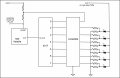
Here is my concept to drive each star.

Operation:

A random positive pulse pulls the astable 555 out of reset.
The 555 begins clocking the 4017.
The 4017 drives the load driver (ULN2008A) which in turn bypasses a higher value resistor connected to each star LED with a lower value.
When the 4017 reaches output "0" it puts the 555 back into reset until the next positive pulse.
The resistor bypasses start with output 2 of the 4017 as to allow the 555 to return to its normal timing.
4017 outputs 1, 8 & 9 are left open.

The circuit is untested and may need to be tweaked.

Obvious connections have been omitted but can be supplied if needed. Component values have also been omitted for obvious reasons.

AAC_Star.jpg
 

dl324

Joined Mar 30, 2015
18,376
I have a PCB software package that I am going to try to learn how to use and see how that works out.
Which one? I like Eagle. It was the third I tried and I decided it was sufficient and stopped looking. Others like KiCad.

The 555 timer symbol in Eagle was goofy, so I made my own.
I'm not going to get involved with microcontrollers just now. I suppose I could, I just don't want to. That is something for down the road, perhaps.
Believe us when we say your flag project would be easier using a microcontroller.

I was in that camp for a long time. I preferred to design with logic chips. When I retired, I wanted to build some LED cubes and scrolling LED signs. Once I started down that path, microcontrollers were the only feasible solution. I missed the Raspberry Pi revolution, so I decided to use a new platform called C.H.I.P. that was a Kickstarter project. It's main claim to fame was that for $9 (plus a keyboard, monitor, and mouse), you had a working Linux computer. Then they went out of business due to poor management and I migrated my code to Raspberry Pi. A similarly configured Pi Zero W would cost more than twice that, have fewer I/O's, and no ADC.

I recently programmed an EPROM with a 4 digit binary to BCD converter. I used C to create the data to program and was fairly certain I programmed it correctly, but I needed to be certain. I contemplated using some counters to test it. But that would have required me to implement a BCD to binary converter or do something silly like watch the display while incrementing a counter. So I wrote a program to do it with an Arduino Mega. That lead to writing half a dozen programs for Uno to test DRAMs and check 5-6 dozen programmed PROMs I picked up in a big lot of components on eBay a decade or two ago to see if any of them could be repurposed.
 

ElectricSpidey

Joined Dec 2, 2017
3,337
I could do this project using 2 control line addressable LEDs using 3 PSoC 059 dev boards, but I feel sorry for anyone trying to do this with a single board...even an Arduino mega, without being able to bit-bang single line addressable LEDs. (probably still wouldn't have enough pins)

And I wouldn't even want to try doing it without addressable LEDs considering the sheer number of control lines needed just for the stars. I have no idea at all how you would pulse each LED using shift registers to expand the GPIOs without using a lot of peripheral drivers, and a nightmare of coding.
 

MrSalts

Joined Apr 2, 2020
2,767
@dl324
If you are going to criticize the way people create schematics and "correct" them, at least use the correct schematics. You've made the same error twice in two different schematics....

75289D22-ACB6-4821-BAF9-0E1283FDAFB3.jpeg
 

MisterBill2

Joined Jan 23, 2018
27,679
A circuit board layout is INDEED not a schematic. It is the mechanical layout of an electrical circuit. And tha ectual PCB IS an electrical circuit. Routing a circuit board is both an art and science, and both can be learned. I started doing it with the colored tape, red for circuit side, blue for solder side, and black for both.
 

Thread Starter

William A Rose

Joined Feb 5, 2022
45
Here is my concept to drive each star.

Operation:

A random positive pulse pulls the astable 555 out of reset.
The 555 begins clocking the 4017.
The 4017 drives the load driver (ULN2008A) which in turn bypasses a higher value resistor connected to each star LED with a lower value.
When the 4017 reaches output "0" it puts the 555 back into reset until the next positive pulse.
The resistor bypasses start with output 2 of the 4017 as to allow the 555 to return to its normal timing.
4017 outputs 1, 8 & 9 are left open.

The circuit is untested and may need to be tweaked.

Obvious connections have been omitted but can be supplied if needed. Component values have also been omitted for obvious reasons.

View attachment 260028
I sure appreciate the reply. I didn't really understand it. I don't know what a ULN2008A is, but I can find out.
 

Thread Starter

William A Rose

Joined Feb 5, 2022
45
Which one? I like Eagle. It was the third I tried and I decided it was sufficient and stopped looking. Others like KiCad.

The 555 timer symbol in Eagle was goofy, so I made my own.
Believe us when we say your flag project would be easier using a microcontroller.

I was in that camp for a long time. I preferred to design with logic chips. When I retired, I wanted to build some LED cubes and scrolling LED signs. Once I started down that path, microcontrollers were the only feasible solution. I missed the Raspberry Pi revolution, so I decided to use a new platform called C.H.I.P. that was a Kickstarter project. It's main claim to fame was that for $9 (plus a keyboard, monitor, and mouse), you had a working Linux computer. Then they went out of business due to poor management and I migrated my code to Raspberry Pi. A similarly configured Pi Zero W would cost more than twice that, have fewer I/O's, and no ADC.

I recently programmed an EPROM with a 4 digit binary to BCD converter. I used C to create the data to program and was fairly certain I programmed it correctly, but I needed to be certain. I contemplated using some counters to test it. But that would have required me to implement a BCD to binary converter or do something silly like watch the display while incrementing a counter. So I wrote a program to do it with an Arduino Mega. That lead to writing half a dozen programs for Uno to test DRAMs and check 5-6 dozen programmed PROMs I picked up in a big lot of components on eBay a decade or two ago to see if any of them could be repurposed.
I was a programmer in the Army. Over 30 years ago. Most of what you said, while interesting, is out of my league.
 

Thread Starter

William A Rose

Joined Feb 5, 2022
45
@dl324
If you are going to criticize the way people create schematics and "correct" them, at least use the correct schematics. You've made the same error twice in two different schematics....

View attachment 260046
There is no way I would have known if this was correct or not. I just assume y'all know. I like the pics. I went to school. They gave me books. I mostly just ate the pages.
 

MrSalts

Joined Apr 2, 2020
2,767
Look at images you posted, pin 2 and 6 are connected to each other and to the capacitor/pot wiper node (and the other end of cap is connected to ground). That is correct.

For some reason @dl324 keeps connecting the pins 2/6 to one of the static pins of the pot. Completely wrong.
 

MisterBill2

Joined Jan 23, 2018
27,679
The method of producing a brighter flash of an individual LED as described in post #35 would be a serious challenge to apply to a series string of LEDs. And a series string will certainly be required to keep the quantity of circuitry hardware, and the overall complexity, within some reasonable amount. To understand the complexity that I am describing, examine the pixel addressing system of an LCD video screen. Even going by row and column it gets big. And consider that while LCD pixels have a bit of persistence, LED illumination does not. So the result would be a flickering flag, along with an incredible amount of high frequency electrostatic radiation.
And just consider the complexity of addressing in an X-Y matrix of LEDs.
 

Thread Starter

William A Rose

Joined Feb 5, 2022
45
The method of producing a brighter flash of an individual LED as described in post #35 would be a serious challenge to apply to a series string of LEDs. And a series string will certainly be required to keep the quantity of circuitry hardware, and the overall complexity, within some reasonable amount. To understand the complexity that I am describing, examine the pixel addressing system of an LCD video screen. Even going by row and column it gets big. And consider that while LCD pixels have a bit of persistence, LED illumination does not. So the result would be a flickering flag, along with an incredible amount of high frequency electrostatic radiation.
And just consider the complexity of addressing in an X-Y matrix of LEDs.
I am a complete novice at all this. Please keep that in mind. I understand some electronic terminology, but not everything. I cn always look up what I don't know when I see new things.

As to the flashing/pulsing of the LEDs, what I have envisioned is having two feed wires going to each LED. The constantly-on portion is easy. Simply a hot and ground to each LED. I'll put in a Zener Diode in each feed so that the voltage in each feed does not go to the other feed. The constantly-on ill have a common resistor after the LEDs. The pulsing feed will come from the cascaded 4017s. Those feeds will have both a Zener Diode and a resistor and connect to the positive terminal on the LED. I do not know a better way. Again, I do not wish to mess with a microcontroller. Maybe someday, but not now.

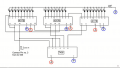
Why is an AND gate (4081 or 7408 (I think)) needed in the cascaded 4017 circuit? I've tried to follow the signal/voltage - the highs and lows, and I am just not seeing it yet.

1644330932888.png

I will need many more 4017s. I am not entirely sure just what that will look like. I think this drawing is wrong. The Inputs and Outputs of the 7408, specifically 4, 5, and 6 are wrong, I think. I am not at all sure of that. It just looks wrong. Oh yeah, as to function, I don't see a difference between the 7408 and the 4081. I have 4081s so that is what I will use if I have to use them at all.

Thank for your comments. I hope everyone else will give their input as well. I may not understand all I read, but I can learn. Little by little and painfully slowly.
 
Top