Repairing a Korg Triton Extreme with loud whine in GND (but not a ground loop)

Thread Starter

cin

Joined Jan 17, 2023
11
I'm troubleshooting a Korg Triton Extreme 61 synthesizer / keyboard that's very noisy when played through an amp.
The noise is a whine that sounds like the LCD, or the digital section. It doesn't change with the keyboard's volume pot.

The noise is present in all the analog outs when the keyboard is plugged into the same AC circuit as the amp. If I power the keyboard with a battery pack the noise disappears, which would indicate a ground loop problem, but it doesn't sound like a typical 60Hz ground loop hum. Here's a quick recoding of the amp as I boot the keyboard:

Recording of the noise

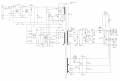
Korg Triton Extreme Schematics

Of note:
- Other synthesizers plugged in the very same scenario (amp, outlet, cord) are quiet.
- The noise doesn't come out of the headphone jack unless I connect the AGND at the headphones to the main chassis GND.
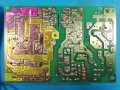
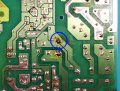
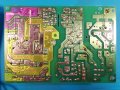
- The AGND and DGND are directly connected via IC3's heatsink on the power supply board, see photo, and are also connected to the chassis GND.
- When the keyboard is Off, there's no resistance between the AGND and DGND. But when the unit is On I get at least 20 Ohm (-20 Ohm in the other direction) and 9mV DC between the AGND and DGND. I'm not sure I understand how that's possible considering they are directly connected. My DMM did not find a diode between the grounds.

I've tried:
- Plugging the keyboard and amp into the same outlet, different outlets, etc. Same. Power conditioner softens the noise but doesn't kill it.
- Directly connecting various grounding points trying to short GND to GND, the noise is not affected at all.
- Adding a ferrite bead to the chassis ground at the AC in, no change.
- Replacing the polarized through-hole electrolytic caps from the power supply board, the main board, the LCD board, and the MIDI board. No change.
- Doing a visual inspection, everything looks fine. Tapping around with a chop-stick, nothing changes.
- I tested the Y capacitors and the rectifier on the power supply board, and they seem ok.
- I tested the power supply board without load and got some weird results (1.5V sawtooth on the 15V rails). With a normal load the 15V raila are noisy but stable.

I'm considering trying to power it up with the LCD board disconnected to see if the noise is still present, but I'm a bit worried it might not like that. There's no way to turn off the LCD via software. Would this be a fairly safe test?

Any other trick to find this pesky bug?

Any insights would be greatly appreciated.
 

Attachments

Thread Starter

cin

Joined Jan 17, 2023
11
The LCD on the Triton is illuminated with a CCFT lamp, which requires a transformer. And apparently those can get noisy. So I unplugged the LCD board from the power board and the main board and powered up the keyboard, and the whine is still there.

So I tried without the keybed connected, without the pitchbend / modwheel / touchstrip boards connected, without the "Cooltron" tube board connected, without the aftertouch connected. The whine is still there.

So I'm now pretty sure the problem is either on the main board or power board, I don't imagine it could be coming from the button/pot boards... but then again what do I know.
:D


Any other tips?

Cheers!
 

wayneh

Joined Sep 9, 2010
18,085
If I power the keyboard with a battery pack the noise disappears....
I'd focus on that. That test would have been my first recommendation and I'm glad you tried it. I'm willing to bet the power supply section is your problem and if I had to guess, I'd bet it's an electrolytic capacitor. That's a very common failure point. It's a valid trick to simply replace them all if you can't test them. The first failure mode is an increase in ESR. This can cause a failure without a loss of measured capacity or any external indication. That's why most people simply replace the caps, because otherwise you need an ESR tester and the time to test them all.

One thing you might try is bypassing the onboard power supply if possible and supplying all power from an outside source, maybe a laptop power brick. A good 12V supply would probably work also. Obviously you'll want to make sure the voltage is not too high and that the current capacity is adequate.
 

Thread Starter

cin

Joined Jan 17, 2023
11
Thanks! I've already replaced all the power supply electrolytic caps, and most other through-hole electrolytic caps on the other boards as well. I've also tested the rectifier, and the Y caps.

I think I have another synth power supply that would provide a +15/-15 and 5V rail, and I can probably use my bench supply for the 3V. Substituting the power supply entirely sounds like a good way of narrowing it down at this point!

Cheers!
 

Attachments

MisterBill2

Joined Jan 23, 2018
27,159
In the photo in post #1 I see a solder connection that has not been cleaned tying two separate traces together. I doubt that is right.
Did this "whine" problem start all at once, or has it gradually increased? One suggestion that I have used was to use a"ground adapter " to disconnect that "green wire safety ground" connection. THAT solved a hum problem for one installation. I AM PERFECTLY AWARE THAT MANY FOLKS WILL SCREAM IN PANIC AT THIS SUGGESTION!!! I am suggesting it as a diagnostic step. And my response to them will not be posted.
If you have an oscilloscope you could check to see where that frequency is present in the system., and then look for it being where it should not be present.
My GUESS is that some portion of the "common"portion of the low level audio portion has become connected to another common that it should not be connected to..
So my first suggestion is to address that filter cap solder connection. Also verify that the capacitor's polarity is correct.
 

Thread Starter

cin

Joined Jan 17, 2023
11
That left over flux is mine and has been cleaned since the photo.

The whine started one day when I powered it on, exactly as it sounds in the recording.

Lifting the ground does work at getting rid of the whine, just like powering the keyboard from a battery pack.

I did look at it with a scope and it's hard to say what the frequency is, but I see that same noise literally everywhere on the power rails, signal path, and grounds. It looks like a dirty very high frequency that's being modulated a bit.

Filter cap polarity checked and correct.

The PCBs look clean, I doubt there's dirt making a connection but it's always possible I missed something. Maybe more like a capacitor that failed closed, or diode that failed open then?

Thanks!
 

MisterBill2

Joined Jan 23, 2018
27,159
What aboutthat filter cap connection that appears to be linking two traces on the PCB??
That left over flux is mine and has been cleaned since the photo.

The whine started one day when I powered it on, exactly as it sounds in the recording.

Lifting the ground does work at getting rid of the whine, just like powering the keyboard from a battery pack.

I did look at it with a scope and it's hard to say what the frequency is, but I see that same noise literally everywhere on the power rails, signal path, and grounds. It looks like a dirty very high frequency that's being modulated a bit.

Filter cap polarity checked and correct.

The PCBs look clean, I doubt there's dirt making a connection but it's always possible I missed something. Maybe more like a capacitor that failed closed, or diode that failed open then?

Thanks!
OK, if lifting the safety ground removed the whine, then it seems to me that at some point the audio common became connected to the safety common.
Since there are probably fewer things intentionally connected to that green wire safety circuit, it seems reasonable to examine every point where the audio common could have become connected to it, because the audio common should not be connected, I don't think. So maybe at one of the input jacks??? Try unplugging all of the input jacks, if you have not done that yet. ( that is a guess at this time)
 

Thread Starter

cin

Joined Jan 17, 2023
11
I just checked on the filter cap I highlighted above, and the pad is actually meant to be on both traces. If that's what you were pointing out.

By "audio common" and "safety common", you mean AGND and chassis ground? I'm not familiar with "common" being used like that, but I suppose "ground" to a signal path is more like the common lead on an AC circuit?

If so, then the AGND, which would be the audio common, is connected to the DGND via the heatsink of IC3 on the power supply board. DGND is connected to the chassis ground via the 2 PCB screws on ground planes, and the chassis is connected to the AC plug's safety common, or earth ground. So, apparently, it's all intentionally connected?!

I will check on the jack board, I haven't inspected it as closely as the rest so far.

I appreciate the help!
 

MisterBill2

Joined Jan 23, 2018
27,159
Some times heat sinks are insulated but they become grounded accidentally.. My reference to the different "ground" connections is a good guess but I have not seen the circuit completely to be able to be certain. And now it is a bit strange at that solder connection. YES, it appears suspect, although it may be intended that way.
 

Thread Starter

cin

Joined Jan 17, 2023
11
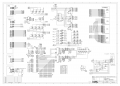
Well, in an attempt to find which board the problem was coming from, I tried disconnecting all the boards except for the main board and the power supply board, and the noise was gone! Reconnecting the boards one by one led me to the KLM-2472 (schematics attached). The noise is present with only the power supply, main board and the KLM-2472, but gone if I disconnect the 2472.

I understand this doesn't mean that the 2472 is the problem for sure, it could still stem from the power or main boards, but it's a good clue.

There's only 4 electrolytic caps on the 2472, so I'm going to change those. I cleaned all the grounding points and did a visual inspection. Everything looks fine.

Any of the parts on there prone to fail?
Thanks!
 

Attachments

MisterBill2

Joined Jan 23, 2018
27,159
OK, and here is an educated guess, which is that the green-wire safety ground has become connected to something it should not be connected to. Like possibly the power system common.
The one time I had some hum problem in a PA system it was with an XLR connector in which the shield had been connected to the connector case when the cable was made.
 

Thread Starter

cin

Joined Jan 17, 2023
11
I checked the resistance between the GND and the common and it's an open loop.

I also tried with only the power rails and GND (pin 1 to 4 of CN15B) connected to the KLM-2472, no data connections, and the whine was absent. I'm assuming this likely means it's not a ground problem between the boards, and more likely something to do with the actual processes happening on that board, like LED or button scanning...

But what could lead these digital chips to bleed into the GND so much? This can't be by design...
And what can be done to find and nullify this whine?
I'll go review my troubleshooting bag of tricks....

Cheers!
 

MisterBill2

Joined Jan 23, 2018
27,159
Certainly a hidden continuity, where it had not been previously, can be a serious "dog" of a bug to deal with. And without a total understanding of every element of the system, there may be a fair amount of luck required. Making it more challenging is that it appears to be that somehow that noise source may be tied to the safety ground circuit and suddenly the opposite side of that noise voltage became connected to the audio circuit. So locating the actual generator of the noise voltage will be a good start.
And I am not implying that any part of the search is simple or obvious.
 

Thread Starter

cin

Joined Jan 17, 2023
11
This perfectly describes my experience so far! hahah
Because the noise is present on the GND, power rails, and everything else, it's rather tricky to locate.

If I go by sound alone, the whine I hear coming out of the amp when I boot the keyboard is similar to what my signal tracer detects around the digital section of the main board. But the noise doesn't come out of the audio outs unless the KLM-2472 is also connected... so I'm guessing either the digital signal I'm hearing on the main board bleeds into the ground on the KLM-2472, or the noisy processes from the main board don't activate if the 2472 is missing. When I sniff around the 2472 with my signal tracer I can hear various noisy digital processes, but none of them sound exactly like what's coming out of the audio outs.

I tried connecting the other pins on the CN15B connector, from the main board, one at a time see if a specific digital signal was causing the whine, but it apparently takes more than one of those data connections to activate the whine.

I redid a full visual inspection of the 2472 under the microscope, redid some iffy solder joints, but the whine remains...

Now considering adding some noise filtration to the 5V and GND wires to see if that does it... but that would be a patch, and I'd really like to find the source of this problem.

Thanks for help!
 

LesJones

Joined Jan 8, 2017
4,511
When you say " the noise is present on the GND, power rails, and everything else " what is that with refeence to ?
In other words what is the scope probe ground lead connected to ?

Les.
 

Thread Starter

cin

Joined Jan 17, 2023
11
When you say " the noise is present on the GND, power rails, and everything else " what is that with refeence to ?
In other words what is the scope probe ground lead connected to ?

Les.
I've probed around with the ground lead on the chassis, on AGND, and DGND, and also disconnected. My assumption is that the noise is mainly on the ground, and that's how it gets to the amp (via the patch cable ground), but I really don't know what I'm talking about, and I certainly don't understand how the noise can be on the chassis ground when the chassis ground is grounded to the AC outlet's safety ground...

There are several things I don't understand about this problem.... Another one is that when the keyboard is Off, there's only 0.3 Ohm resistance between the chassis ground, AGND and DGND. But when the keyboard is On, there's 120 Ohm of resistance between the AGND and DGND, yet they are directly connected on the power supply board via a heatsink. There's 120 Ohm of resistance (when the keyboard is On) between the heatsink leg that's on the AGND and the leg that's on the DGND. I don't believe it's really resistance, but potential difference, since if I switch my leads I get negative resistance... All very confusing :)

Cheers!
 

Attachments

MisterBill2

Joined Jan 23, 2018
27,159
I've probed around with the ground lead on the chassis, on AGND, and DGND, and also disconnected. My assumption is that the noise is mainly on the ground, and that's how it gets to the amp (via the patch cable ground), but I really don't know what I'm talking about, and I certainly don't understand how the noise can be on the chassis ground when the chassis ground is grounded to the AC outlet's safety ground...

There are several things I don't understand about this problem.... Another one is that when the keyboard is Off, there's only 0.3 Ohm resistance between the chassis ground, AGND and DGND. But when the keyboard is On, there's 120 Ohm of resistance between the AGND and DGND, yet they are directly connected on the power supply board via a heatsink. There's 120 Ohm of resistance (when the keyboard is On) between the heatsink leg that's on the AGND and the leg that's on the DGND. I don't believe it's really resistance, but potential difference, since if I switch my leads I get negative resistance... All very confusing :)

Cheers!
Reverse the polarity of your ohm meter and you will get a much different resistance reading with power on. AND, that connection might be the problem. The safety ground is for protection against mains connections to touchable points on the equipment. AND you did mention that disconnecting it stopped the whine, I think you said.
 

Thread Starter

cin

Joined Jan 17, 2023
11
Oh yes, like I said, if I reverse the probes polarity I get negative resistance. Weird.
Which connection are you saying is the problem? The AC safety ground to the chassis? That one seems very much part of the design. I can't imagine the synth sounds like this by design.
 

MisterBill2

Joined Jan 23, 2018
27,159
My point was that the system common does not need to be tied to the safety ground. And the negative resistance reading is because your meter runs a small current thru the circuit being measured and reads the resulting voltage. So what that shows is that there is a voltage between the two portions and probably current is flowing as a result. and that current flowing thru the safety ground connection is coupling the noise to your external amplifier.
That sort of points a guilty finger at the "ground" side of your output connection, as to having developed some resistance. Or a power connection that it should not have. or maybe a weak connection to a "common" somewhere towards the output.
 
Top