Raspberry Pi Pico 2 Alarm

Thread Starter

EdgarAndre

Joined May 14, 2024
1
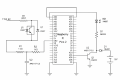
Hello, I am new to electronics and I would like to make a power outage alarm with a Raspberry Pi Pico 2 circuit that I bought as a kit. The Pico would be connected via USB and when a power outage occurs, a two-hour timer would start and after these two hours an alarm would sound. The circuit would be powered by a 9 volt battery for two hours. The alarm could sound for one minute with a bib every two seconds. If the power comes back on before two hours, I would like the timer to reset. Do you have any solutions to suggest or examples of circuits adaptable to this project? Thank you very much for your help. I found a picture off a circuit but I would like to know if this is a good base for this alarm ?
 

Attachments

dl324

Joined Mar 30, 2015
18,216
Welcome to AAC!
I found a picture off a circuit but I would like to know if this is a good base for this alarm ?
That schematic has issues.
  1. There is no apparent power connection to the Pico 2.
  2. Either Q1 or AD4 will be unhappy when AD4 is supposed to turn the transistor on.
  3. The resistor on the collector of Q1 is labeled Q1.
  4. The 115VAC to Pico 2 GND connection is just weird.
Pico 2 require programming before they can do anything useful.

My advice is to ignore it and anything else from wherever you found it.
 

Jerry-Hat-Trick

Joined Aug 31, 2022
775
To achieve your objective I’d recommend a Digispark ATtiny85 processor module. It can plug into the USB port of your computer for programming directly with the Arduino IDE and it has sufficient I/O for your application. It has an on board voltage regulator which will allow you to power it with a 9V battery. Use a 5V USB wall plug adapter to provide 5V when the mains power is on into an input pin. When the mains fails, simple code using looped delay() instructions can provide your two hour delay followed by a modified version of the “blink” example code.

The processor kit you have is way more powerful than you need. As a beginner, consider getting to know the Arduino UNO and the corresponding IDE.
 

be80be

Joined Jul 5, 2008
2,394
don't need programming experience the pico 2 is simple to work with and google AI would help you load the code there's the code just take thonny and load it.

Code:
import machine
import time
import ntptime

# Pin assignments
power_sense_pin = machine.Pin(14, machine.Pin.IN, machine.Pin.PULL_UP)  # High when power is on
buzzer_pin = machine.Pin(12, machine.Pin.OUT)

# Time tracking
power_off_time = 0
power_off_flag = False

# Constants
ALARM_DELAY_SECONDS = 2 * 60 * 60  # 2 hours

def power_status_changed(pin):
    """
    Interrupt service routine for power status changes.
    """
    global power_off_time, power_off_flag
    time.sleep_ms(50)  # Debounce delay
    
    if power_sense_pin.value() == 0:  # Power has gone off
        power_off_time = time.time()
        power_off_flag = True
        print("Power off detected at:", time.localtime(power_off_time))
    else:  # Power has come back on
        if power_off_flag:
            power_on_time = time.time()
            off_duration = power_on_time - power_off_time
            print("Power restored. Off duration:", off_duration, "seconds")
            if off_duration < ALARM_DELAY_SECONDS:
                print("Power restored within 2 hours. Alarm canceled.")
                power_off_flag = False

# Attach interrupt
power_sense_pin.irq(trigger=machine.Pin.IRQ_FALLING | machine.Pin.IRQ_RISING, handler=power_status_changed)

def sound_alarm():
    """
    Activates the buzzer for a set duration.
    """
    print("Sounding alarm!")
    for _ in range(5):
        buzzer_pin.on()
        time.sleep(0.5)
        buzzer_pin.off()
        time.sleep(0.5)

def main():
    """
    Main loop to check for the alarm condition.
    """
    global power_off_flag

    # Synchronize time with an NTP server
    try:
        ntptime.settime()
        print("Time synchronized:", time.localtime())
    except Exception as e:
        print("Error synchronizing time:", e)
        # Handle the case where time synchronization fails,
        # maybe by using a default time or retrying.

    while True:
        if power_off_flag:
            current_time = time.time()
            elapsed_time = current_time - power_off_time
            
            if elapsed_time >= ALARM_DELAY_SECONDS:
                print("More than 2 hours have passed since power off.")
                sound_alarm()
                power_off_flag = False  # Reset the flag after alarming
        
        time.sleep(1)

if __name__ == "__main__":
    main()
 

Ya’akov

Joined Jan 27, 2019
10,226
I would like to make a power outage alarm with a Raspberry Pi Pico 2 circuit that I bought as a kit. The Pico would be connected via USB and when a power outage occurs, a two-hour timer would start and after these two hours an alarm would sound. The circuit would be powered by a 9 volt battery for two hours. The alarm could sound for one minute with a bib every two seconds. If the power comes back on before two hours, I would like the timer to reset. Do you have any solutions to suggest or examples of circuits adaptable to this project? Thank you very much for your help. I found a picture off a circuit but I would like to know if this is a good base for this alarm ?
Welcome to AAC.

FIRST:
I found a picture off a circuit but I would like to know if this is a good base for this alarm ?
No, it is not good for anything except as an example of dangerous nonsense. As has already been said, chuck it out, it's worse than useless. It is dangerous.

I would like to make a power outage alarm with a Raspberry Pi Pico 2 circuit that I bought as a kit.
It is not clear what you have, could you post a link to the actual product to help us help you?

The Pico would be connected via USB and when a power outage occurs, a two-hour timer would start and after these two hours an alarm would sound. The circuit would be powered by a 9 volt battery for two hours. The alarm could sound for one minute with a bib every two seconds. If the power comes back on before two hours, I would like the timer to reset.
I can't work out the reason for the described behavior in our requirements.

  1. I am assuming the USB connection is to sense the presence of the 5V from the port (normal) or the absence (alarm).

  2. Why is there a two hour delay before the alarm?

  3. Why a PP3 (9V) battery, one of the most expensive and least useful power sources available?

  4. Are you saying you want the alarm to beep 30 times after the two hour delay, and then stop? (This seems odd and I can't picture the scenario where you need to know there is a power outage that you wouldn't already know about if all you need us one minute of intermittent beeping to be alerted.)

  5. I assume that if the alarm did get triggered you would still want the reset of power restoration.
It would be very helpful if you started with the problem you are trying to solve instead of the solution you propose to solve it. What is the purpose of this alarm, what is the use case? You have mixed a problem statement with random, naïve implementation details which may or may not be relevant to what you need to solve your problem.

A short description of the actual problem is the first step here otherwise your "solution" becomes the problem and when we are done solving that you may well end up with the problem you started with and something that "works" but is useless to you, or worse, just really bad at doing what you need.


Jerry-Hat-Trick

Joined Aug 31, 2022
775
Following up on my post #4 you might want to consider powering the Digispark ATtiny85 from the 5V USB wall plug adapter and use 3 x 1.5V cells in series (like Alkaline AA) to provide power if the mains fails. Both should connect to the ATtiny85 via a diode so they are both protected from each other. The wall plug adapter will dominate when the mains is on, so no current will be drawn from the 4.5V battery. The ATtiny85 works down to 1.8V power supply so ordinary silicon diodes dropping 0.6V will do. When connecting the wall plug voltage to an I/O pin the voltage should be dropped with a potential divider so it doesn't see a higher voltage than the supply. If you decide to stick with your Raspberry Pi you can connect in a similar way, with oodles of functionality and I/O you don't need for this application. I've used AI to make code suggestions but I urge you to only use code you understand - AI can be helpful but it makes alarming errors, particularly with hardware suggestions and I do wonder if the circuit you posted was created by AI? Indeed, I wonder how AI software stands if it suggests something dangerous and someone is consequently injured or killed......

I do see one potential application for your idea - if there is a power failure for longer than a defined period food in a freezer or refrigerator could be lost. In fact, it would be good for the system to include a warning light to alert the user to a power outage when they were not there. Pressing a button could then beep for the number of minutes the power was lost.
 
Last edited:
Top