Questions on this pic adapter

Thread Starter

Snowfish

Joined May 11, 2017
42
Hi,

I am here because I would like to know if someone has experience with this attached pic adapter (jpg pics).
For exemple, for the case of DIP28,40 we have
DIP28,40: J1:3/J2, J3, J4, J5, J6, J7:2-3

what does it mean exactely J7: 2-3 ?
what is the difference between 1-2 and 2-3 ? which pins are for 1-2 and which ones are for 2-3 exactely because it's not indicated on the circuit or I can't see it?
Also I would like to know is it 2-3 only for J7 or it's 2-3 for J2, J3, J4, J5, J6, J7 when we write DIP28,40: J1:3/J2, J3, J4, J5, J6, J7:2-3?

Thank you
 

Attachments

Last edited:
Hi,

I am here because I would like to know if someone has experience with this attached pic adapter (jpg pics).
For exemple, for the case of DIP28,40 we have
DIP28,40: J1:3/J2, J3, J4, J5, J6, J7:2-3

what does it mean exactely J7: 2-3 ?
what is the difference between 1-2 and 2-3 ? which pins are for 1-2 and which ones are for 2-3 exactely because it's not indicated on the circuit or I can't see it?
Also I would like to know is it 2-3 only for J7 or it's 2-3 for J2, J3, J4, J5, J6, J7 when we write DIP28,40: J1:3/J2, J3, J4, J5, J6, J7:2-3?


Thank you
"what does it mean exactely J7: 2-3 ?"

It means that the connection for J7 should be pin 2 connected to pin 3. There are little "hats" which are movable jumpers. They will connect two pins. If there are three pins on the "jack", pins 1, 2 & 3 - you can use the jumper to connect pin 1 to pin 2 or move it to connect pin 2 to pin 3.

For J1, it works a little different. You actually have three sets of two pins each. You can then position the jumper to be in position 1, 2 or 3.

Different PICs want signals on different pins to program them. So, "DIP28,40: J1:3/J2, J3, J4, J5, J6, J7:2-3?" means:

For programming PIC chips that are 28 or 40 pins (DIP=dual inline package), position the jumper for J1 in position 3, position the jumpers on J2 and J3 and J4 and J5 and J6 and J7 so that on each, pin 2 is connected to pin 3.

If that makes any sense, can you describe the positions that J1-J7 are in for the picture you posted? That is kind of test if you are understanding.

Also, on the reverse, there is information about the orientation of the chip in the socket.

All of these have to be correct or you will not only fail to program the chip, but you could do some damage to the chip as well,
 
Last edited:

spinnaker

Joined Oct 29, 2009
7,830
Hi,

I am here because I would like to know if someone has experience with this attached pic adapter (jpg pics).
For exemple, for the case of DIP28,40 we have
DIP28,40: J1:3/J2, J3, J4, J5, J6, J7:2-3

what does it mean exactely J7: 2-3 ?
what is the difference between 1-2 and 2-3 ? which pins are for 1-2 and which ones are for 2-3 exactely because it's not indicated on the circuit or I can't see it?
Also I would like to know is it 2-3 only for J7 or it's 2-3 for J2, J3, J4, J5, J6, J7 when we write DIP28,40: J1:3/J2, J3, J4, J5, J6, J7:2-3?

Thank you

Who makes it? Do you have the documentation? If so did you read it?

I have a set of these from j1sys. Their documentation will show how to set the jumpers based off of the type of pic you are using. If you don't have the documentation then you could figure it out pretty easily by taking a close look at the circuit board or just trail and error continuity test by moving the jumpers and checking the datasheet for the pic you are trying to use. .

You need the various pic pins to connect to the ICSP adapter.

1. MCLR
2. VDD
3. VSS
4. PGD
5. PGC

You pic will have these pins too but not in the order. Check the datasheet and move jumps to you get them connected to ICSP connector correctly.
 

Thread Starter

Snowfish

Joined May 11, 2017
42
"what does it mean exactely J7: 2-3 ?"

It means that the connection for J7 should be pin 2 connected to pin 3. There are little "hats" which are movable jumpers. They will connect two pins. If there are three pins on the "jack", pins 1, 2 & 3 - you can use the jumper to connect pin 1 to pin 2 or move it to connect pin 2 to pin 3.

For J1, it works a little different. You actually have three sets of two pins each. You can then position the jumper to be in position 1, 2 or 3.

Different PICs want signals on different pins to program them. So, "DIP28,40: J1:3/J2, J3, J4, J5, J6, J7:2-3?" means:

For programming PIC chips that are 28 or 40 pins (DIP=dual inline package), position the jumper for J1 in position 3, position the jumpers on J2 and J3 and J4 and J5 and J6 and J7 so that on each, pin 2 is connected to pin 3.

If that makes any sense, can you describe the positions that J1-J7 are in for the picture you posted? That is kind of test if you are understanding.

Also, on the reverse, there is information about the orientation of the chip in the socket.

All of these have to be correct or you will not only fail to program the chip, but you could do some damage to the chip as well,
Thank you.

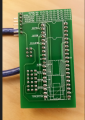
on my picture bfront.jpg. Can you please confirm to me that
J1 is on position 3
J2, J3, J4, J5 and J6 are on position 1-2
J7 is on position 2-3

I am asking this because I don't want to mix 1-2 with 2-3
Thank you
 

spinnaker

Joined Oct 29, 2009
7,830
Thank you.

on my picture bfront.jpg. Can you please confirm to me that
J1 is on position 3
J2, J3, J4, J5 and J6 are on position 1-2
J7 is on position 2-3

I am asking this because I don't want to mix 1-2 with 2-3
Thank you

We can't confirm anything if you don't mention what pic you are using. This isn't that difficult. Just set the pins you think are correct then confirm continuity from the ISCP pins to the pins on the socket.
 

Thread Starter

Snowfish

Joined May 11, 2017
42
We can't confirm anything if you don't mention what pic you are using. This isn't that difficult. Just set the pins you think are correct then confirm continuity from the ISCP pins to the pins on the socket.
Are you shure that you can't confirm? I don't think that you need to know which pic i am using. I am only asking to confirm if the jumpers from the picture bfron,jpg are on the place which I said. I am using pic18 with 40 pins and pickit3.

On the picture bfron,jpg
J2, J3, J4, J5 and J6 are on position 1-2
J7 is on position 2-3
Are they placed like this?
I am not asking if it's the right way to place them for my pic . I am only asking if their current place from the picture is like this.

I am asking this because I don't want to mix 1-2 with 2-3
 
_pins.jpg View attachment 138160
Thank you.

on my picture bfront.jpg. Can you please confirm to me that
J1 is on position 3
J2, J3, J4, J5 and J6 are on position 1-2
J7 is on position 2-3

I am asking this because I don't want to mix 1-2 with 2-3
Thank you
EDIT NOOOOOOOOOOOOOOOOO to what I wrote {dang where is that strikeout}
J2, J3, J4, J5 and J6 are in position 2-3
J7 is in position 1-2

See picture where I put the pin numbers in red - that is how I would read the pins.
 
Last edited:

spinnaker

Joined Oct 29, 2009
7,830
Are you shure that you can't confirm? I don't think that you need to know which pic i am using. I am only asking to confirm if the jumpers from the picture bfron,jpg are on the place which I said. I am using pic18 with 40 pins and pickit3.

On the picture bfron,jpg
J2, J3, J4, J5 and J6 are on position 1-2
J7 is on position 2-3
Are they placed like this?
I am not asking if it's the right way to place them for my pic . I am only asking if their current place from the picture is like this.

I am asking this because I don't want to mix 1-2 with 2-3

You are making this way harder than it needs to be. This isn't rocket science. They even make it easy for you. They mark all of the pins on the connector. Mine aren't marked.

1. Set the jumpers for your pic

2. Get your datasheet out for your pic. Look at the pinout.

3. Measure continuity between the connector on the upper right of the board to the pins on the socket. Example PGC on the connector to where PGC should be on the socket according to the datasheet.

If everything ohms out your good.
 

spinnaker

Joined Oct 29, 2009
7,830
I might see the TS's confusion. That chart is really confusing IMHO. But I still say it is not all that difficult to figure it out with the board in your hands.
 

Thread Starter

Snowfish

Joined May 11, 2017
42
You are making this way harder than it needs to be. This isn't rocket science. They even make it easy for you. They mark all of the pins on the connector. Mine aren't marked.

1. Set the jumpers for your pic

2. Get your datasheet out for your pic. Look at the pinout.

3. Measure continuity between the connector on the upper right of the board to the pins on the socket. Example PGC on the connector to where PGC should be on the socket according to the datasheet.

If everything ohms out your good.
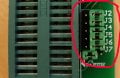
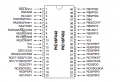
I can see on the connector the pin LVP (first pin) and GND pin. I would like to know to which pins do they correspond on this datasheet of pic18f452 (attached picture 18f452.png) ?

Also there is another thing which I noticed. I tested continuity of all the corresponding pins except LVP and GND with same connection as on my bfront.jpg picture which isn't ¨¨DIP28,40: J1:3/J2, J3, J4, J5, J6, J7:2-3¨¨ and they ohms when I test them with ohmmeter. Why is that the case?
 

Attachments

spinnaker

Joined Oct 29, 2009
7,830
I can see on the connector the pin LVP (first pin) and GND pin. I would like to know to which pins do they correspond on this datasheet of pic18f452 (attached picture 18f452.png) ?

Also there is another thing which I noticed. I tested continuity of all the corresponding pins except LVP and GND with same connection as on my bfront.jpg picture which isn't ¨¨DIP28,40: J1:3/J2, J3, J4, J5, J6, J7:2-3¨¨ and they ohms when I test them with ohmmeter. Why is that the case?
Look at the back of your board. Do you see the pic18f452 on there anywhere? I do not see it. That board may not support that chip.

LVP is low voltage programming. Sorry I do not know much about that. I have never used it. I don't think you need to worry about that pic.

Just

1. MCLR
2. VDD
3. VSS
4. PGD
5. PGC

But that board might not be compatible with your chip. You might be able to get it to work by moving jumpers around and doing a continuity check.


upload_2017-10-27_23-36-8.png
 
Can you please tell me how did you figure that out?

Thank you
I don't have the device in front of me where I can trace connections, so I could be wrong. That being said, I "figured" it out because I normally read left to right. In this case, orienting the device in the direction indicated by the writing "J3,J4,J5, etc.." and reading left to right.

Look at this similar device: Notice how they considerately put the "1 2 3" right on the silk screen to make it harder to screw up - failing that, I am figuring that they did it rationally.
 
Top