Pressing (programmatically) buttons with 4n25/MAX395, multiplex or suggested setup

Thread Starter

StealthRT

Joined Mar 20, 2009
317
Hey all I am in need of some advice on how to go about doing the following:

I have some 30 buttons I need to press programmatically. I know I can do this using a 4n25 but that would take up a lot of space on the PCB if I used that many!

I also ran across the MAX395 that has 8 switches within it instead of just one like the 4n25 has. This would cut down the size of the PCB. but would also be a challenge since I am unable to find any schematic & code using either an Arduino or ESP32 for this IC.

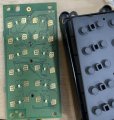
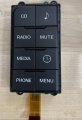
But I am unsure if that would be the best way to go about it? The type of switches I am trying to control via an arduino or ESP32 would be something like this:
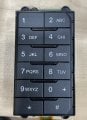
Image-1.jpeg

Image.jpeg

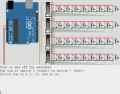
I also found this animation that demonstrates something that looks like it would work as well for my project (multiplexing I believe this is?) But of course this is getting input instead of output like I would need:
switchessmaller2.gif

So suggestions would be great!

Image-3.jpeg

Image-2.jpeg

Image-1 (1).jpeg

Image (1).jpeg

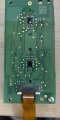
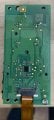
As you can see, there is epoxy on the back that covers the chips and traces. I'm sure any attempt at lifting this epoxy will cause traces/resistors/chips to be lifted.

This is how my dash looks now:
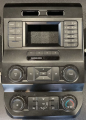
dash2.png

And this is what it will look like when i add my tablet:
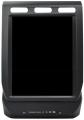
dash.png
 
Last edited:

Ya’akov

Joined Jan 27, 2019
10,226
Welcome to AAC.

It would be very helpful if you would explain the problem you are trying to solve rather than just the solution you have settled on. The additional information will assist greatly in advising you, and may reveal oversights in your plan to a more experienced eye.
 

MisterBill2

Joined Jan 23, 2018
27,180
The meaning of this statement:" I need to press programmatically." is unclear to me. What is clear is that there are 30 buttons and so at some point a bit distant 30 function choices are available to be selected. One way to achieve that would be very simple with 31 wires. It can also be done with only two wires and a bit of electronics.
So now my questions are about what will be going on. If two buttons at a time would be pressed, then there are about 30X30differentchoices.
The simple way to do it with only 2 wires and only 30 function choices is to use resistors and an A/D converter and a bit of software . OR it can use the same 30 resistors and three of the ten output LED bar graph ICs. OR it could use the resistors and the analog input of an arduino.
 

Thread Starter

StealthRT

Joined Mar 20, 2009
317
The meaning of this statement:" I need to press programmatically." is unclear to me. What is clear is that there are 30 buttons and so at some point a bit distant 30 function choices are available to be selected. One way to achieve that would be very simple with 31 wires. It can also be done with only two wires and a bit of electronics.
So now my questions are about what will be going on. If two buttons at a time would be pressed, then there are about 30X30differentchoices.
The simple way to do it with only 2 wires and only 30 function choices is to use resistors and an A/D converter and a bit of software . OR it can use the same 30 resistors and three of the ten output LED bar graph ICs. OR it could use the resistors and the analog input of an arduino.
I am looking to just push one button at a time. Pushing meaning the Arduino will push the button for me.

I like the 2 wire approach. Are you talking having a resistor per button that each button has a different value resistor? How would that work with programmatically pushing the button? I thought that was more of giving the Arduino notice when I actually push the button myself?
 

MisterBill2

Joined Jan 23, 2018
27,180
Certainly "Y" has an important point!! Generally, push button operation is reserved for humans. Or is this something like an "autodial" function on a phone?? Without a better explanation of the whole scheme you will be left to random guesses about how to implement the solution you picked. WHICH, BTW, will not work.
 

Thread Starter

StealthRT

Joined Mar 20, 2009
317
I am simply trying to mimic a push to a button via an arduino so i can us my gui to do the visual part to me. My app is using c# .net and it will be running on a tablet that's taking the place of all these buttons.
 

meth

Joined May 21, 2016
298
I am simply trying to mimic a push to a button via an arduino so i can us my gui to do the visual part to me. My app is using c# .net and it will be running on a tablet that's taking the place of all these buttons.
Why are trying to mimic it with Arduino? If you have the c# code you can write a function there, where instead buttons are pressed in a sequence, the code mimics a sequence that certain buttons are pressed.
 

Thread Starter

StealthRT

Joined Mar 20, 2009
317
Why are trying to mimic it with Arduino? If you have the c# code you can write a function there, where instead buttons are pressed in a sequence, the code mimics a sequence that certain buttons are pressed.
And how do you see it "pushing" those buttons via c# when there is nothing connected to the program to do so?

The c# program would be talking to the arduino via usb serial and letting it know what button to "press". I don't see how that's possible if you take out the arduino completely?
 

meth

Joined May 21, 2016
298
I am sorry, I might not understand your setup. The Arduino is part of your end design or you are using it for test only?
 

Ya’akov

Joined Jan 27, 2019
10,226
So, here's the problem. You are using a brute force approach that will require far more resources than a properly engineered one would. The right way to do this is to work out the signaling being done by the various switch clusters.

As is evident from the connecting FFCs, the number of data lines is far less that the total number of switches. Some scheme is being used to encode the switch information and that is what your MCU should be doing. Reverse engineering it shouldn't be much of a problem—in fact, it should be easier than the mess 30 simulated switch closures would make.

If you don't (yet) know how to do it, it is well worth learning and a good opportunity.
 

meth

Joined May 21, 2016
298
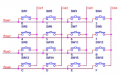
If you want to know how a keyboard matrix works, so you dont have separate input for each button, it is really easy:
1739956265019.png

Rows are outputs from the controller, Col are inputs.
The sequence is:
-make ALL outputs FALSE
-make ROW1 TRUE
-Check input COL1. If TRUE, 0 is pressed
-Check input COL2. If True, 1 is pressed
-Check input COL3. If TRUE, 2 is pressed
-Check input COL4. If True, 3 is pressed
-make ALL outputs FALSE
-make ROW2 TRUE
-Check input COL1. If TRUE, 4 is pressed
-Check input COL2. If True, 5 is pressed
-Check input COL3. If TRUE, 6 is pressed
-Check input COL4. If True, 7 is pressed
..
same for ROW3 and ROW4 - you get the idea.
So this cycle will infinitely rotate. and of course you should add a function where if X button is pressed, the Arduino should send that data to your other controller.
 

JohnSan

Joined Sep 15, 2018
121
Folks seem to be making this overly complicated.

From the pictures:-
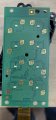
There are 8 pushbuttons and led's on the keypad PCB..

Each pushbutton on the PCB connects to ground.
If the OP can confirm, the led's are for back lighting typical on this type of keypad, then there is 1 connection required for these.
So connections required are 8 + 1 + Gnd = 10.

There are 10 traces in that flexible PCB.
So on the source PCB, you need to identify which is gnd and which is the one output for the leds and ignore it.

Measure the voltage on the keypads to establish what type of swtich will be needed.
An oscilloscope would be best for this.

Two CD4016B quad switches may work just fine. Easily controllable from arduino (or ESP32).
There are other 8 channel switch devices available, but the ones I found are surface mount so difficult to handle.

If the voltage range is within the 4016 spec (around +5V to +15V) then start test.

Testing:-
Disconnect the keypad PCB.
Just use one 4016 with its four switches connected to four signal inputs on the source pcb and the other side of each switch connected to the gnd connection on the source PCB.

The 0V (pin 7) will connect to gnd.
The supply (pin 14) will likely depend on what you measure on the keypad contacts.
It could be 5V or possibly 12V.

On each control input on the 4016, connect a pulldown resistor (anything from 1k to 1M) to 0V (gnd).
On each control input on the 4016, connect a pushbutton to the 4016 supply voltage.

(The pulldown resistors are needed to ensure the control input is at 0V when a switch is not pressed).

Put the power on and try pushing each of your four buttons......
If you have an arduino, you could also test with that, but if the 4016 supply is >5V, don't forget to add some level shifting between it and the 4016.

We will await your results.
:)
 

Ya’akov

Joined Jan 27, 2019
10,226
Folks seem to be making this overly complicated.
Maybe you missed that he wants to operate 30 buttons, that the buttons are part of a car dashboard, and that the interconnecting FFCs clearly use only a few conductors, indicating that the chips on the back of the PCB are encoding the switch matrix.

The brute force approach of operating the switches is a very bad design. Matching the encoding is much more sensible. At that point he can even leave the switch panels out entirely. If he connects to the switch contacts he will need a massive wiring harnesss connected to three large panels that will need to be stowed somewhere.

This is just not a good option when a much more elegant solution with a much smaller BoM and much more flexibility is available. His problem isn‘t “programmatically operating 30 switches“, it’s “replacing 30 switches with touch screen control”.

His naive solution is just a new problem, not a good solution to the original problem.
 

JohnSan

Joined Sep 15, 2018
121
Yes. I read the original post.

First sentance: Quote "Hey all I am in need of some advice on how to go about doing the following:",

The OP has assessed the size of the task.
In fact, the MAX395 is probably a good solution as it will also work between +5V and +15V.
Only need 4 devices.

The OP has other choices:
1). Reverse engineer the comms between the existing unknown keypad controller and whatever media device it connects to.
Requires the unknown chip to be identified to assess whether this is a practical option, given the level of OP skill / knowledge.

2). Replace the unit with an aftermarket device.
If such a unit exists. They may have already considered this and discounted it.

3). Buy another car that has a touch screen for media control.
Likely the most expensive option.


Here is a project using an arduino and a MAX395 someone has already done.
https://chariscat.wordpress.com/2020/12/06/serial-communications-between-arduino-and-max/

So there are a few ideas to be getting on with.
A lash-up to test if one will work is probably the next thing.
 
Top