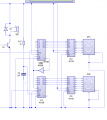
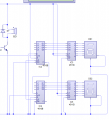
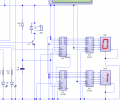
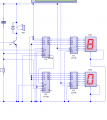
I have removed the invertor and have connected the LD pins together.
I was given a sheet on loading a number on 1 seven segment but there is no information on how to load onto 2. This is where I got the idea for the not gate.
I realize you didn’t know how to load a value from which you can count down. But you have and understand all the information that you need. Forget what you don’t know. Think about what you do know and how to use that knowledge to solve your problem.
It’s right there. I’ve given you several direct hints. But you’ll learn a lot more if you figure it out for yourself. Give it one more college try!
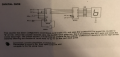
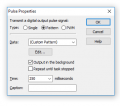
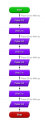
Ok I have done what I think would pre-set the value and when I tested it, it froze in this position. I'm not sure if that's to do with the pulse settings or whether I have just connected it incorrectly. I have attached my tester flowchart with the pulse properties.
hi,
Why have you removed the Res/Cap circuit I posted in post #20.?
In your latest diagram the two LD's are not connected, so the circuit will 'freeze'
Sorry, I completely missed that post!
I swapped them around and when I started the circuit it started to countdown from 10 but then got stuck at 9 so I''m thinking its something to do with how I have programmed the pulses.
hi,
OK,
So check your Pulse program and post back your result, we can go from there.
E
Updated:
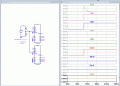
For information only this image is a the simplest LTSpice sim of 4510's with a LD pulse, loading the number '13' into the 4510's
You can see that the Loading of the number '13' is correct.
Hi,
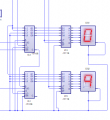
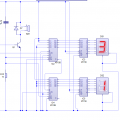
It will still only pulse for 1 digit no matter what pulse setting I use. I looked at the diagram you sent and noticed that both reset pins went to ground so I changed the one at the top and it now says 13!!
Hi,
I changed the flowchart by taking out the other components and just used single pulses and waits and I managed to get it to count down to 8 from 13!!
We just had to design the final circuit for tomorrow and make a test flowchart to make sure everything was working. I think we were going to start drawing up pcbs today in class but my school is now closed. For now, I'm just going to leave it there as I have been working on it for ages and I have some other work to get caught up on!
Thanks again for your help as I would not have been able to do this without you.

 Facebook
 Google
 GitHub
 Linkedin