@Raymond Genovese Seriously, I say go for it! It's worth way more than $99 just to satisfy ur curiosity! Also Python is vry intuitive, easy to learn language! BTW I say if u don't like _yuppies_ (who does?) just stay clear of their haunts (like Starbucks) it works for me!
Yeah, but the women at the swapfest are scarier and look like they could beat me up
More, seriously, I appreciate your encouragement, especially regarding Python. I have always experienced a lot of negative transfer between operating systems, IDEs and even computer languages. Many has been the time that I am sitting with Eclipse and wondering why something from MPLAB X IDE doesn't work. It is a little sad.
Anyways, I have pulled the trigger. It will take a few weeks to arrive. Followed by a few months of it sitting in an unopened box. Followed by a couple more months. After that, I will come back here and ask what the $%@#! is the matter with you people telling me to get that thing and it is the biggest POS since the Zune!
Subsequently, I will claim that I am going to put in the Bay for $20, but I will never get around to it and it will remain in my estate. Finally, after the GA, it will be discovered by some kid who will sells it on Space-Bay for 100,000 credits.
The fact it has a RPi compatible gpio I/O connector is a big win for me as I have several kernel projects using RPi off-board SPI connected devices that access those pins with header compatible boards.
I have to admit it looks tempting. Sold out online where I have looked.
The only thing I could say against it is that the Google Coral edge TPU usb dongle looks even better. I have ordered that instead. Performance is apparently much better, and lower power consumption. It's a little USB dongle, so more portable. No gigantic heat sink.
The Google TPU is more limited in what neural net software you can run on it. It is tensorflow lite only. However the advantages outweigh that drawback for me.
It may be different for others. For me, portability, speed, and low power usage are top priorities. As long as i can run object detection and classification, my needs are taken care of and the TPU smokes the Jetson Nano at that apparently.
I'm not doing anything until I get closer to finishing up the Commodore-64 project, which is going wonderfully, and has spread out beyond its allowed boundaries, which has caused some uhm difficulties.
Now, if you will excuse me, I have to get back to "work"...
So, today I decided to take it out of the package....
Formatted the 128GB SD card...downloaded the image...installed Etcher...flashed the image...attached the external 5A PS and attached a jumper to use it rather than the micro USB port...plugged in a monitor and old USB keyboard and mouse...plugged it in and powered up. Answered a few questions...set up a few little things...said no to some...agreed to more than I would read...and...
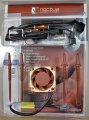
Check out the "Cadillac" of fans sheesh, I figured a fan in a bag and solder it yourself...too much ordering from AliBangBay I guess - is this how you rich people do it?
@Raymond Genovese,
I too got it out of the box and fired it up. But I haven't done much with it. I started printing out parts for the JetBot -- and watched some of the training videos on setting up ROS.
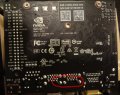
On a side note: The first one I received was DOA -- but Arrow shipped another one right out. Gave me time to inspect it a bit visually. Take a look at the trace spacing near the annular rings below. Someone made an oopsie.
Since this is a low-voltage board, it's not really a matter of creepage/clearance, but trace/space minimum standards. Trace and space guidelines exist because of manufacturing limitations. Copper doesn't always etch into straight lines, and the safe spacing depends on the thickness of the copper used (1/2 oz - 6 oz). So trace/space minimums on 1/2 oz might be 3/3 mil, and on 6 oz might be 9/15 mil.
What I was showing in the picture is that the engineers allowed their annular rings to violate minimum conductor spacing. So many of their boards likely had to be rejected due to short circuits between adjacent nets when the copper trace merged with the annular ring. That error is usually, but not always, caught during flying probe checks.
You've identified another issue -- seems like someone forgot to include an ESD diode during schematic design or board layout. Oops.
Regarding the case -- have you seen the 3D printed ones? I half printed one last night, but I ran out of filament. I was going to try out one of those.
BTW -- maybe we should start a new thread that details our discoveries.

 Facebook
 Google
 GitHub
 Linkedin


 ! It's worth way more than $99 just to satisfy ur curiosity! Also Python is vry intuitive, easy to learn language! BTW I say if u don't like _yuppies_ (who does