PICKIT2 and PICKIT3 doesn't work on My WIN10, but they work in XP, which is not connected ro Internet

nsaspook

Joined Aug 27, 2009
16,503
When I write a new code it went ok, but when I read the code it is fully 0xFF.
So what can be a reason, why this PCB doesn't write a code ( although) it seems to be ok?
It has #FUSES NOPROTECT //Code not protected from reading
Pekka
Show us some screen images/captured of what's happening during reading/programming so we can see it for ourselves.
 

Thread Starter

pekka123

Joined May 18, 2017
40
Hey
here are some pictures, but they do not show anything.
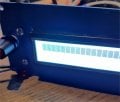
First is in front of my project. LCD is not shoeing any thing
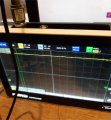
Second in from my RS232 output pin, It should be low, but it high.
The third is from my Computer, RS232 program, It shows the last working program (PIC16F886), but nothing in my PIC18F2431 cpu.
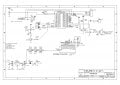
The last picture is my schematic diagram.

Pekka
 

Attachments

nsaspook

Joined Aug 27, 2009
16,503
Hey
here are some pictures, but they do not show anything.
First is in front of my project. LCD is not shoeing any thing
Second in from my RS232 output pin, It should be low, but it high.
The third is from my Computer, RS232 program, It shows the last working program (PIC16F886), but nothing in my PIC18F2431 cpu.
The last picture is my schematic diagram.

Pekka
I was talking about the PICKIT programming/reading process screens, something with actual useful data, maybe.

Schematic diagram
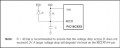
For MCLR you usually add a 0.1uf or so cap from there to ground/common for a delay circuit so power can stabilize before the MCLR pin goes high level. Usually not a show-stopper.
 

nsaspook

Joined Aug 27, 2009
16,503

nsaspook

Joined Aug 27, 2009
16,503
OK you found something better, but this doesn't help me.
Do you have something else?
Sure, you need to continue to isolate the source of the device programming/read problems you have. If you're reading 0xFF when valid data should be there, find the cause.
 

Thread Starter

pekka123

Joined May 18, 2017
40
Hey,
I continue to declare my problem. I used other PC, but it worked similarly.
Then I decided to chance the CPU from PIC18F2431 to PIC18F2620.
I programmed this SO-model without any PCB,
I worked normally,
Then I take PIC18F2431 out form my test PCB and change PIC18F2620
It worked also normally and it start to give a serial information.
Tomorrow I change the PIC18F2620 to my normal PCB.
But what was the reason that four new CPU doesn't keep the program?

Pekka
 

nsaspook

Joined Aug 27, 2009
16,503
Hey,
I continue to declare my problem. I used other PC, but it worked similarly.
Then I decided to chance the CPU from PIC18F2431 to PIC18F2620.
I programmed this SO-model without any PCB,
I worked normally,
Then I take PIC18F2431 out form my test PCB and change PIC18F2620
It worked also normally and it start to give a serial information.
Tomorrow I change the PIC18F2620 to my normal PCB.
But what was the reason that four new CPU doesn't keep the program?

Pekka
There have been some problems programming that chip in LVP mode when the PGM pin is not set in the proper manner. Be sure to use High-voltage programming if possible.

23.9 Single-Supply ICSP™ Programming

The LVP bit in Configuration Register 4L (CONFIG4L<2>) enables Single-Supply ICSP Programming. When
LVP is enabled, the microcontroller can be programmed without requiring high voltage being applied
to the MCLR/VPP pin, but the RB5/PGM pin is then dedicated to controlling Program mode entry and is
not available as a general purpose I/O pin.

LVP is enabled in erased devices.

While programming, using Single-Supply Program- ming, VDD is applied to the MCLR/VPP pin as in
normal execution mode. To enter Programming mode, VDD is applied to the PGM pin.

If Single-Supply ICSP Programming mode will not be used, the LVP bit can be cleared and RB5/PGM
becomes available as the digital I/O pin RB5. The LVP bit may be set or cleared only when using
standard high-voltage programming (VIHH applied to the MCLR/ VPP pin). Once LVP has been disabled,
only the standard high-voltage programming is available and must be used to program the device.

Memory that is not code-protected can be erased using either a block erase, or erased row by row,
then written at any specified VDD. If code-protected memory is to be erased, a block erase is
required. If a block erase is to be performed when using Single-Supply Programming, the device must
be supplied with VDD of 4.5V to 5.5V.

Note

1: High-voltage programming is always
available, regardless of the state of the LVP bit or the PGM pin, by applying VIHH to the MCLR pin.

2: When Single-Supply Programming is enabled, the RB5 pin can no longer be used as a general
purpose I/O pin.

3: When LVP is enabled externally, pull the PGM pin to VSS to allow normal program execution.
 

Thread Starter

pekka123

Joined May 18, 2017
40
Thank you for explanation of LOW voltage programming. I have newer use low voltage programming. But what is the reason for not programming with PICKIT2 or PICKIT3. They were just new devices and and they seemed to program right, but when I read the device back the were full of 0xff code.
 

LesJones

Joined Jan 8, 2017
4,544
Have you tried using Pickitminus software with the Pickit2 or Pickit3 on your windows10 system. It works OK on my windows11 system.

Les.
 

Thread Starter

pekka123

Joined May 18, 2017
40
I have had PIKIT2minus with PICKIT2 and PICKIT3 devices about 5 years. It works perfectly. know this Finnish guy. I am also a Finnish.
 
Thread starter Similar threads Forum Replies Date
Arjune Microcontrollers 67
Top