Picking a decent reasonable display

Thread Starter

Futurist

Joined Apr 8, 2025
721
I'm interested in adding a little display to my Nucleo/NRF experiments.

I can see there are a lot of types, options and so on.

How do these typically communicate? SPI or what? (I use SPI for NRF24 so have some familiarity with it now)

Is "epaper" color too? are the OLED versions vs LCD backlit?

Do different types use markedly different power?

Are they touch sensitive?

How do we code to them, are they treated as some kind of array, matrix of pixel values?

Just want to get a basic idea of what's involved before I pick some out.

This caught my eye but I'm not technically familiar enough to judge it
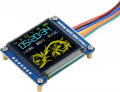
1746551712750.png
 
Last edited:

BobTPH

Joined Jun 5, 2013
11,463
OLED displays produce their own light, color LCD have to be backlighted, mono LCDs can produce a low contrast display without backlight and use very little power.

If a that little display you showed is big enough for you, go for it, it will be much prettier than any LCD.
 

Thread Starter

Futurist

Joined Apr 8, 2025
721
OK that small one seem reasonable to at least get some exposure too. If the operation isn't too involved I can write the management code for it myself I think.
 

Thread Starter

Futurist

Joined Apr 8, 2025
721

nsaspook

Joined Aug 27, 2009
16,250
OK that waveshare one seem to be the same on I was looking at on Amazon.

Why though do I not see a MOSI and MISO labelled pin if this is SPI?
That one only has a write only display buffers on the glcd controller. You do all graphics operations (fonts, lines, dots, etc) on a memory buffer on your controller then bulk transfer that to the display using DMA if you want it to refresh faster.

https://forum.allaboutcircuits.com/threads/pic32mk-mc-qei-example.150351/post-1617150

Some graphics controllers do allow for r/w access to the internal buffer.
 
Last edited:

Thread Starter

Futurist

Joined Apr 8, 2025
721
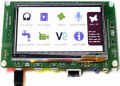
I have used STM32F746G-DISCOVERY very successfully.
I have programmed graphics with my own code and also with TouchGFX.

https://www.st.com/en/evaluation-tools/32f746gdiscovery.html

View attachment 348567
Actually I have one of those!!!!

I bought it several years ago when I just beginning to play around with MCUs, it was too capable for my needs at the time, I just bought it because it seemed to have potential if I wanted to do anything fancy. Since then I have been working with smaller boards.

So actually it might make sense to dust this off...
 

nsaspook

Joined Aug 27, 2009
16,250
To save memory requirements most seem to use versions of vector graphics for static UI dsplays. It's slow but the old SGI vector graphics API was pretty good for the day as a early parent to GL.
https://en.wikipedia.org/wiki/OpenGL

https://forum.allaboutcircuits.com/threads/led-matrix-animation.83063/post-591949
pic18f45k80
https://github.com/nsaspook/matrix_led/tree/xc8
Simple rotation and scaling transformations.

C:
typedef struct pixel_t {
    int8_t x, y; // display bit x,y and v for pixel value 0=off
    uint8_t v; // pixel dot value
    int8_t m_link, n_link; // pixel links m_ id for each pixel, n_ pixel group id for object
} volatile pixel_t; // -1 in the m_link and n_link means end of display data

/* store the pixel data in rom then copy it to the ram buffer as needed. */
const struct pixel_t pixel_rom[] = {
    -1, -3, 1, 0, 0,
    0, -2, 0, 1, 0,
    1, -1, 1, 2, 0,
    2, 0, 1, 3, 0,
    -1, 0, 1, 4, 0,
    1, 1, 1, 5, 0,
    0, 2, 1, 6, 0,
    -1, 3, 1, 7, 0,
    -2, 0, 1, 8, 0,
    -2, -2, 1, 9, 9,
    -1, -1, 1, 10, 9,
    1, 1, 1, 11, 9,
    2, 2, 1, 12, 9,
    0, 0, 1, 13, 9,
    2, 0, 1, 14, 14,
    0, 2, 1, 15, 14,
    -2, 0, 1, 16, 14,
    0, -2, 1, 17, 14,
    2, 2, 1, 18, 14,
    -2, -2, 1, 19, 14,
    0, 3, 1, 20, 20,
    0, 2, 1, 21, 20,
    0, 1, 1, 22, 20,
    2, 2, 1, 23, 20,
    3, 0, 1, 24, 20,
    2, -2, 1, 25, 20,
    0, -3, 1, 26, 20,
    -2, -2, 1, 27, 20,
    -3, 0, 1, 28, 20,
    -2, 2, 1, 29, 20,
    0, 0, 0, 30, 20,
    0, 0, 0, -1, -1,
    0, 0, 0, -1, -1
};

/*
* Display file point mode data for line drawing display
*/

/* default data for ram buffer */
volatile struct pixel_t pixel[PIXEL_NUM] = {
    0, 0, 0, -1, -1
},

/* returns a 8-bit object ID */
uint8_t obj_init(uint8_t rom_link, uint8_t clear)
{
    size_t pixel_size;
    uint8_t ram_link_start = 0;
    static uint8_t ram_link = 0;

    if (clear) {
        ram_link = 0;
        pixel[ram_link].m_link = -1;
        pixel[ram_link].n_link = -1;
        return 0;
    }

    pixel_size = sizeof(pixel_t); // size in bytes of one pixel data structure
    do {
        memcpy((void *) &pixel[ram_link + ram_link_start].x, (const void *) &pixel_rom[rom_link + ram_link_start].x, pixel_size);
        pixel[ram_link + ram_link_start].m_link = (int8_t) (ram_link + ram_link_start); // make a RAM ID for each pixel
        pixel[ram_link + ram_link_start].n_link = (int8_t) ram_link; // link RAM ID to object
        ++ram_link_start;
    } while (pixel_rom[ram_link_start + rom_link].n_link == rom_link);

    ram_link += ram_link_start;
    pixel[ram_link].m_link = -1;
    pixel[ram_link].n_link = -1;
    return ram_link - ram_link_start;
}


/* This is a simple scan converter to a random access display */

/* Timer 2 */
void low_handler_tmr2(void)
{
    debug_low0_SetHigh();
    debug_low0_SetLow();
    debug_low0_SetHigh();
    TMR2_WriteTimer(PDELAY);
    LATB = 0xff; // blank the display
    LATC = 0x00;
    while (!pixel[list_numd].v) { // quickly skip pixels that are off
        if ((pixel[list_numd].m_link == -1) || (++list_numd >= PIXEL_NUM)) {
            list_numd = 0;
            break;
        }
    }
    // We move up the display list data array and display a DOT on the matrix display as needed
    if ((pixel[list_numd].x >= 0) && (pixel[list_numd].y >= 0)) { // clip display space to +x and +y
        xd = 1; // load a bit at origin x0
        yd = 1; // load a bit at origin y0
        xd = xd << pixel[list_numd].x; // move the cross bar to the correct location
        yd = yd << pixel[list_numd].y;
        if (pixel[list_numd].v) {
            LATB = (uint8_t) ~yd; // set to low for dot on, load the crossbar into the chip outputs
            LATC = (uint8_t) xd; // set to high for dot on
        } else { // no dot
            LATB = 0xff;
            LATC = 0x00;
        }
    }
    if ((pixel[list_numd].m_link == -1) || (++list_numd >= PIXEL_NUM)) {
        list_numd = 0; // start over again from next line
    }
    debug_low0_SetLow();
}

// graphics primitives

void pixel_set(uint8_t list_num, uint8_t value)
{
    if (list_num >= PIXEL_NUM) return;
    pixel[list_num].v = value;
}

void pixel_rotate(uint8_t list_num, float degree) // pixel,degree rotation
{
    // remember old rotations
    static float to_rad, float_x, float_y, sine, cosine, old_degree = 1957.7;

    if (degree != old_degree) {
        to_rad = (float) 0.0175 * degree;
        cosine = (float) cos(to_rad);
        sine = (float) sin(to_rad);
        old_degree = degree;
    }

    float_x = (float) pixel[list_num].x;
    float_y = (float) pixel[list_num].y;

    pixel[list_num].x = (int8_t) (float_x * cosine - float_y * sine);
    pixel[list_num].y = (int8_t) (float_x * sine + float_y * cosine);

}

void pixel_trans(uint8_t list_num, int8_t x_new, int8_t y_new)
{
    pixel[list_num].x += x_new;
    pixel[list_num].y += y_new;
}

void pixel_scale(uint8_t list_num, float x_scale, float y_scale)
{
    float float_x, float_y;

    float_x = (float) pixel[list_num].x;
    float_y = (float) pixel[list_num].y;
    pixel[list_num].x = (int8_t) (float_x * x_scale);
    pixel[list_num].y = (int8_t) (float_y * y_scale);
}

void object_rotate(uint8_t list_num, float degree)
{
    uint8_t i;

    if (list_num >= PIXEL_NUM) return; // check for valid range

    for (i = 0; i < OBJ_NUM; i++) {
        if (pixel[list_num + i].n_link != list_num) return; // invalid current object id
        pixel_rotate(list_num + i, degree);
    }
}

void object_trans(uint8_t list_num, int8_t x_new, int8_t y_new)
{
    uint8_t i;

    if (list_num >= PIXEL_NUM) return; // check for valid range

    for (i = 0; i < OBJ_NUM; i++) {
        if (pixel[list_num + i].n_link != list_num) return; // invalid current object id
        pixel_trans(list_num + i, x_new, y_new);
    }
}

void object_scale(uint8_t list_num, float x_scale, float y_scale)
{
    uint8_t i;

    if (list_num >= PIXEL_NUM) return; // check for valid range

    for (i = 0; i < OBJ_NUM; i++) {
        if (pixel[list_num + i].n_link != list_num) return; // invalid current object id
        pixel_scale(list_num + i, x_scale, y_scale);
    }
}

void object_set(uint8_t list_num, uint8_t value)
{
    uint8_t i;

    if (list_num >= PIXEL_NUM) return; // check for valid range

    for (i = 0; i < OBJ_NUM; i++) {
        if (pixel[list_num + i].n_link != list_num) return; // invalid current object id
        pixel_set(list_num + i, value);
    }
}
XY on an analog scope.

Raster graphics at the small scale are fairly easy to make with a decent scan converter from raster format. The GLCD controller might have vector converter in more advanced unit.
 
Last edited:

MrChips

Joined Oct 2, 2009
34,628
It depends on the requirements of the application, GUI and touch screen.

In one application, users needed to click on buttons and a key pad while the display presented information in large readable fonts. I used TouchGFX for that.

In another application for displaying gamma-ray spectroscopy, the user was required to manipulate cursors, cross-hairs, scroll bars, overlapping windows, etc. Hence fine line graphics was required. I wrote my own graphics libraries for that.
 

Thread Starter

Futurist

Joined Apr 8, 2025
721
To save memory requirements most seem to use versions of vector graphics for static UI dsplays. It's slow but the old SGI vector graphics API was pretty good for the day as a early parent to GL.
https://en.wikipedia.org/wiki/OpenGL

https://forum.allaboutcircuits.com/threads/led-matrix-animation.83063/post-591949
pic18f45k80
https://github.com/nsaspook/matrix_led/tree/xc8
Simple rotation and scaling transformations.

C:
typedef struct pixel_t {
    int8_t x, y; // display bit x,y and v for pixel value 0=off
    uint8_t v; // pixel dot value
    int8_t m_link, n_link; // pixel links m_ id for each pixel, n_ pixel group id for object
} volatile pixel_t; // -1 in the m_link and n_link means end of display data

/* store the pixel data in rom then copy it to the ram buffer as needed. */
const struct pixel_t pixel_rom[] = {
    -1, -3, 1, 0, 0,
    0, -2, 0, 1, 0,
    1, -1, 1, 2, 0,
    2, 0, 1, 3, 0,
    -1, 0, 1, 4, 0,
    1, 1, 1, 5, 0,
    0, 2, 1, 6, 0,
    -1, 3, 1, 7, 0,
    -2, 0, 1, 8, 0,
    -2, -2, 1, 9, 9,
    -1, -1, 1, 10, 9,
    1, 1, 1, 11, 9,
    2, 2, 1, 12, 9,
    0, 0, 1, 13, 9,
    2, 0, 1, 14, 14,
    0, 2, 1, 15, 14,
    -2, 0, 1, 16, 14,
    0, -2, 1, 17, 14,
    2, 2, 1, 18, 14,
    -2, -2, 1, 19, 14,
    0, 3, 1, 20, 20,
    0, 2, 1, 21, 20,
    0, 1, 1, 22, 20,
    2, 2, 1, 23, 20,
    3, 0, 1, 24, 20,
    2, -2, 1, 25, 20,
    0, -3, 1, 26, 20,
    -2, -2, 1, 27, 20,
    -3, 0, 1, 28, 20,
    -2, 2, 1, 29, 20,
    0, 0, 0, 30, 20,
    0, 0, 0, -1, -1,
    0, 0, 0, -1, -1
};

/*
* Display file point mode data for line drawing display
*/

/* default data for ram buffer */
volatile struct pixel_t pixel[PIXEL_NUM] = {
    0, 0, 0, -1, -1
},

/* returns a 8-bit object ID */
uint8_t obj_init(uint8_t rom_link, uint8_t clear)
{
    size_t pixel_size;
    uint8_t ram_link_start = 0;
    static uint8_t ram_link = 0;

    if (clear) {
        ram_link = 0;
        pixel[ram_link].m_link = -1;
        pixel[ram_link].n_link = -1;
        return 0;
    }

    pixel_size = sizeof(pixel_t); // size in bytes of one pixel data structure
    do {
        memcpy((void *) &pixel[ram_link + ram_link_start].x, (const void *) &pixel_rom[rom_link + ram_link_start].x, pixel_size);
        pixel[ram_link + ram_link_start].m_link = (int8_t) (ram_link + ram_link_start); // make a RAM ID for each pixel
        pixel[ram_link + ram_link_start].n_link = (int8_t) ram_link; // link RAM ID to object
        ++ram_link_start;
    } while (pixel_rom[ram_link_start + rom_link].n_link == rom_link);

    ram_link += ram_link_start;
    pixel[ram_link].m_link = -1;
    pixel[ram_link].n_link = -1;
    return ram_link - ram_link_start;
}


/* This is a simple scan converter to a random access display */

/* Timer 2 */
void low_handler_tmr2(void)
{
    debug_low0_SetHigh();
    debug_low0_SetLow();
    debug_low0_SetHigh();
    TMR2_WriteTimer(PDELAY);
    LATB = 0xff; // blank the display
    LATC = 0x00;
    while (!pixel[list_numd].v) { // quickly skip pixels that are off
        if ((pixel[list_numd].m_link == -1) || (++list_numd >= PIXEL_NUM)) {
            list_numd = 0;
            break;
        }
    }
    // We move up the display list data array and display a DOT on the matrix display as needed
    if ((pixel[list_numd].x >= 0) && (pixel[list_numd].y >= 0)) { // clip display space to +x and +y
        xd = 1; // load a bit at origin x0
        yd = 1; // load a bit at origin y0
        xd = xd << pixel[list_numd].x; // move the cross bar to the correct location
        yd = yd << pixel[list_numd].y;
        if (pixel[list_numd].v) {
            LATB = (uint8_t) ~yd; // set to low for dot on, load the crossbar into the chip outputs
            LATC = (uint8_t) xd; // set to high for dot on
        } else { // no dot
            LATB = 0xff;
            LATC = 0x00;
        }
    }
    if ((pixel[list_numd].m_link == -1) || (++list_numd >= PIXEL_NUM)) {
        list_numd = 0; // start over again from next line
    }
    debug_low0_SetLow();
}

// graphics primitives

void pixel_set(uint8_t list_num, uint8_t value)
{
    if (list_num >= PIXEL_NUM) return;
    pixel[list_num].v = value;
}

void pixel_rotate(uint8_t list_num, float degree) // pixel,degree rotation
{
    // remember old rotations
    static float to_rad, float_x, float_y, sine, cosine, old_degree = 1957.7;

    if (degree != old_degree) {
        to_rad = (float) 0.0175 * degree;
        cosine = (float) cos(to_rad);
        sine = (float) sin(to_rad);
        old_degree = degree;
    }

    float_x = (float) pixel[list_num].x;
    float_y = (float) pixel[list_num].y;

    pixel[list_num].x = (int8_t) (float_x * cosine - float_y * sine);
    pixel[list_num].y = (int8_t) (float_x * sine + float_y * cosine);

}

void pixel_trans(uint8_t list_num, int8_t x_new, int8_t y_new)
{
    pixel[list_num].x += x_new;
    pixel[list_num].y += y_new;
}

void pixel_scale(uint8_t list_num, float x_scale, float y_scale)
{
    float float_x, float_y;

    float_x = (float) pixel[list_num].x;
    float_y = (float) pixel[list_num].y;
    pixel[list_num].x = (int8_t) (float_x * x_scale);
    pixel[list_num].y = (int8_t) (float_y * y_scale);
}

void object_rotate(uint8_t list_num, float degree)
{
    uint8_t i;

    if (list_num >= PIXEL_NUM) return; // check for valid range

    for (i = 0; i < OBJ_NUM; i++) {
        if (pixel[list_num + i].n_link != list_num) return; // invalid current object id
        pixel_rotate(list_num + i, degree);
    }
}

void object_trans(uint8_t list_num, int8_t x_new, int8_t y_new)
{
    uint8_t i;

    if (list_num >= PIXEL_NUM) return; // check for valid range

    for (i = 0; i < OBJ_NUM; i++) {
        if (pixel[list_num + i].n_link != list_num) return; // invalid current object id
        pixel_trans(list_num + i, x_new, y_new);
    }
}

void object_scale(uint8_t list_num, float x_scale, float y_scale)
{
    uint8_t i;

    if (list_num >= PIXEL_NUM) return; // check for valid range

    for (i = 0; i < OBJ_NUM; i++) {
        if (pixel[list_num + i].n_link != list_num) return; // invalid current object id
        pixel_scale(list_num + i, x_scale, y_scale);
    }
}

void object_set(uint8_t list_num, uint8_t value)
{
    uint8_t i;

    if (list_num >= PIXEL_NUM) return; // check for valid range

    for (i = 0; i < OBJ_NUM; i++) {
        if (pixel[list_num + i].n_link != list_num) return; // invalid current object id
        pixel_set(list_num + i, value);
    }
}
XY on an analog scope.

Raster graphics at the small scale are fairly easy to make with a decent scan converter from raster format. The GLCD controller might have vector converter in more advanced unit.


nsaspook

Joined Aug 27, 2009
16,250

We had X/Y porn on the old radar scopes as test patterns using mag tape recorders we used to record radio traffic. The ingenuity of humans is infinite when there is lots of time to kill.
 

Thread Starter

Futurist

Joined Apr 8, 2025
721
An attraction of vector graphics is the low data sizes, a square is defined by four sets of 2D coordinate but in raster form, rather more data is needed.

We had X/Y porn on the old radar scopes as test patterns using mag tape recorders we used to record radio traffic. The ingenuity of humans is infinite when there is lots of time to kill.
:oops:
 

Sensacell

Joined Jun 19, 2012
3,768
I would begin with a simple 2 line LCD or other simple display.
It's easy to underestimate the complexities of managing a graphic display on a small MCU
 

nsaspook

Joined Aug 27, 2009
16,250
I would begin with a simple 2 line LCD or other simple display.
It's easy to underestimate the complexities of managing a graphic display on a small MCU
My standard is a 4x20 character lcd using SPI. I've got standard software that has 4 virtual lcd buffers for quickly switching buffered info screens to the physical lcd for display. For embedded devices that run for years without human interactions, fancy glcd screens are mainly eye candy.
 

meth

Joined May 21, 2016
298
At university, the final project in digital electronics was to display a picture on oscilloscope display.
What I vaguely remember, we sent clock on Z-axis, the 0's and 1's of the picture were stored on EEPROM and we used another chip.. MUX with counter maybe (dont remember) to rotate the addresses of the bytes in the memory and send it to the oscilloscope.

I made a bigass smiley face. Beautiful times. Fell in love with digital stuff ever since.
 

Thread Starter

Futurist

Joined Apr 8, 2025
721
I've written sophisticated dumb terminal managers in the past, minicomputer days (serial comms, escape codes etc).

Imagine devices you can send commands and data to, like set cursor position, write chars, set background color et.

We needed to display rapidly changing stock price data to like fifty such screens and it was absolutely not an option to just redraw the pages every time a 6 changed to a 1 for example. (working with minis back in the 70s and 80s was a similar exercise in limited resource use as MCUs are)

The design was two buffers, representing the screens current state and the next state, we were able to compute a delta string, which was the command and data bytes needed to make the change in appearance. It worked extremely well, just a few bytes sent to each screen per second and numbers changing as you'd expect.

I recall a soak test for it, ran for 24 hours non-stop at 10x the change rate we needed, it was magic to watch those screens.

I wonder if such a design has merits with these displays? if displaying just fixed width text, I guess it could work.


1746629085539.png
 
Last edited:
Top