pic16f877a led flasher

Thread Starter

tommer5k

Joined Jan 10, 2013
7
just started on pcs this weekend and i've put together this led flasher circuit. It worked for a bit, the timing was much longer than the 500 ms that it was programmed for though(blame it on the breadboard?) at about 2-3 second intervals.


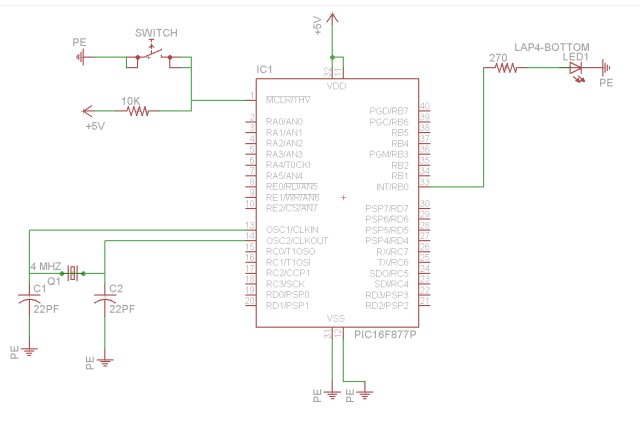
sorry, i don't have a schematic made up. XT is 4mgh, config set to HS. The caps going to ground are 22pf(datasheet says 15 but closes i have is 18)

Here's the code, i used mikroc, also i did not personally author the code

void main()
{
- TRISB = 0xFE; // set direction of RBO to output
//0xFE = 11111110
do // To set infinite loop
{
PORTB.F0 = 1; // Set RB0 to high
Delay_ms(500); // 500 mili seconds delay
PORTB.F0 = 0; // Set RB0 to low
Delay_ms(500); // 500 mili seconds delay
}while(1); // To set infinite loop
}

It was working for several minutes, then just stopped when I wasn't looking. Any ideas?
 

Attachments

spinnaker

Joined Oct 29, 2009
7,830
1. Post a schematic. Sorry but there are no excuses. If you expect help then you need to do some work too. A very easy schematic software is Express PCB. You will be up and running in minutes. Post the schematic in png format.

2. Post your code with the code tags surrounding it. You have a small program but it still makes it easier to read.

3. Start your sentences with capitals. Again easier to read.

What happens if you continue looking does it work? :)


What happens if you put the program into debug mode? Can you continue to step / debug through the loop?


Does the pic16f877a have an internal clock? If so try using it. Chanes are you just have a bad connection to your xtal.
 

ErnieM

Joined Apr 24, 2011
8,415
mikroc likes to hide the configuration settings in another window (I don't use it enough to tell you where those are) so they may be set incorrectly.

Also, I believe the Delay_ms() routine needs to know how fat your PIC is running to be accurate. The help file should show you how to do that.
 
Last edited:

Thread Starter

tommer5k

Joined Jan 10, 2013
7
1. Here's the schematic.

2.
Rich (BB code):
void main()
{
- TRISB = 0xFE; // set direction of RBO to output
//0xFE = 11111110
do // To set infinite loop
{
PORTB.F0 = 1; // Set RB0 to high
Delay_ms(500); // 500 mili seconds delay
PORTB.F0 = 0; // Set RB0 to low
Delay_ms(500); // 500 mili seconds delay
}while(1); // To set infinite loop
}
3. no comment.

Supply is coming from the Pickit2, i did double check with a meter and I'm getting an expected 5v. I don't know how to use the debugger tool, in MikroC project settings I have it disabled(easily enabled I believe though). I do have it configured as a 4MHZ crystal.

Also, I previously had a 0.1uf cap butted up against the vdd and vss pins but took that out.


Thread Starter

tommer5k

Joined Jan 10, 2013
7
Also, although I'm not saying it can't be the breadboard, I did a full continuity test yesterday with no dead spots.
 

spinnaker

Joined Oct 29, 2009
7,830
The purpose of the code tag is to keep your formatting. Your code is simple enough so it is not really needed now but if you post more complicated code in the future you should post formatted code only.

That decoupling cap has a purpose. It should be replaced but placed close to the chip as possible. See the sticky in General Electronics for details.

You are going to have to learn to use the debugger. It is another troubleshooting tool. You won't get very far if you don't use all the tools at your disposal.

I do not think there there many mikro C users around here. Most use the Microchip line of compilers in MPLab


And you still did not answer my question: Does your pic have an internal osc and have you tried it?
 

ErnieM

Joined Apr 24, 2011
8,415
What is the - in this line:?
- TRISB = 0xFE; // set direction of RBO to output

It seems to work but I don't know what the "-" does.

Put that cap back in, in fact put two in, one each at the pair of power pins.
 

Thread Starter

tommer5k

Joined Jan 10, 2013
7
Yeah, it was the "-". I hadn't noticed it before, the way MikroC is set up made it easy for me to miss(lots of colors and busy screen).

I think I'm going to switch over to MPLab. Works now. Must have been Schrodingers cat while i wasn't looking.
 

spinnaker

Joined Oct 29, 2009
7,830
That was the whole problem? The "-"??? You must have leaned on the keyboard. :)

Do learn to use the debugger when you switch to mplab.
 
Top