PCB Design - What's wrong here?

Thread Starter

james211

Joined May 29, 2012
291
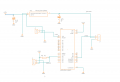
I’m a newbie and I’m probably over complicating this, but I’m trying to do this PCB to learn (also a functional part for me), and clearly I’ve failed some where. I know this schematic isn’t great, but I’m hoping to figure out why this LDO voltage regulator is shorting out.

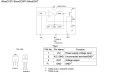
LDO - https://www.mouser.com/ProductDetail/755-BAJ2CC0FP-E2
- Data Sheet: https://www.onsemi.com/pdf/datasheet/ncp1117-d.pdf
The temp sensor is a 18b20

I appreciate your advice, but also appreciate a guided answer so I know what I have done wrong.

Thank you!
Screenshot 2024-07-23 at 9.50.09 AM.png
 

WBahn

Joined Mar 31, 2012
32,703
What do you mean by "shorting out"? The only thing your regulator output is going to is a pin on a connector?

What is the voltage that you are measuring?

Your text annotations indicate that you are expecting this to be 12 V (implied by the "12V-FAN" annotation). But if your input voltage is 12 V, that's not going to happen. You have to allow for the roughly 1 V dropout voltage.

I'm not familiar with the Arduino, but you appear to have inputs (such as reset) that are unconnected. This is generally a very bad thing. Unless an input specifically says that it can be left floating, always connect it to a firm and valid logic level.
 

Thread Starter

james211

Joined May 29, 2012
291
Well, its responding as though its shorting, its getting hot to the point of smoking. Input voltage is 12v, output voltage is proper, it's coming in just under 11v. I'm not concerned with the low voltage side, it's the higher voltage that could fry the fan. This little fan controller will be powered by a battery that puts out just over 17v at full charge, and on the low end about 11.9v.
 

WBahn

Joined Mar 31, 2012
32,703
Well, its responding as though its shorting, its getting hot to the point of smoking. Input voltage is 12v, output voltage is proper, it's coming in just under 11v. I'm not concerned with the low voltage side, it's the higher voltage that could fry the fan. This little fan controller will be powered by a battery that puts out just over 17v at full charge, and on the low end about 11.9v.
If the output voltage is just under 11 V, then it definitely isn't shorting out (you would see a very low voltage at the output if that were the case).

What is getting hot to the point of smoking? The regulator IC? Even with nothing connected to the J3 jack? If that's the case, then something on the board is wrong (or the regulator is bad, but that is unlikely if it is holding the output at 11 V). Perhaps C2 is leaking excessively?

If it's cool when nothing is connected to J3, but gets hot when the fan is connected, then it might just be that the fan represents too much of a load. How much current does the fan draw? Is the regulator properly heat sunk for that current?
 

Thread Starter

james211

Joined May 29, 2012
291
The fan isn't even connected, I wanted to verify the voltage before connecting the fan. Within less than a minute of connecting it, the IC heats up, and fast! The solder pads start to loosen.

All the parts are from Mouser, so they aren't cheap parts.
 

samunal

Joined Jul 3, 2024
26
Can you tell me how many amperes your 12v fan is taking, this regualtor can handle a max of 800mA and I think that is more than enough for a CPU fan. Although you should supply more than 12v at input, atleast 13volt. Which covers the drop-out of regulator.
1) Use a multimeter and check the total current going in
2) Check the current of FAN
3) Check the current of other circuit wirh arduino
If you made the PCB then there may be some short, if there is any short it is hard to identify. If it is a design mistake check it in free DFM tool online one here:https://dfm.jlcpcb.com/
4) Lower down the values of input capacitors if you are supplying the power from a constant source greater than 12v.

FAN will approximately took less than 200mA and Arduino will take 100-200mA ATMAX.
Your schema is correct.
 

WBahn

Joined Mar 31, 2012
32,703
The fan isn't even connected, I wanted to verify the voltage before connecting the fan. Within less than a minute of connecting it, the IC heats up, and fast! The solder pads start to loosen.

All the parts are from Mouser, so they aren't cheap parts.
Again, WHICH IC is the one that is heating up? The regulator, or the Arduino? I'm going to assume you are talking about the regulator IC, but you really should avoid requiring readers to make assumptions or practice their mind-reading skills (which are generally pretty poor).

With power off, measure the resistance between the regulator output and ground. Assuming that the regulator's output stage looks like a high resistance under these conditions (which may not be a good assumption), you should see a pretty high reading. If it's not, then remove the regulator and C2 and measure it -- you should read an open circuit. If you don't, you have a board problem. If you do, measure the resistance of C2 (observing polarity). If it's low, us a new cap. If it's high, you might have damaged the regulator IC and need to use a new one. If so, install it onto the board without the output can and see if it heats up. If not, then install the output cap.

In general, when populating a PCB (especially a new design), you should populate it in small stages and check for proper behavior incrementally.

Do you have another unpopulated board available?
 

Thread Starter

james211

Joined May 29, 2012
291
Its the regulator IC.
Okay, I have more boards, and more parts.

The board was ordered through JCB, I didn't make the PCB myself.
 

Thread Starter

james211

Joined May 29, 2012
291
reviewing the data sheet a bit closer, I think the library I imported into fusion had the wrong pinout. The pinout I downloaded has the tab and pin2 connected, the actual data sheet has the fin(tab) as ground, pin 1 as an input and pin 3 as output. I'm going to see if I can find the proper IC.

Screenshot 2024-07-23 at 11.58.29 AM.png
 

MisterBill2

Joined Jan 23, 2018
27,164
I do not see the 0.1 mfd capacitors directly between the input and supply negative, nor between the output terminal and the supply negative. Those are not just hints, they are rather important suggestions. The regulator ICs WILL OSCILLATE, AND THAT WILL PRODUCE VERY STRANGE RESULTS. So your fix might be that simple. And the two caps need to be close to the device, 1/2 inch away at most.
 

samunal

Joined Jul 3, 2024
26
It is a very simple circuit check you connections and the test the voltage/currents. There might be something wrongly connected in actual circuit or maybe a damaged component is there.
 

MisterBill2

Joined Jan 23, 2018
27,164
Certainly wrong connections will result in wrong function, BUT DO NOT leave out those 0.1 mFD caps!! The regulator is able to oscillate at several megahertz and that can produce very strange results. That is a personal experience from early in my career.
 
Top