Paradigm PDR10/v.4 subwoofer repair

Thread Starter

MrChips

Joined Oct 2, 2009
34,628
I am in the process of reverse engineering a Paradigm PDR10/v.4 subwoofer. There is no Service Manual or circuit schematics to be found.
One of the low voltage pass transistors (Q2, 2SB647) is open. Also the power transformer is shorting. I have no idea what is the output voltage of the transformer. I am guessing the supply rails are about ±60 VDC.

I will post my efforts here.
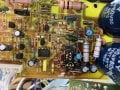

Paradigm PDR10 thru the board.jpg
 

Thread Starter

MrChips

Joined Oct 2, 2009
34,628
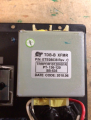
The transformer has one secondary winding with a centre tap.
Here is the label on the transformer.

1739832554333.png


I use an electronic circuit breaker in situations like this when the fuse is blown.
For testing, I am using a Hammond transformer 167N70, 70 VAC / 4 A with centre tap.
I put a variac transformer ahead of it so that I can adjust the output voltage until I decide what voltage to use.
 

Thread Starter

MrChips

Joined Oct 2, 2009
34,628
Look for capacitors shortly after the secondary and read the voltage.
The two reservoir capacitors on the positive and negative supply rails are 6800 μF / 80 V.
Hence I am testing no higher than ±60 VDC.

I know that one power supply transistor is blown. I can just replace the transistor and transformer and hope for the best.
But since I have this unit in front of me, I figured I may as well draw up the circuit schematics. It might be helpful to someone else.
 

Thread Starter

MrChips

Joined Oct 2, 2009
34,628
Your doing it right I guess. The transformer was shorted on the primary or one of the secondaries?
This is a high current transformer. Hence the DC resistance on the secondaries are very low. It is difficult to determine if the short is in the secondaries. I disconnected the secondaries from the circuit and it still trips the electronic breaker.

I have already substituted with another transformer and testing the circuit with live voltages. The output to the speaker is at the positive rail (speaker disconnected).

Just working on the schematics now.
 

Thread Starter

MrChips

Joined Oct 2, 2009
34,628
How to reverse engineer a printed circuit board (PCB)

The first thing I do is take clear, high resolution photographs of both sides of the board.

1) Take photos of the component side (top) at different angles so that you can possibly read all the component circuit designations. Sometimes it is easier to examine photos if you have limited access to the board. Also, while viewing on a tablet or computer, you can zoom in for a clearer view.

2) Take photos of the solder side of the board (bottom). The angle of the lighting is critical. Try different lighting angles in order to maximize the contrast of the PCB traces against the laminate. Then I print copies of the photo with the image flipped to show the traces as seen from the top side looking through the board.

3) This one is important. Take a photo from the component side with illumination from behind. In this manner, you can see the PCB connections without having to flip over the board. See the image in post #1, for example. Of course, this does not work with multi-layered boards.

The next step is to enter the schematic on a computer. For this I use Autodesk Eagle PCB CAD.
I enter all components, including jumpers, in their positions as they appear on the PCB. The position does not have to be exact. The physical dimensions, transistor and IC package and pinouts do not have to match unless you were going to create the PCB itself.

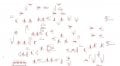
PCB Reverse Engineering - Step 1

Here is the first draft of the Paradigm subwoofer amplifier boad.

Paradigm PDR10_1.jpg


The next step is to make the electrical connections to the components as you see them on the board and photos.
I will post the results in my next post.
 

Thread Starter

MrChips

Joined Oct 2, 2009
34,628
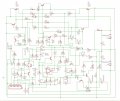
PCB Reverse Engineering - Step 2

Here is the circuit with connections.

Paradigm PDR10_2.jpg

Now that the hard work is done, the fun begins.

The next step is to rearrange the circuit diagram into something recognizable. In this step, I will be removing any jumpers except where they will come in handy for probing.
 

Thread Starter

MrChips

Joined Oct 2, 2009
34,628
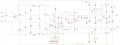
PCB Reverse Engineering - Step 3

Here is the preliminary circuit schematics, pending correction to errors.
Now that we have a schematic, we can run it on a simulator and check DC voltages and AC performance.
That will come in my next update. But first, I need to go get some real transistors.

Edit: This circuit diagram is the current revision and will be updated when errors have been found. The diagram in post #9 will remain without corrections applied.

Paradigm PDR10_3.jpg
 

Thread Starter

MrChips

Joined Oct 2, 2009
34,628
Update on the Paradigm PDR10/v.4 repair.
I replaced Q2 and the circuit is now operational. I now will experiment with the proper transformer voltage and try to find a replacement.

To finish off this repair, I will run a simulation and post the expected DC operating voltages.
In the process, I may have to update the schematics if I encounter any errors.

Edit: I don't quite see how the TL071 op amp functions in the circuit. Maybe when I do the simulation it will come to light.
 
Top