Olympic rapid fire training aid

Thread Starter

MarkAB

Joined Feb 27, 2016
80
Does it make a melodious sound or more raspy; wild guess that it might be an electromechanical buzzer, electromagnet & points, maybe an adjusting screw on back ? Still need to know current draw. Try connecting a 10 ohm R in series across 6V. Measure V across R. Did sound drop off some. ? Try adding more resistance
to see if sound will drop to an acceptable level.
Its sound is just an annoying beeeep, no screw to adjust.
Connected 10 ohm resistor and 0.02v drop but still sounds the same.
Connected 100 ohm resistor and now the sound is lower and acceptable.
:)
 

Thread Starter

MarkAB

Joined Feb 27, 2016
80
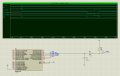
With a mcu, here is how simple it can get: a 8dip PIC12F675, two resistors, one capacitor, plus a switch, and some leds + buzzers.

For simulation purposes, I shrunk everything so that 10 milli-seconds in simulation = 1 second.

Timing sequence is as follows, after the switch is pressed (goes low):

1) buzzer (BUZ1 + BUZ2) sounds briefly: it goes on for a second / 10 ms - active high;
2) red led goes on for 60 seconds / 600ms - active low;
3) buzzer (BUZ1 + BUZ2) sounds briefly: it goes on for a second / 10ms - active high;
4) start a 7 second / 70ms delay;
5) red led goes off and green led comes on;
6) delay 5 seconds / 40ms;
7) all led / buzzer goes off
8) back to 1.

The code follows that logic:
Code:
        //sound buzzer briefly
        BUZ_ON();                            //sound buzzer briefly
        tmr1_dly1s(1);                        //ls delay
        BUZ_OFF();                            //buzzer off

        //red led on, 1 minute delay
        LED_ON(LED_RED);                    //turn on red led
        tmr1_dly1s(60);                        //delay another 60 seconds
    
        //sound buzzer briefly
        BUZ_ON();                            //sound buzzer briefly
        tmr1_dly1s(1);                        //ls delay
        BUZ_OFF();                            //buzzer off

        //start with a 7-second delay
        tmr1_dly1s(7);
    
        //turn off red led
        LED_OFF(LED_RED);
        //and turn on green led
        LED_ON(LED_GREEN);
    
        //end with a 4 second delay
        tmr1_dly1s(4);
    
        //turn off all leds and buzzer
        LED_OFF(LED_RED | LED_GREEN | LED_ORANGE);
        BUZ_OFF();
You can easily port it to other mcus, like an arduino. You can interlace the signaling, like what I did with the red / green leds.

The orange LED is not used.
Ok too much for me as a beginner but interesting o_O
So this is like an Arduino yes?

I do this setup, program the chip and presto the chip keeps working without the need to ever re-program it yes?

What software did you use to program this "8dip PIC12F675" chip and do i need a driver for it?

Sorry but this is all new for me:confused:
 

dannyf

Joined Sep 13, 2015
2,197
Ported the code over to Arduino - basically copy-and-paste with minor changes.

Running on an Arduino Mini.

The output is the same as with the 12F675.

Note: I added the LED_ORANGE line - the only change from the PIC version.
 

Attachments

Thread Starter

MarkAB

Joined Feb 27, 2016
80
Ported the code over to Arduino - basically copy-and-paste with minor changes.

Running on an Arduino Mini.

The output is the same as with the 12F675.

Note: I added the LED_ORANGE line - the only change from the PIC version.
Thanks but I liked your previous Idea plus 12F675 would be a cheaper option if I was to produce a couple more for my fellow shooters.

What software did you use to program the 12F675 chip and do i need a driver for it?
 

AnalogKid

Joined Aug 1, 2013
12,137
Coming back to this thread, thinking about just the the LEDS...
Once a cycle starts is there ever a time when both LEDs are off, or is it red for 67 seconds, green for 4 seconds, end?
Also, should the circuit automatically recycle, or run once and then stop, waiting for another button push?

ak
 

Thread Starter

MarkAB

Joined Feb 27, 2016
80
Coming back to this thread, thinking about just the the LEDS...
Once a cycle starts is there ever a time when both LEDs are off, or is it red for 67 seconds, green for 4 seconds, end?
Also, should the circuit automatically recycle, or run once and then stop, waiting for another button push?

ak
From red to green and back to red and at no time are are led lights to be all off. It is either red or green.
I would also like it to automatically recycle with the option to adjust times at least the 60 sec red.
 

Bernard

Joined Aug 7, 2008
5,784
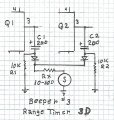
Sounder is medium high Z so we can cap. couple outputs of Q1 & Q2 to sounder. Sound will be loudest at start and trail off over a fraction of a sec. Rx may need to be re adjusted for desired level.
If you wish a fixed sound duration we can go back to Beeper # 2 with some miner changes.Range Timer 3D 00000.jpg
 

Bernard

Joined Aug 7, 2008
5,784
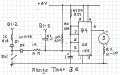
If you would rather a flat top beep then this might do. First beep is triggered by the SW, the second at the end of 60 sec. If SW is held down longer than 1/2 sec, beep will stay on longer; or go back & re connect old C1 like post # 72, but parallel old C1 with a 100k R. We then have 2-C1's.Range Timer 3E 00000.jpg
 

Thread Starter

MarkAB

Joined Feb 27, 2016
80
Sounder is medium high Z so we can cap. couple outputs of Q1 & Q2 to sounder. Sound will be loudest at start and trail off over a fraction of a sec. Rx may need to be re adjusted for desired level.
If you wish a fixed sound duration we can go back to Beeper # 2 with some miner changes.View attachment 108254
tried this one and its great but could we make this beep a little longer maybe with a different capacitor?
 

Thread Starter

MarkAB

Joined Feb 27, 2016
80
OK put some 330 caps and now works great.

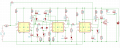
I have also done some alterations to clean up some of the cable mess, in an effort to make the restart work again as this is still giving me some problems. I have changed some of the resistors as I had some with two or three in series to make the desired ohm's.

I have put three red led in parallel and changed the resistor value from 115 ohms to 100 ohms.
I have put three green led in parallel and changed the resistor value from 150 ohms to 100 ohms.
I have changed both the yellow led resistors values from 300 ohm to 470 ohm making them dimmer so I can also display them in the background.

With all this I still have problems making the reset work so I have sent for a universal board to start soldering some parts.

do you think these resistor value changes could affect the reset Bernard?
 

Bernard

Joined Aug 7, 2008
5,784
Most R values shown as 10k could be 10k to 100k.
The yellow LED.s can be retained but are not needed, were helpful in the early stages of development
It would be better for R & G LED's to have individual current limiting Rs. R5 on schematic shown as 10K;
3 X 120 might be better & if sticking to 3 LEDs in parallel, against AAC suggestion, 40 ohms might be closer.
Do not forget to tie all pin 4s & Q4 collector together.
 

Thread Starter

MarkAB

Joined Feb 27, 2016
80
against AAC suggestion, 40 ohms might be closer.
Do not forget to tie all pin 4s & Q4 collector together.
Thanks for pointing that out, I have amended it and will be putting individual 100 Ohm resistors to each red/green LEDs when I mount them on the outer case.
Keeping the yellow LEDs as I like to know at what stage the timings are so they are great.

Sorry but what do you mean by AAC suggestion , 40 ohms might be closer???

Sorry picture was cut and did not show pin 4 connections but they are there thanks.
New pics att:
View attachment 108400 View attachment 108401
 

Attachments

Bernard

Joined Aug 7, 2008
5,784
Where did 100 ohm for LED Rs come from, new measured LED Vf measurements ?
I would stick with 120 ohms Red, 150 ohms for G until better information is available.
Red LED, 3 in parallel, need to drop about 2.4 V @ 60 mA = 40 ohm.
As to paralleling LEDs, millions are in use , is it good practice ? Some say yes, some say no.
I had a 18 LED costume project that could have used all in parallel, Vfs all matched to 50 mV, & I chose 18 Rs.
 

Thread Starter

MarkAB

Joined Feb 27, 2016
80
Where did 100 ohm for LED Rs come from, new measured LED Vf measurements ?
I would stick with 120 ohms Red, 150 ohms for G until better information is available.
Red LED, 3 in parallel, need to drop about 2.4 V @ 60 mA = 40 ohm.
As to paralleling LEDs, millions are in use , is it good practice ? Some say yes, some say no.
I had a 18 LED costume project that could have used all in parallel, Vfs all matched to 50 mV, & I chose 18 Rs.
100 ohm are the resistors I had sorry will get some new ones:oops:
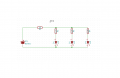
led.png
Is this what you mean for the led's?
Green would be the same but with 150ohms
Obviously the supply comes from the board ends D3,D4 for the red's and not the Battery as in picture ;)
Thanks
 

Bernard

Joined Aug 7, 2008
5,784
On drawing, if using 3 Rs, R1 = 0, not 40; if using R1 @ 40 ohms then Rs 2,3 & 4 all = 0 ohms.
Please forget that I ever mentioned 40 ohms, it's just mudding up the water.
100 ohms may be ok, I do not have any measurements or specs on the LEDs, just guesswork.
For me it's no big deal to measure Vf of a LED, grab a 1K pot, connect in series with LED, whole thing across
12 V supply, crank pot down to 20 ma, measure LED V.
 

Bernard

Joined Aug 7, 2008
5,784
You are right, 12 V can fry a LED, even when set up to measure LED Vf. If we should mistakenly connect pot
to O ohms to start rather than max R, then Poof, LED & or mA meter. That is why I almost always add some resistance in series with a pot, smallest R that will prevent damage by itself.
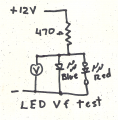
Simple setup to measure LED Vf, generally used to sort Vf of many LEDs into piles of same V, then if used in series strings, the strings can be made up of low V, med. V & high V so that all strings are = V. The blue LED is used for protection of reversed DUT, device under test. When testing white LEDs, for blue LED might use a white & red LED in series to give about 5 V, which should be safe for a reversed LED. The 470 ohm R could be made from a combination
of series & parallel Rs to give desired test current.

LED Tester 00000.png
 
Last edited:

AnalogKid

Joined Aug 1, 2013
12,137
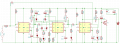
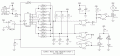
First pass at an all-digital timer based on the parameters in post #1. The giant wad of diodes looks messy, but it is much easier than decoding 60, 67, and 71 with gates. The 1 Hz integrated oscillator is $1.70 at Digi-Key, 0.01% timing accuracy. No start button; turn-on is a power-on reset and start. SW1 is for mid-cycle reset/restart.

Edit: Y1 needs a 3.3 V regulator and output level shifter. Even with those additions, still fewer parts than the 555 circuit.

I'm puttering with another version using 4017's that is adjustable.

ak
Olympic-2-c.gif
 

Attachments

Last edited:
Top