Need help with this circuit board!

Thread Starter

jaaykub

Joined Apr 11, 2023
14
I don't see how the switch connected in place of C202 can effect the speed. It just breaks the AC feed to the bridge rectifier. (It is just a power on / off switch) Can you confirm that there is continuity between the pads 5 and 6 even with the on board switch removed ? Can you confirm that there ar no connections to pads 1 and 3. (I can't see any tacks going to those pads in the pictures.) What happend if the orange wires are connected to pads 4 and 5 ? On the pad on the right hand end of the upper of the two red lines there looks like a solder spash shorting to the pad above it, Check if this is shorting the pads.

Les.
Les! Thank you once again for your help! and everyone else that chimed in of course:D
I had the wires on the switch backwards coming off the board so its playing properly now!
Amazing that you took the time out to help trace the paths!!! Amazing
 

LesJones

Joined Jan 8, 2017
4,509
Re post #19 It sounds like you were testing between pins on the switch rather than pads on the board. If the switch was not connected to the board it can't change any resistance measurements on the board. I think your definition of open and closed is different to mine. As I think both switches are DPDT (Double pole double throw.) switches you can't say the switch is open or closed, You can only say that a connection between a pair of pins is open or closed. I suspect that on alternate pressed the button is at a higher or lower level. If this is the case which of these two positions are you calling "closed" ?
Can you do some testing to confirm my assumption that both switces are DPDT switches with a normal terminal layout ? On the switch that you removed from the board measure the resistance between the pins that were connected to these pad numbers on the board. Between 1 and 2 If you get a low resistance reading (Continuity) You should get in infinite (Meter indicating over range) reading between 2 and 3, Check that the readings between 4 and 5 are the same as between 1 and 2 and the reading between 5 and 6 are the same as between 2 and 3. Press the swich button once . Repeat the above tests, All the reading should be opposite to the readings before the button was pressed, Check that in neither position of the switch that there is no continuity between 1, 2, 3 and 4,5,6, (This will be 9 tests.)
Do the same tests on the switch shown in picture 2 post#10
Did you check thepossible short between the pads I mentioned in post #20 ?
Which time zone are you in as you give no information in you profile of where you are located ?

EDIT. I have just realised that I missed your post #21 as I had not noticed the thread had moved on to a second page So the above test are not relavent.

Les.
 
Last edited:

Thread Starter

jaaykub

Joined Apr 11, 2023
14
Re post #19 It sounds like you were testing between pins on the switch rather than pads on the board. If the switch was not connected to the board it can't change any resistance measurements on the board. I think your definition of open and closed is different to mine. As I think both switches are DPDT (Double pole double throw.) switches you can't say the switch is open or closed, You can only say that a connection between a pair of pins is open or closed. I suspect that on alternate pressed the button is at a higher or lower level. If this is the case which of these two positions are you calling "closed" ?
Can you do some testing to confirm my assumption that both switces are DPDT switches with a normal terminal layout ? On the switch that you removed from the board measure the resistance between the pins that were connected to these pad numbers on the board. Between 1 and 2 If you get a low resistance reading (Continuity) You should get in infinite (Meter indicating over range) reading between 2 and 3, Check that the readings between 4 and 5 are the same as between 1 and 2 and the reading between 5 and 6 are the same as between 2 and 3. Press the swich button once . Repeat the above tests, All the reading should be opposite to the readings before the button was pressed, Check that in neither position of the switch that there is no continuity between 1, 2, 3 and 4,5,6, (This will be 9 tests.)
Do the same tests on the switch shown in picture 2 post#10
Did you check thepossible short between the pads I mentioned in post #20 ?
Which time zone are you in as you give no information in you profile of where you are located ?

EDIT. I have just realised that I missed your post #21 as I had not noticed the thread had moved on to a second page So the above test are not relavent.

Les.
Hi Les, I will update my profile now. I am located in Ontario, Canada (Eastern Time.)
Sorry for my bad terminology and some lack of understanding! I need to do more research and studying, I'm trying to learn haha!
But as for in post 19, I tested the switch off the board to make sure it was functioning. I believe I also said that i tested pads 4 and 5 on the board itself without the switch installed, and the board showed no continuity between those pads.
I have got it working as intended, however it is not the way it was shipped from the factory and realistically (pun intended) i'd like to be as it was brand new.
I will however do these tests just to get a better understanding of the DPDT switch because you are correct it does not function as my brain thought it did, i should have definitely checked first.

Jacob.
 

LesJones

Joined Jan 8, 2017
4,509
One thing that still puzzles me is the lack of continuity between pads 5 and 6. If you look at the picture in post #13 you will see that the track from pad 5 comes down to the left hand end of jumper J204 and the track from pad 6 comes down to the right hand end of jumper J204. So all those points shoud be connected together. A can't see any breaks in those tracks. If the solder splash is shorting the two pads together it could explain why when the external switch was connected that it switched between 33 RPM and stopped. If there was a short it was between the DC positive rail and the switch.
I have just finished typing this post at 18:04 local UK time so I think that will be 13:04 your time.

Les
 

MrChips

Joined Oct 2, 2009
34,886
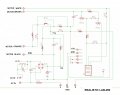
Here is the Realistic LAB-290 schematic reversed engineered as far as I can figure out. There is a brown component next to C202 at the top-left corner of the board. I don't know what it is. I labeled it as L1.

The only components on your board are D201, L1, C201, VR201, VR202, R205, and all jumpers.

Realistic LAB-290 schematic.jpg
 

MrChips

Joined Oct 2, 2009
34,886
btw, the numbers on the switch labeled JP1 do not match up with the numbering that LesJones used.

In my diagram, bridge JP1, 4 and 6 to change speed (pins 4 and 5 in LesJones diagram) as you have already found out.
 

LesJones

Joined Jan 8, 2017
4,509
Hi MrChips, Your schematic agrees with the part that I traced out. I only traced out the cpmponents that were fitted. I think the board was designed to be fitted in a number of different products and just fitted with the required components. I am not convinced that this was the original boarf fitted to the product as with the onboard switch fitted as there was no spare pad to connect the external switch to without soldering it to the underside of the board. I thing a board populated for this product would not have the onboard switch fitted.

Les.
 
Top