Need help identifying componets

Thread Starter

xtal_01

Joined May 1, 2016
227
A few weeks ago, I was given a board and asked if I could "fix it".

Since then, I have drawn out the circuit (along with another board member) and realized even it I could find the problem, I would have no idea how to calibrate it ... I don't even know what the board does or what it comes out of.

OK so I told the person who sent it to me ... who actually got it off another person that I either need a lot more information or I can't do it.

I got an e-mail today saying they have a tech who will calibrate it ... just replace all the parts I can test or that I think may need replacing.

So, my plan is to replace all the capacitors, IC's (lucky they are all on sockets), transistor, voltage regulator, and diodes. I will check each of the resistors just to see if any have an issue. I think that is the best I can do with this.

I need help identifying parts.

Can anyone check me on the parts I have identified already and try to help me guess at the others?

I think I have C1 - C6 correct (but would like someone to check me).

I am not sure what type of cap C7 is.

C8 seems to be obsolete. I found two on ebay but I don't think I want to put 30 year old caps on the board. Maybe I picked a few possible replacements.

The zener only has 56A on it. How can I test it to see what I need to replace it? De-solder and ???

The other diode just looks like something generic. I can see the 1N but the other numbers are underneath and smudged.

My list has the manufacturer part number and the Digikey number.

Any advice would be greatly appreciated !!!!!!!!!!!!
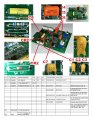
Part_ID_pictures_NUMBERS.jpgboard-Model_small.jpg
 

MrChips

Joined Oct 2, 2009
34,628
Before you do that I would suggest that you ask the original client what the board is supposed to do.
With more information, we may be able to test the functionality of the board.

I hope that they are remunerating you well to do this.
 

Tonyr1084

Joined Sep 24, 2015
9,744
So, my plan is to replace all the capacitors, IC's (lucky they are all on sockets), transistor, voltage regulator, and diodes. I will check each of the resistors just to see if any have an issue. I think that is the best I can do with this.
What if the problem isn't with the components. What if it's a broken trace. What if it's a broken trace on an inside layer. What if it's a fractured connection at a through-hole junction? Replacing everything on the board could fix it. But what does it do? How do you know if it works? It COULD even be a bad solder joint right now. Change everything for no good reason isn't a good plan.
 

SamR

Joined Mar 19, 2019
5,470
None of the components appear damaged and are likely not. Simple enough, IF you feel you must, remove them from the board and test them. I'd be looking at solder joints first and touch up any that look "not glossy" or cracked. How about a close up shot from a few different angles of the complete board. Hard to tell from the pictures but I see a few questionable solder joints but hard to tell from the pics.
 

Thread Starter

xtal_01

Joined May 1, 2016
227
What if the problem isn't with the components. What if it's a broken trace. What if it's a broken trace on an inside layer. What if it's a fractured connection at a through-hole junction? Replacing everything on the board could fix it. But what does it do? How do you know if it works? It COULD even be a bad solder joint right now. Change everything for no good reason isn't a good plan.
When I made the drawing, I had to follow all the traces. By doing this, I kind of tested each trace. I would got from component to component to make sure I followed the trace ... and thus tested them. Sure, could be a bad joint but it has been working for about 30 (maybe 40) years. I am guessing a bad cap but I could well be wrong. Thanks!
 

MisterBill2

Joined Jan 23, 2018
27,164
Certainly Sam is right. A good magnifier and a good light and inspect all the solder connections. AND a resistance test of parts on a PCB can reveal a lot of failure modes. Resistors do not fail shorted and seldom fail open unless overheated or damaged. Capacitors may fail open or leaky. so their test is more complex.
 

Thread Starter

xtal_01

Joined May 1, 2016
227
None of the components appear damaged and are likely not. Simple enough, IF you feel you must, remove them from the board and test them. I'd be looking at solder joints first and touch up any that look "not glossy" or cracked. How about a close up shot from a few different angles of the complete board. Hard to tell from the pictures but I see a few questionable solder joints but hard to tell from the pics.
This has been working from 30 or 40 years .... just stopped. It is in a lab so good environment. My guess is a bad cap but I could be wrong.

When I first put this up a few weeks ago, I put up a lot of pictures ... the can be found on this post:

https://forum.allaboutcircuits.com/threads/board-repair-help-are-all-555-times-the-same.204707/

I also checked most of the joints and traces when I made the drawing ... used my meter to follow the traces.

Thanks!
 

Tonyr1084

Joined Sep 24, 2015
9,744
ould be a bad joint but it has been working for about 30 (maybe 40) years. I am guessing a bad cap but I could well be wrong.
Elderly neighbor had a sprinkler controller, had it from around 1964 to 2013 before it stopped working. Some local kid had been squeezing her for money. When her controller quit he wanted to replace it for her. Told her a new controller could cost $300. You can get the same level of controller she had for around $65. Had to get her family involved in protecting her from this sheister. Meanwhile I took her controller into the work shop. Upon examination it was crystal clear she had fractured solder joints on the main control switch. Once those joints were reflowed it's working to this day.

Sometimes you can't see fractured solder but electrons don't want to pass across a small break. No, not suggesting you reflow all the joints, but as SamR suggests, watch for bad solder joints. I got a TV with bad horizontal. Reflowed all the joints on the horizontal control circuit and the TV worked fine after that.
 

Tonyr1084

Joined Sep 24, 2015
9,744
When I made the drawing, I had to follow all the traces. By doing this, I kind of tested each trace. I would got from component to component to make sure I followed the trace ... and thus tested them.
Testing components when in circuit does not properly test the components themselves. You might have two resistors that are parallel to each other. You might read 100Ω whereas both resistors (in parallel) of 100Ω each, in parallel they equal 50Ω. Testing in circuit you never know how other components can affect the reading. I would not trust in circuit testing unless I knew exactly what to expect.
 

Thread Starter

xtal_01

Joined May 1, 2016
227
Elderly neighbor had a sprinkler controller, had it from around 1964 to 2013 before it stopped working. Some local kid had been squeezing her for money. When her controller quit he wanted to replace it for her. Told her a new controller could cost $300. You can get the same level of controller she had for around $65. Had to get her family involved in protecting her from this sheister. Meanwhile I took her controller into the work shop. Upon examination it was crystal clear she had fractured solder joints on the main control switch. Once those joints were reflowed it's working to this day.

Sometimes you can't see fractured solder but electrons don't want to pass across a small break. No, not suggesting you reflow all the joints, but as SamR suggests, watch for bad solder joints. I got a TV with bad horizontal. Reflowed all the joints on the horizontal control circuit and the TV worked fine after that.
It is a very very small board ..... relfowing all the joints is something I have been thinking about. "Most" joints look good but there are one or two that I would have done over (I am a fanatic about everything I do ... just ask my wife ... that is why it has taken me 3 years to build a new workshop). I am a bit worried about the IC sockets as I can't see them.

I will take a good look. I was given a binocular microscope (being thrown out by a college) ... might be a good time to try it out.

Is reflowing a board a good idea?
 

MrChips

Joined Oct 2, 2009
34,628
Working for 30 or 40 years means nothing.

I had the same thing on a computer that developed a short across the power rail after working for decades. The DEC flipchip boards were mounted vertically in a card rack. The fault was excess solder hidden underneath a 25 cent logic IC. Over the years the solder had creeped to form a bridge across the power traces.

Locating a short across the power rail has got to be one of the most challenging tasks in the repair business. Why? Because you can have hundreds of components connected across the power rails along with decoupling capacitors.
 

MrChips

Joined Oct 2, 2009
34,628
Here is a start.

Don’t remove any component.
Apply +12 VDC and GND at the P5 input and check the voltages at the 7805 pins. Measure the current going to the board.

Next, apply both +12 VDC and -12 VDC and measure the voltages at the LM324 pins.

Measure the current on both +12 V and -12 V supplies.

Measure the voltages at all three pins of the three trimpots.
 

Thread Starter

xtal_01

Joined May 1, 2016
227
Here is a start.

Don’t remove any component.
Apply +12 VDC and GND at the P5 input and check the voltages at the 7805 pins. Measure the current going to the board.

Next, apply both +12 VDC and -12 VDC and measure the voltages at the LM324 pins.

Measure the current on both +12 V and -12 V supplies.

Measure the voltages at all three pins of the three trimpots.
I will try that first thing in the morning.

Thanks!
 

MisterBill2

Joined Jan 23, 2018
27,164
Re-flowing the solder joints is certainly a fast and easy "shotgun" approach that can solve problems, sometimes. It certainly has worked for me. OF COURSE you need to have the right soldering iron/pen, at the right temperature AND with a clean tip. You will also need a bit of solder, and pay close attention to what you are doing, because re-flowing a poor joint with a thin wire in a slightly-to-big hole can cause an open circuit.
If the tip is hot enough it should not take more than a couple or three seconds to do each connection. BUT if the iron tip is just barely hot enough the project can be a real ordeal.
 

Thread Starter

xtal_01

Joined May 1, 2016
227
Re-flowing the solder joints is certainly a fast and easy "shotgun" approach that can solve problems, sometimes. It certainly has worked for me. OF COURSE you need to have the right soldering iron/pen, at the right temperature AND with a clean tip. You will also need a bit of solder, and pay close attention to what you are doing, because re-flowing a poor joint with a thin wire in a slightly-to-big hole can cause an open circuit.
If the tip is hot enough it should not take more than a couple or three seconds to do each connection. BUT if the iron tip is just barely hot enough the project can be a real ordeal.
Funny story ... I had always used an relatively cheap Radio Shack iron .. built odd kits as a kid growing up. I am actually a machinist but got into building industrial control panels over the years so really no "electronics" ... starters, relays ... simple stuff. Then about 25 years ago, I got asked to wire 25 DPDT switches and 25 three wire LED's into two DB50 connectors and make it fit into a 1U rack mount. Two guys had tried .. both used wires ... and both failed. The job had been quoted and promised and the deadline was a few days away. I said I would give it a try. Used online software ... designed a PCB (think I used PDB123 ... sticks in my mind) ... UPS red the boards ... asked the vendor who gave me the job to throw in a good soldering iron. He gave me a Hako 937. I worked through the weekend and got the job done. First time I had made my own PCB (well except for using rub on traces and a kit in my mothers laundry sink when I was a teen). It worked! I got paid and got a soldering iron. Still have the same iron and use it all the time.
 

MisterBill2

Joined Jan 23, 2018
27,164
Funny story ... I had always used an relatively cheap Radio Shack iron .. built odd kits as a kid growing up. I am actually a machinist but got into building industrial control panels over the years so really no "electronics" ... starters, relays ... simple stuff. Then about 25 years ago, I got asked to wire 25 DPDT switches and 25 three wire LED's into two DB50 connectors and make it fit into a 1U rack mount. Two guys had tried .. both used wires ... and both failed. The job had been quoted and promised and the deadline was a few days away. I said I would give it a try. Used online software ... designed a PCB (think I used PDB123 ... sticks in my mind) ... UPS red the boards ... asked the vendor who gave me the job to throw in a good soldering iron. He gave me a Hako 937. I worked through the weekend and got the job done. First time I had made my own PCB (well except for using rub on traces and a kit in my mothers laundry sink when I was a teen). It worked! I got paid and got a soldering iron. Still have the same iron and use it all the time.
Interesting indeed!! I used those Radio Shack $4.95 irons until they became way too expensive for what they were. Certainly they are good for very fast reflow work, where the goal is to quickly remelt and possibly add just a bit of solder.
AND, I am impressed with the PCB story. Certainly there is a place for PCBs, but not everywhere. Wires are more common but they do not pack so very well.
 

Thread Starter

xtal_01

Joined May 1, 2016
227
OK ... so I started testing ...12 volts in ... regulator works (5.09) ... tried a bunch of traces, everything checks out.

So I started taking off parts.

I still can't identify the zener. It is marked 56A

I put it into my cheap component tester ... 7.9 volts

There is no 7.9 volt zener!

Looking over some old charts ... I see a 1N756 ... 8.2 volts

Any suggestions on this?

I don't have a variable supply, just a fixer 5 and 12 ... could I put a ??? resistor inline with the zener and check it?

Thanks!
 

sarahMCML

Joined May 11, 2019
695
OK ... so I started testing ...12 volts in ... regulator works (5.09) ... tried a bunch of traces, everything checks out.

So I started taking off parts.

I still can't identify the zener. It is marked 56A

I put it into my cheap component tester ... 7.9 volts

There is no 7.9 volt zener!

Looking over some old charts ... I see a 1N756 ... 8.2 volts

Any suggestions on this?

I don't have a variable supply, just a fixer 5 and 12 ... could I put a ??? resistor inline with the zener and check it?

Thanks!
The component tester probably doesn't put enough current through it to get it right up on its "knee". If you use your PSU and a suitable resistor to get 10 to 20mA through it you should measure its true value.
 
Top