Need assistance diagnosing malfunction in PCB design

Thread Starter

dpr95

Joined Nov 13, 2024
7
I designed a PCB layout incorporating several pre-built components, including:

  • 1x ESP32-WROOM-32D
  • 2x laser sensors (KY-008)
  • 1x JST connector for the lasers
  • 2x IR sensors (TCRT5000)
  • 1x current and voltage measurement sensor (INA3221)
  • 2x motor drivers (DRV8871)
  • 1x motor driver (TB6612FNG)
  • 1x stepper motor driver (A4988)
  • 1x 35V 100µF capacitor
  • 1x buck converter (27V to 5V)
  • 1x LED
  • 1x push button
  • 1x passive buzzer
  • 1x JST connector for power input, with additional JST connectors for motor and sensor I/O.
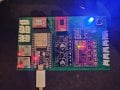
Since I’m new to PCB design, I created the layout in KiCad and tested it on a protoboard. To my surprise, it mostly worked with an 18V 1A supply. However, when I switched to a 24V 1A supply (as the circuit and motors were designed to handle), the circuit started pulsing on and off. I suspected an issue with my soldering or that a protection feature in the drivers was triggering.

After more then 50 hours working with the 18V supply, two motor drivers burned out (A4988 and TB6612FNG).

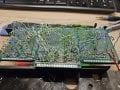
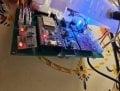
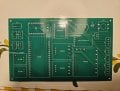
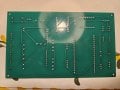
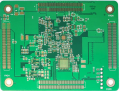
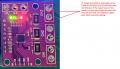
This led me to order the PCB, but after assembly, it performed worse than the protoboard. Nothing worked as expected, and during diagnostics, I found that removing both the A4988 and TB6612FNG drivers improved circuit stability. I also noticed that the LED on the INA3221 sensor was dimmer than on the protoboard. Additionally, the no-load currents on channels 1, 2, and 3 differ significantly, measuring 40mA, 40mA, and 80mA, respectively.

If anyone could help me understand what might be wrong with the circuit, I would greatly appreciate it!
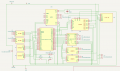
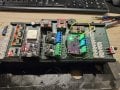
Captura de ecrã 2024-11-15 000628.png

20240729_034628.jpg

20240729_034606.jpg

20241115_001457.jpg

20241031_002001.jpg
 

Thread Starter

dpr95

Joined Nov 13, 2024
7
Good idea.
And what about the circuit itself, do you think is there something missing, or connected in a wrong way?
 

Thread Starter

dpr95

Joined Nov 13, 2024
7
If you don't know how to do ground pours in KiCAD just ask. I do it all the time.
I found some YouTube videos on the subject, and I’ll give them a try. However, before proceeding, I need to ensure that the circuit is well-designed and that nothing is causing issues.

I suspect there might be a problem with the high-voltage section of the system, as well as with the burning of both the stepper and motor drivers.
 

ronsimpson

Joined Oct 7, 2019
4,645
I don't understand your circuit well. I think grounds are not good and have noise which caused communication to break down.
There is probably large amount of current in the grounds of the (motor driver??).
My guess is that you have low current modules and high current module(s) and "ground bounce" is killing you.
Things to try.
On the PCB at each module add a 0.1uf cap from VCC to GND.
Use solder wick or thick wire and tie the GNDs together. Reduce the ground resistance.
 

Thread Starter

dpr95

Joined Nov 13, 2024
7
I don't understand your circuit well. I think grounds are not good and have noise which caused communication to break down.
There is probably large amount of current in the grounds of the (motor driver??).
My guess is that you have low current modules and high current module(s) and "ground bounce" is killing you.
Things to try.
On the PCB at each module add a 0.1uf cap from VCC to GND.
Use solder wick or thick wire and tie the GNDs together. Reduce the ground resistance.
Thank you so much for your time! I’ll give your advice a try.
 

panic mode

Joined Oct 10, 2011
4,864
when designing boards one need to consider relevant parameters such as voltage, current, decoupling, isolation, protection, heat dissipation, noise, mechanical support etc. also PCB is a canvas that can be used to mark things conveniently so that use is clear and convenient.

it all starts with schematics... i like to label all nets or at least power and I/O. i also like to add overcurrent and reverse polarity protection, LED for each power rail, decoupling capacitors near each power terminals. all footprints will have orientation marking. pin 1 is normally identified by square pad.

1732488652432.png

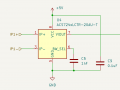
an example of decoupling capacitor at each IC (C9 is placed as close as possible to U4).
1732488812296.png

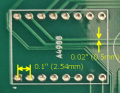
for example each component and module are carefully examined, traces for power rails are sized etc. for example those 4 pins are power.
1732487381699.png

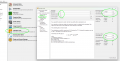
according to online info above unit is supposed to handle 2A and for that trace need to be sufficiently wide. KiCad ahs calculator for many things including trace width. note that cooling of inner traces is limited so for same current, they would need to be considerably wider than the outside traces. and it does not hurt to go larger.
1732487686090.png

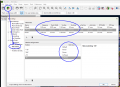
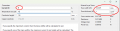
when doing board design, use Net Classes to create settings for each class of signal.
normally i leave Default for signals but create additional classes for power traces depending on requirements and calculations.
5VDC is usually pretty low current... drives etc can draw more. so set clearance, track width etc for each. then assign nets to each class.... perhaps something like this. then when you routing traces, KiCad will pick chosen trace size for you and keep track of clearances.

1732488198517.png
an example of traces of different with... note that traces for power are labeled while netnames for some of thinner ones are autogenerated.

1732488316473.png

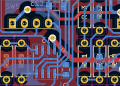
i see that you did use different trace size but still left the power tracks waaaay undersized.

1732489553710.png

your J12 is supplying power to several devices:
A4988 (2A)
2x DRV8871 (each may draw up to 3.6A)
5V regulator
so... without knowing what your circuit really draws, one may add them up which is some 9A.
you need to calculate width of that trace. it is quite a bit more than 0.5mm you have now. some 13x more...
even if you choose PCB with really thick copper like 4oz/ft^2, you still get 1.5mm trace or 3x wider than what you have currently.

1732490494092.png


1732490216410.png

example of square pad on pin1 and silkscreen label for each signal of each terminal block. i do the same for modules, usually both top and bottom - makes troubleshooting easier.
1732489098602.png
 

Thread Starter

dpr95

Joined Nov 13, 2024
7
when designing boards one need to consider relevant parameters such as voltage, current, decoupling, isolation, protection, heat dissipation, noise, mechanical support etc. also PCB is a canvas that can be used to mark things conveniently so that use is clear and convenient.

it all starts with schematics... i like to label all nets or at least power and I/O. i also like to add overcurrent and reverse polarity protection, LED for each power rail, decoupling capacitors near each power terminals. all footprints will have orientation marking. pin 1 is normally identified by square pad.

View attachment 336586

an example of decoupling capacitor at each IC (C9 is placed as close as possible to U4).
View attachment 336588

for example each component and module are carefully examined, traces for power rails are sized etc. for example those 4 pins are power.
View attachment 336578

according to online info above unit is supposed to handle 2A and for that trace need to be sufficiently wide. KiCad ahs calculator for many things including trace width. note that cooling of inner traces is limited so for same current, they would need to be considerably wider than the outside traces. and it does not hurt to go larger.
View attachment 336579

when doing board design, use Net Classes to create settings for each class of signal.
normally i leave Default for signals but create additional classes for power traces depending on requirements and calculations.
5VDC is usually pretty low current... drives etc can draw more. so set clearance, track width etc for each. then assign nets to each class.... perhaps something like this. then when you routing traces, KiCad will pick chosen trace size for you and keep track of clearances.

View attachment 336580
an example of traces of different with... note that traces for power are labeled while netnames for some of thinner ones are autogenerated.

View attachment 336582

i see that you did use different trace size but still left the power tracks waaaay undersized.

View attachment 336591

your J12 is supplying power to several devices:
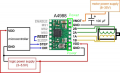
A4988 (2A)
2x DRV8871 (each may draw up to 3.6A)
5V regulator
so... without knowing what your circuit really draws, one may add them up which is some 9A.
you need to calculate width of that trace. it is quite a bit more than 0.5mm you have now. some 13x more...
even if you choose PCB with really thick copper like 4oz/ft^2, you still get 1.5mm trace or 3x wider than what you have currently.

View attachment 336594


View attachment 336592

example of square pad on pin1 and silkscreen label for each signal of each terminal block. i do the same for modules, usually both top and bottom - makes troubleshooting easier.
View attachment 336590
Amazing explanation.

I have a lot of information to take in. I'll do a hole new PCB design from the mistakes I've learn through the first design. Once that is done, I'll post it here.

Regarding the A4988 Stepper driver, do you think the 35V 100uf capacitor is enough to prevent signal noise, or should I add a 0.1uf capacitor between VDD and GND?

Thank you so much for taking the time to provide such a detailed explanation.
 
Top