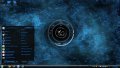
Usually the start menu button should change automatically. If it doesn't, you should use the Windows 7 Start Button Changer (free download). Magnet, I can't seem to remember what you said didn't work with that. You should be able to find the button file in C:\Windows\Resources\Themes\(*theme name*)\explorer.exe. Then you'd have to load it into the SBC. There are instructions of how to do that here.
As for the icons in the task bar, you'll have to create your own icons and replace what's already there. No part of the theme changes the taskbar icons.
Also, if you're talking about the icons in your start menu, you might have to change those manually too, if it's possible. I never bothered with mine.
The SBC didn't work, it gave me unreadable path errors
and I didn't mean the ions, i meant if you look at the lower right portion of the bar it doesn't look continuous
and for the start menu, i didn't mean the icons there either, look at the area around the all programs and shutdown buttons, compared to yours, mine shouldn't be transparent
The SBC only works for the start button in the taskbar
Try converting the PNG to a .ico format. You can do that online if you find the right converter.
As for the taskbar, I see nothing wrong with it. The tray icons are supposed to be outside of the lighter gray section. You can go to properties to put them in one place so they're not all visible at once. That's how I have it. That will stretch the "inner" part of your taskbar out further. It won't extend to the end, if that's what you're looking for.
Finally, I see what you mean about the "Core Systems" and "Reactor" buttons. Try unloading the theme and re-load it. Who knows? Maybe the modified start button will come up correctly when you do it....
As for the taskbar, I see nothing wrong with it. The tray icons are supposed to be outside of the lighter gray section. You can go to properties to put them in one place so they're not all visible at once. That's how I have it. That will stretch the "inner" part of your taskbar out further. It won't extend to the end, if that's what you're looking for.
Noooooooo, look at the horizontal line in the center of the taskbar, it's supposed to line up all the way across, and it doesn't
Finally, I see what you mean about the "Core Systems" and "Reactor" buttons. Try unloading the theme and re-load it. Who knows? Maybe the modified start button will come up correctly when you do it....
Oh, yikes! I see it now
Not sure why it does that. It's just a little glitch. I keep my taskbar hidden until I move my mouse to the bottom of the screen, so I wouldn't see it (not that I have the problem). Maybe change around some resolution settings and see if anything happens.
Try relocating your taskbar to the side or top, and see if the glitch sticks around. If not, see if moving it back to the bottom cures it.
It's strange, i've never seen those problems before. With the start menu, I think the problem came when you patched your computer. There was a checklist on the side (three options, I believe) that should have all been checked. I'm wondering if one or two were left un-checked....
Something just struck me, Magnet. Did you install the Theme Resource Changer, or only patch the system? You'll need the Them Resource Changer to automatically change buttons. If you didn't install that, the custom start menu orb, "core systems" button, and "reactor" buttons won't show up--only the text will. That would account for the missing pieces. You can download and install the TRC here: http://www.mediafire.com/?ws8bwq3d193l64c
Ok, I am NEVER using that SBC again
effed up some system files, i almost thought I was gonna have to reinstall windows, thankfully sfc /scannow fixed it, but I had a helluva time even getting to the command prompt as an administrator
anyway, fixed things and got it back to windows aero default
Ok, I am NEVER using that SBC again
effed up some system files, i almost thought I was gonna have to reinstall windows, thankfully sfc /scannow fixed it, but I had a helluva time even getting to the command prompt as an administrator
anyway, fixed things and got it back to windows aero default
I opened it, got an error of some sort and hit continue, clicked restore aero default start orb, and explorer went away and wouldnt open, on reboot all i got was a black screen, had to do new task, browse, cmd.exe, run as admin, sfc /scannow, followed by shutdown /r in order to fix it, some system file somewhere had been corrupted
I opened it, got an error of some sort and hit continue, clicked restore aero default start orb, and explorer went away and wouldnt open, on reboot all i got was a black screen, had to do new task, browse, cmd.exe, run as admin, sfc /scannow, followed by shutdown /r in order to fix it, some system file somewhere had been corrupted
not sure
now i've tried multiple HUD themes and all get the same issues, no start orb, messed up start menu buttons
and now i have a virus
if i try anything requiring admin privileges (run as admin, etc.), i get "a device attached to the system is not working" error
I know this is unrelated to the other issue, but it's still ******* me off
not sure
now i've tried multiple HUD themes and all get the same issues, no start orb, messed up start menu buttons
and now i have a virus
if i try anything requiring admin privileges (run as admin, etc.), i get "a device attached to the system is not working" error
I know this is unrelated to the other issue, but it's still ******* me off
Sorry to hear that. Where have you been getting your themes? I never had any issues with any of them. Always had everything included (start orb, buttons, etc) and NEVER got a virus. Makes me wonder how you've been obtaining your themes....
P.S. Didn't know about an auto-censor feature..... Probably a good idea though!

 Facebook
 Google
 GitHub
 Linkedin