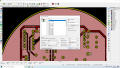
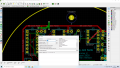
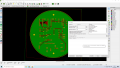
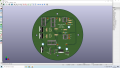
Can you put a ground pour on the bottom too? Then stitch them together with vias. The island for C7 is obvious. I suspect just curing that will cure the C8 fault too.
Usually is ground pour in bottom layer (green in this case). Then you can put most signal and positive supply wires to top layer where components are placed. For two layer PCB-s with SMD components it is more natural approach of course.
That's what I suspected would happen. Fixing one fixed both.
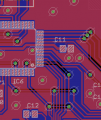
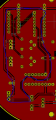
A ground pour onbothsides rarely creates a problem. You will see that in a lot of commercial boards. I am just a hobbyist, but here is a recent board:
Easy to see how the pours on top and bottom saved a lot of routing. You can see some of my knitting vias too.
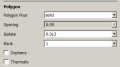
Note that the pour is not going between pins spaced 0.1". I am sorry that I do not know the KiCad terms, but there are 2 parameters you can change to get the pour to ge between the pins, if that is what you want. In Eagle they are called spacing and isolate. Isolate is how close the pour gets to borders and tracks. Spacing is how wide the pour lines are:
I hope KiCad allows that level of control. I would adjust isolate before spacing. Don't go too small on the spacing.
I would still add a few vias. Helps ensure a good ground on both sides. Your current connections are the plated through holes. Besides, make the board house work for its money.
I like the way you have added more clearance between traces around the edges and edges. That allows more ground pour. I have not checked every detail, but it looks good for what you are doing. Christmas will be here soon.
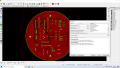
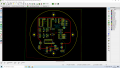
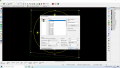
In Kicad, select copper fill zone edge and press E. Then you can reduce copper fill clearance and other parameters. I think you have currently 0,508mm clearance set.
Yup. This is what it looks like. I think I read two different opinions. Jpanhalt likes more clearance and trebla want to reduce it. Is that correct or do I misunderstand?
I depends of your design requirements. If you design requires good isolation and works in high power area then you will set clearance bigger. If you power/voltage is less then you can go down to 6 mils (approx. 0,156mm) with clearance settings (6 mils is standard PCB pool minimum setting for many PCB fabs). Getting down with clearance is usually a must when you design requires very big density.
@jpanhalt tells you about mounting holes, if you mount yor PCB into conductive case, then you maybe want isolate your board from this. If you want keep out copper pour for some areas, then you can either constcuct fill zone edge to keep out from these areas or if this is not possible (these areas are in middle of pour) then you can use Add keepout areas tool (underneath Add filled zones tool button in right panel) and construct these areas. You can select keepout rules for all copper areas or select copper pour only.
Okay so I'll set the clearance to 6 mils and I already added keep out zones for the mounting holes. Not that i am going to mount the pcb in anything conductive but it was nice to learn.
Thank you all so much. I think I am about to place my second order of this pcb.
One thing - if you use small clearance for copper you want to sure is the solder mask correctly generated. You can check that with some gerber viewer, with Kicad Gerber viewer or with some web hosted one. I check gerber files (each layer) every time before ordering actual PCB-s.
One thing - if you use small clearance for copper you want to sure is the solder mask correctly generated. You can check that with some gerber viewer, with Kicad Gerber viewer or with some web hosted one. I check gerber files (each layer) every time before ordering actual PCB-s.
Yes and looking is everything in place - drill holes, solder mask openings, etc. For SMD parts you want to check solder paste layer too. Some footprints, downloaded from other sources or your own designed, may have some layers missing. It is happened sometimes with me too

 Facebook
 Google
 GitHub
 Linkedin