My daughter's electric pencil sharpener just stopped

Thread Starter

felipefelix

Joined Jun 2, 2024
5
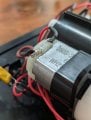
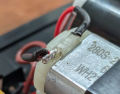
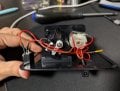
Hi everyone! My daughter's electric pencil sharpener stopped working, and I opened it up to see if I could find anything unusual. I don't know much about electronics, but I noticed a small wire that seemed out of place compared to the others.
I tried to find help on Gemini, and it suggested using cutting pliers to remove the damaged cable, stripping the ends of the new wire about 1/2 inch, connecting the ends of the new wire to the correct terminals on the electric pencil sharpener, and using electrical tape to secure the connections. However, I also noticed a small weld that was not mentioned by Gemini. I think I may need to redo it to fix it completely, but all of this is new to me. I'm wondering if my assumptions are correct and if you could give me some guidance. Thanks.
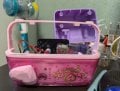
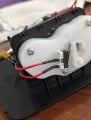
A pink electric pencil sharpener wide open
the interior of the electric pencil sharpener
The damaged cable
 

WBahn

Joined Mar 31, 2012
32,783
What the heck is "Gemini"? Yet another stupid generative AI that people thing actually knows something about broken pencil sharpeners?

The bare terminal on the switch in your second picture looks like it never had anything connected to it, so you can probably just ignore it.

What was it about some wire that somehow seemed out of place relative to the others? Remember, we aren't mind readers.

If it was that wire that is barely touching the second terminal of the motor, was it disconnected completely before? Was that what was out of place?

What happens if you connect that wire to that motor terminal?
 

Thread Starter

felipefelix

Joined Jun 2, 2024
5
What was it about some wire that somehow seemed out of place relative to the others? Remember, we aren't mind readers.
Hi! Thanks for replying to my thread. Yes, the "small wire that seemed out of place" I've mentioned is the bare one. I only opened the pencil sharpener and didn't touch anything, so the wire was either like that from the beginning or something happened and it got that way.


What happens if you connect that wire to that motor terminal?
Do I need to redo the weld to connect it?
1717382164745.png
 

MrChips

Joined Oct 2, 2009
34,719
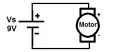
The battery is connected to the switch, the switch to the motor, the motor back to the battery.

Firstly, check that the switch is not faulty by putting a wire jumper across the switch terminals.
 

WBahn

Joined Mar 31, 2012
32,783
Hi! Thanks for replying to my thread. Yes, the "small wire that seemed out of place" I've mentioned is the bare one. I only opened the pencil sharpener and didn't touch anything, so the wire was either like that from the beginning or something happened and it got that way.


Do I need to redo the weld to connect it?
It's not a weld, it's a solder joint. Very different thing.

I can't tell for sure from the picture, but it looks like there is still a connection there, albeit a very poor one. Looks like with just a couple strands connected, the contact resistance might have been high enough to drop enough voltage to cause enough heat to melt the insulation and the shrink wrap. That might have dropped the total current to a too-low value for the motor to start turning.

Trace the wires from the battery. My guess is that on one side will be a wire that goes directly to the motor and that, on the other, a wire will go to the switch. Use a wire to go directly from the side of the battery that normally goes to the switch and go, instead, directly to the other side of the motor. If the damaged wire is on the side that goes directly to the motor, bypass it as well. If the motor turns when connected directly to the battery, then that is a good sign. Resolder the bad connection on the motor (though, if you don't have a soldering iron and electronic solder -- don't use plumber's solder!), those might cost you more than a new pencil sharpener will. If that fix doesn't work, then it is almost certainly a bad switch, which may or may not be fixable.
 

Alec_t

Joined Sep 17, 2013
15,112
That bad connection to the motor terminal is at least part of the problem and needs correcting. The plastic housing the terminal shows signs of heat damage, so the associated commutator brush may not be making good contact with the commutator.
 

MrChips

Joined Oct 2, 2009
34,719
In some languages, the word for “solder“ is translated to English as “weld”.
For example, Google translates “souder” in French and “soldar” in Spanish to “weld” in English.
 

Thread Starter

felipefelix

Joined Jun 2, 2024
5
In some languages, the word for “solder“ is translated to English as “weld”.
For example, Google translates “souder” in French and “soldar” in Spanish to “weld” in English.
Yes, I used a translator because I didn't know how to say "solda", which is the word in Portuguese, in English. Makes sense now :D
 

Thread Starter

felipefelix

Joined Jun 2, 2024
5
Thanks for all the comments guys. I need to buy a soldering iron and an electronic solder. Even if buying a new pencil sharpener this time looks cheaper, I think this may help me with future projects, so it's about time.

Trace the wires from the battery. My guess is that on one side will be a wire that goes directly to the motor and that, on the other, a wire will go to the switch. Use a wire to go directly from the side of the battery that normally goes to the switch and go, instead, directly to the other side of the motor. If the damaged wire is on the side that goes directly to the motor, bypass it as well. If the motor turns when connected directly to the battery, then that is a good sign. Resolder the bad connection on the motor...
This is what it looks like from the back. It also uses an external power supply. Based on this image, would you still suggest the workaround mentioned above?
WhatsApp Image 2024-06-03 at 7.35.50 PM.jpeg

Firstly, check that the switch is not faulty by putting a wire jumper across the switch terminals.
I don't have a wire jumper at the moment. I wonder if I should get one. I heard it helps when using Arduino, which is something I heard about recently, so maybe?
 

Thread Starter

felipefelix

Joined Jun 2, 2024
5
The battery is connected to the switch, the switch to the motor, the motor back to the battery.

Firstly, check that the switch is not faulty by putting a wire jumper across the switch terminals.
I wanna try this, but I'm unsure where to put the paper clip...
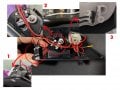
Are these 3 parts what you call switch terminals?
parts.jpg
 

MrChips

Joined Oct 2, 2009
34,719
I now see three switches. You want to bypass all three switches and just connect the motor directly to the power input.
(Ignore the 9V shown in this diagram.) If the motor runs then you know that power in and motor are good.

1717546919491.png
 
Top