MOSFET Spice Model to LTSpice Model

MrPIxel

Joined Oct 18, 2023
20
I downloaded the model from the STMicroelectronics website.
I created the symbol and always do a basic test to ensure it "works".
However, I'm not responsible for how well the model is designed, that's up to the author(s).

Glad it work for you...
Teaching a man to fish, is good ....I'm slightly embarrassed as I scoured that STMicro url looking for the Mosfet Spice model, but I failed to look carefully in the Ecad folder. I thank you again for testing the code and supplying the test code that helped me. Question for you: ON LTSpice I can control-click and get a power trace sometimes ... or type in an expression of current In * voltage and get a power trace. Do you know if there is any way to get the average power over the scope window time frame? I thought it was the control key or Alt key option .... but I'm using a Macbook and that doesn't seem to work. Can you demystify what needs to be done?.. Thanks in advance.. MrPixel
 

eetech00

Joined Jun 8, 2013
4,709
Teaching a man to fish, is good ....I'm slightly embarrassed as I scoured that STMicro url looking for the Mosfet Spice model, but I failed to look carefully in the Ecad folder. I thank you again for testing the code and supplying the test code that helped me. Question for you: ON LTSpice I can control-click and get a power trace sometimes ... or type in an expression of current In * voltage and get a power trace. Do you know if there is any way to get the average power over the scope window time frame? I thought it was the control key or Alt key option .... but I'm using a Macbook and that doesn't seem to work. Can you demystify what needs to be done?.. Thanks in advance.. MrPixel
Yes.
Hold down the the Alt key while clicking the item of interest on the schematic, so that its trace appears as "power" in the graph.
Then go to the new trace in the graph and control-click the trace. A pop-up window should appear showing the calculate avg.
 

MrPIxel

Joined Oct 18, 2023
20
Yes.
Hold down the the Alt key while clicking the item of interest on the schematic, so that its trace appears as "power" in the graph.
Then go to the new trace in the graph and control-click the trace. A pop-up window should appear showing the calculate avg.
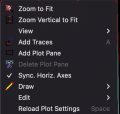
Unfortunately, it doesn’t seem to work on my MacBook .. The only menu I can get is this ... Maybe I should try this on a PC laptop ?
Screen Shot 2023-10-26 at 11.28.20 PM.png
 

eetech00

Joined Jun 8, 2013
4,709
Unfortunately, it doesn’t seem to work on my MacBook .. The only menu I can get is this ... Maybe I should try this on a PC laptop ?
View attachment 306008
Sorry, I guess won't be much help with LTspice on MAC. I use windows. I'm not even sure the key combination even works on MAC.

However, you can try using a ".meas" statement on the schematic. This doesn't require a graph trace.

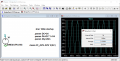
Here is an example. I show CTL-Click and the use of a .meas statement.
The .meas statement to calculate the average value of the V(AC) signal is:

.meas AC_AVG AVG V(AC)

The output of the .meas statement is stored in the error log., so you have to view the error.log to view results.

1698414490444.png

Below is a partial content of the error log:

ac_avg: AVG(v(ac))=1.0166 FROM 0 TO 0.16

Date: Fri Oct 27 06:47:20 2023
Total elapsed time: 0.067 seconds.

There's more information about .meas statements in "Help".
 

MrPIxel

Joined Oct 18, 2023
20
eetech00 That was a fantastic suggestion to use .meas as an alternative to a Windows point-and-click.
I was delighted to find the INTEG argument that let me integrate a waveform and I could get a component power dissipation estimate. I had some problems justifying the output numbers until I tested the function out on a square wave I generated in a test file, and could easily integrate that in my head. Then I had confidence in the numbers. ( if I integrated for a whole second of simulation the numbers output watts/sec exactly) I can’t wait to test the “.four” command to get a Fourier dump...
Thanks for the fantastic suggestions you come up with. Much Appreciated, MrPixel
 

MrPIxel

Joined Oct 18, 2023
20
Hello eetech00, I found a pretty good mosfet driver ...+- 30 amps < 20ns rise fall but I hope faster if I just do +-10 amps
check out https://www.mouser.com/datasheet/2/240/media-3323229.pdf
I’m hoping to find a LT Spice model for this chip ... but would be happy if I find one for a similar chip as I don’t know if I need this much power yet .. but it would be nice... I see that you are a stellar help to others with similar problems .. Keep up the great work. MrPixel
 

eetech00

Joined Jun 8, 2013
4,709
Hello eetech00, I found a pretty good mosfet driver ...+- 30 amps < 20ns rise fall but I hope faster if I just do +-10 amps
check out https://www.mouser.com/datasheet/2/240/media-3323229.pdf
I’m hoping to find a LT Spice model for this chip ... but would be happy if I find one for a similar chip as I don’t know if I need this much power yet .. but it would be nice... I see that you are a stellar help to others with similar problems .. Keep up the great work. MrPixel
I will be posting IXDD630, IXDN630, and IXDI630 tomorrow...
 

eetech00

Joined Jun 8, 2013
4,709
Hello eetech00, I found a pretty good mosfet driver ...+- 30 amps < 20ns rise fall but I hope faster if I just do +-10 amps
check out https://www.mouser.com/datasheet/2/240/media-3323229.pdf
I’m hoping to find a LT Spice model for this chip ... but would be happy if I find one for a similar chip as I don’t know if I need this much power yet .. but it would be nice... I see that you are a stellar help to others with similar problems .. Keep up the great work. MrPixel
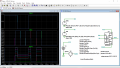
As promised, models and symbols included in attached zip file.
These are simple models but should work ok for you.
"M" versions are included.

1701362301429.png
 

Attachments

MrPIxel

Joined Oct 18, 2023
20
Thanks enormously! Did you generate that model from scratch? What is Rser=100 in the pulse parameter do?
Aside: I found a YouTube LTSpice tutorial about modeling a Spark Gap with 6000 volts ... it was very educational about the physics of the spark gap and the fellow compensated for Spice idiosyncrasies. I have a Marks Generator in my lab. Would you like the url to see it? I’m going to have to relearn how to characterize components as I’m building some of own and will need to take into account parasitic inductances and capacitances. Thanks enormously again. MrPixel
 

eetech00

Joined Jun 8, 2013
4,709
Thanks enormously! Did you generate that model from scratch? What is Rser=100 in the pulse parameter do?
Yes. I generated this from scratch using the datasheet. Be advised, I don't have the physical part.

The Rser param specifies an internal serial resistance within the voltage source between the +/- terminals.
In electronics, all voltage sources (like batteries) have some internal resistance, so it has become a habit of mine to specify a small value. Voltage sources do not act like a switch contact when their value is zero. When the value is zero, then its a short circuit between its terminals. Sometimes users simulating circuits can be fooled by this behavior, as when testing inputs that should switch between +V (or -V) and floating. Additionally, many times I have performed simulations, using third party models, where the simulation would not converge, and specifying this param fixed it. When I test my models, I try, when I can remember :), to test both with, and without this param.
 
Last edited:

MrPIxel

Joined Oct 18, 2023
20
Hello eetech00,
I have learned so much from your examples about LTSpice, and getting more proficient with your generous help. You must be very proficient, and I’m curious how long it took you to generate the .subckt models? I’m curious about 2 items, A on your example IXD_630_Test.asc you floated the VGND apparently? What is the rational with the battery ground and V3=0... ( on my circuit I maybe need to do something similar as I have a bipolar op-amp control circuit V+ V- 15volts that I’ll need to make unipolar or similar to drive the MOSFET switch) and B on the .subckt

.SUBCKT IXDD630 IN EN OUT VCC VGND PARAMS: VT=12.5 VH=0.75
D1 IN VCC Din
D2 VGND INR Din
R1 INR IN 200
R2 VCC EN 400k
D3 EN VCC Din
D4 VGND EN Din
A5 0 INRi 0 ENn 0 0 AND 0 AND Tripdt=tdt
S1 OUT VCC SWP 0 SWP

etc ....
I’m just glad it all works, but not Sure how you generated the list from the chip documentation
Some line by line * comments might give me a clue ...or maybe better via email? than on this forum

Aside: my next component that will take me awhile to build as I don’t see a reasonable source will be a variable 200 amp inductor.. .When I get done simulating and modeling .. I think it will be between 1.5uH and 44uH for optimum efficiency.
 

eetech00

Joined Jun 8, 2013
4,709
Hello eetech00,
I have learned so much from your examples about LTSpice, and getting more proficient with your generous help. You must be very proficient, and I’m curious how long it took you to generate the .subckt models?
Generating them was easy, developing took longer...I don't remember how much time specifically.

I’m curious about 2 items, A on your example IXD_630_Test.asc you floated the VGND apparently? What is the rational with the battery ground and V3=0... ( on my circuit I maybe need to do something similar as I have a bipolar op-amp control circuit V+ V- 15volts that I’ll need to make unipolar or similar to drive the MOSFET switch)
Over time you develop certain habits that in the long run prevent modeling problems. This is one of them.
It forces the user to connect VGND pin externally to ground (or -V), but this is not the only reason...there are too many to describe. There are modeling constraints when this shouldn't be done as experience will show. The V3=0 thing I thought you would have gleaned from post #30, but, again, its just another test habit of mine, I could have connected pin 3 to directly ground.
 

MrPIxel

Joined Oct 18, 2023
20
Thanks .... for the good habits idea that prevents modeling problems.... I just learned that the hard way... so probably won’t forget it now.

Aside: I’ve noticed one anomaly in the latest Mosfet model that won’t impact me but just surprised me. The enable pin in your example was tied to 5V, but that didn’t turn it on so I just saw minuscule currents out of the driver. The spec said to enable with 2/3rds the Vcc voltage, but leaving it open circuit should have the same results .... It didn’t so I tied it very high to get it to conduct. I just got samples of that Mosfet driver chip, so I almost have enough parts to start breadboarding. I just have to decide on how best to make some high-current inductors. I’m thinking of Welding cable 1 or 0 gauge or so (200amps) and winding my own air core. I haven’t decided on a toroid or single-layer bobbin style yet. I also have to finish LTSpice modeling so I know how much power is dissipated in each component. Also going to try something new. Putting two 138 Mosfets in parallel and letting them current share for an eventual 200 amps. I learned another good Spice trick that I’m sure you know, but new to me, and was how to use a voltage-controlled switch. My current control circuit is hyper-efficient at low power levels ( PFM )and not so efficient at high power levels so I might put the switch in to change control circuits at some point.

I REALLY appreciate all your help. MrPixel
 

eetech00

Joined Jun 8, 2013
4,709
Hi MrPixel,

Sorry about the enable pin. I've fixed it.
I'm attaching a revised model file (Rev: Dec 12 2023) that replaces the previous one. The symbol files are the same so do not need to be replaced. Please discard the previous model file.
 

Attachments

MrPIxel

Joined Oct 18, 2023
20
Well Thank You !!!! I didn’t need it that quickly but anxious to see what you did... I’m busy now ... If that email address worked that I sent you earlier, later I’ll send you an awesome picture. MrPixel.
 

MrPIxel

Joined Oct 18, 2023
20
Hi, I went to a EE design show....and saw what PCB vias, pins & sockets look like for 175 & 350 amps ... just 8 mm and 11 mm
pins and sockets. I re-learn and re-learn that good physics scales. 8mm for 1/0 gauge wire and 11 mm for 4/0 wire. good physics scales from nano to cosmic black holes. I need to figure out how thick a power/ground plane might be for 200 amps. My gut unfortunately always overbuilds things. The vias for those pins are an inch in diameter. Does anyone have any thoughts on 4oz copper vs dual 2oz copper vs rolling my own credit card thickness layers or maybe 1/8 inch bus bars bent to shape? I need to make a transition from 3 terminal Mosfets to 1/0 wire. The pins on the 138 amp Mosfets are 2mm x 0.4mm in cross-section. MrPixel
 

eetech00

Joined Jun 8, 2013
4,709
Hi, I went to a EE design show....and saw what PCB vias, pins & sockets look like for 175 & 350 amps ... just 8 mm and 11 mm
pins and sockets. I re-learn and re-learn that good physics scales. 8mm for 1/0 gauge wire and 11 mm for 4/0 wire. good physics scales from nano to cosmic black holes. I need to figure out how thick a power/ground plane might be for 200 amps. My gut unfortunately always overbuilds things. The vias for those pins are an inch in diameter. Does anyone have any thoughts on 4oz copper vs dual 2oz copper vs rolling my own credit card thickness layers or maybe 1/8 inch bus bars bent to shape? I need to make a transition from 3 terminal Mosfets to 1/0 wire. The pins on the 138 amp Mosfets are 2mm x 0.4mm in cross-section. MrPixel
You wouldn't use vias for high current carrying areas of the PCB.
The mosfets would look different as well. Likely a large flat pk surface mount type with large pin areas. Or even a load switch, or module, or SSR instead.
In addition, there are special wire-to-board connectors/devices for high current.
 
Last edited:

MrPIxel

Joined Oct 18, 2023
20
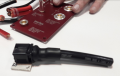
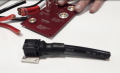
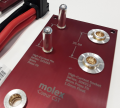
Hello again, I’m just exploring different approaches to couple the MOSFET and its drivers to the larger 1/0 wire inductors, etc. One way to do it is with a PCB transition board to the cables, or mount the ICs on a heavy heat sink and mechanically attach my bus bars... At the EE show, I saw some 1/0 wires attached to 8mm PCB-mounted pins and I saw bus bars on power supplies that were about 2X the thickness I had calculated would be needed for the MOSFETS. A picture is worth 1000 words attached are some ideas I want to consider on connectors and a similarly rated current power supply. Worst case I attach a big cable to a bus bar with a 5/16” copper bolt through a crimped-on ring connector. See pics attached with 1” vias, 1/0 cable, and how a vendor attached is MOSFETs and drivers to a bus bar.

Screen Shot 2024-02-01 at 4.04.11 PM.png
1/0 cable blackScreen Shot 2024-02-01 at 4.05.05 PM.png
The 8mm 150 amp vias and pins

Screen Shot 2024-02-01 at 4.05.25 PM.pngScreen Shot 2024-02-01 at 4.06.10 PM.png

I could mount my MOSFETs and drivers similarly to the below, I’ll need a similar size heat sink.

Screen Shot 2024-02-01 at 4.06.34 PM.pngScreen Shot 2024-02-01 at 4.06.53 PM.png
 

MrPIxel

Joined Oct 18, 2023
20
Those pins come in 4 sizes from 3.4mm to 11 mm or 75 amp to 350 amp respectively, and many lengths ... the sockets for the pins go through the PCB... which is why I called them vias .. they are huge compared to anything I’ve used before. The cables just snap on and off with ease, much faster than a car battery clamp, or a 3/8” bolt and nut that might be less expensive.
https://www.molex.com/content/dam/molex/molex-dot-com/en_us/pdf/datasheets/987652-4531.pdf?inline

https://www.molex.com/en-us/part-li...nomyPathValueLast=PCB Headers and Receptacles
 
Top