MOSFET question

Thread Starter

tiny747

Joined Jul 31, 2010
16
I am somewhat new to electronics and need a little help with some MOSFET's that are controlled by a op-amp acting as a voltage comparator. The op amp has a VCC of 10vdc. As I said it is acting as a voltage comparator. The output of the comparator (op amp) is about 9 volts when on to 0 volts when off which goes to the gate of my P channel MOSFET. The MOSFET is hooked up with a 12 volt source. It also has a pull down resistor of 1 M ohm. The problem is that the output of the MOSFET is always on. It seems as if the 9 volts is not enough to turn off the MOSFET. Do you guys have any suggestions?
 

Attachments

Audioguru

Joined Dec 20, 2007
11,248
I simply pressed Print Scrn key, copied it into MS paint and saved it as a PNG file type.

The Mosfet turns off when its gate voltage is the same as its source voltage. Your gate voltage does not go high enough to turn off the Mosfet. Use an NPN level-shifting transistor to drive the gate low. Then when the level-shifting transistor turns off the Mosfet will be turned off by the gate-source resistor.
Note that the NPN level-shifting transistor will invert the signal.
 

Attachments

Thread Starter

tiny747

Joined Jul 31, 2010
16
Awesome. Thank you so much. I have been racking out my brains for a while about this. I'm glad that the print scrn key worked for you. When ever I push that key it doesn't do anything. Thanks again for all of your help and insight.

:) :rolleyes: :cool:
 

Audioguru

Joined Dec 20, 2007
11,248
I press the PRINT SCRN key then I paste the image into MS Paint program to edit or save it.
Paste works in MS Paint when it is in the EDIT mode.
 

thatoneguy

Joined Feb 19, 2009
6,359
Awesome. Thank you so much. I have been racking out my brains for a while about this. I'm glad that the print scrn key worked for you. When ever I push that key it doesn't do anything. Thanks again for all of your help and insight.

:) :rolleyes: :cool:

PrtScrn Puts the contents of the screen into the clipboard.

Open MS Paint, and pick "Paste", the crop to what you want to show, save as .PNG and you are done.

Simpler way is FastStone Screencap which lets you select a rectangular region and autosave it as a .PNG.
 

eblc1388

Joined Nov 28, 2008
1,542
If you don't want to invert the drive signal, another solution is to place in series a zener diode of 3.3V to 4.7V between the MOSFET gate and comparator output.

This would allow the MOSFET gate to be pulled up to 12V when the comparator output is only 9V, thus turning off the P-Ch Mosfet.

You can instead use a white or blue LED too.
 

Thread Starter

tiny747

Joined Jul 31, 2010
16
I like the idea of not having to invert my signal but I don't understand how a zener diode in series is going to help. When the voltage is below 3.3V to 4.7V it will turn on the MOSFET like it is supposed to. Then when it goes above that threshold of 3.3 -4.7 it will allow all of the electricity to flow up to the 9 volts that is being supplied to it by the comparator? (which isn't enough to turn it off) Please explain how that works? I am not an expert and would like to understand.
 

eblc1388

Joined Nov 28, 2008
1,542
Please explain how that works? I am not an expert and would like to understand.
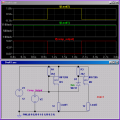
Perhaps you are not visualizing how the zener diode is being connected. I'll show the connection and perform a simple simulation.

In the simulation, V2 is the comparator output voltage which can react only 9V maximum, as shown. The current in the load of both the MOSFETs are show for comparison.

As you can see, the first MOSFET does not turn off but the second one does because the zener diode is held off as the voltage between it and the +12V(i.e. 12V-9V) is less that then zener voltage.


Attachments

Thread Starter

tiny747

Joined Jul 31, 2010
16
I like the idea of not inverting my signal. But could someone please explain how adding an led or zener diode in series will up my voltage. I thought for sure that a diode would give me a drop of about 2 volts?
 

Thread Starter

tiny747

Joined Jul 31, 2010
16
Sorry about the second post. My screen must not have refreshed itself. Thanks for the explanation. I will try what you said tonight.
 
Top