Monitoring AC fans

Thread Starter

Josuesov115

Joined Nov 1, 2020
4
Hello,

I have a question, I want to monitor some fans connected to AC, the main intention is to know if any fan fails for this just have a led indicator to know that the fan is still running. My first idea was to monitor the current consumption but the restriction is not to use microcontrollers (there are 40 fans and having a micro with 40 analog inputs to read current sensors is not feasible). Does anyone know any current monitoring circuit that only activates an indicator? or any idea to monitor the fans?
 

LowQCab

Joined Nov 6, 2012
5,101
Don't bother with all the complexities of monitoring Current X 40.

Use a small Limit-Switch with a Vane attached to it for each Fan.

These may be available pre-made, and are relatively cheap, and are very reliable.

I would wire all Switches in series,
so that only 2 Wires would be required to monitor the entire room.

Alternatively, each switch could be connected to
an individual Noise-Maker, and/or, a Flashing-Indicator-Lamp of some sort.
.
.
.
 
Last edited:

MaxHeadRoom

Joined Jul 18, 2013
30,565
There are several methods out there, often used in industrial application .
One of the simplest is to rig up a micro switch with a small vane actuator, where the air stream will keep the vane/switch in the activated state.
Turns on a led or audible device if air fails
If just using one notification indicator for all, use N/C contacts on L/S. switches
Per post #2.
 

Tonyr1084

Joined Sep 24, 2015
9,744
I'm also on board with the Vane approach. Fans can fail but still draw current. I've seen plenty of fans that would hardly spin or even outright freeze up. With a stalled motor the current goes up and the coils get hot. Eventually they either burn out or blow what is called a "Fusible Link" which is designed to open up at a given temperature or higher. Once blown they have to be replaced - if you're lucky enough to be able to get to one.

Monitoring current would be a difficult approach because the fan is going to draw a start-up current higher than the running current. If some obstruction restricts the motor then the current would go up again. You'd have to have an analog sensor capable of distinguishing start-up current versus stalled motor. Now, if the current goes to zero then you know the motor has failed and is either dead or the fusible link has blown. That's why I would second (or actually third) the comment about using air vanes to detect wind pressure. After all, that's the chief purpose of a fan - to move air.
 

Tonyr1084

Joined Sep 24, 2015
9,744
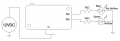
No doubt you've seen micro-switches like the one pictured below. I've taken the liberty to draw a "Vane" or paddle that would reside in the air stream. The switch is shown in the Non-Actuated position. But when the wind blows down on the paddle the switch actuates, making the C (Common) and the NO (Normally Open) contacts to close. Wire an indicator to the NO and C contacts. When there's wind blowing on the paddle the switch will indicate air flow. OR wire the C and the NC (Normally Closed) contacts. When there isn't any wind it will light an indicator lamp.

You KNOW how to wire a switch; right? In series with a power source and an indicator lamp. Not suggesting you don't know such things but there are from time to time people who visit this site who don't know even the most basics of electrical and electronic things. I'm not trying to suggest you don't know - just making sure all bases are covered.

Screenshot 2024-05-09 at 8.32.08 AM.png
 

Tonyr1084

Joined Sep 24, 2015
9,744
Slight correction to my post #3, it would require using the N/O contacts, as they should close when the vane is operated, if all switches are are in series with one single indicator.
This works. But you only get one indicator if any one or more fan(s) fail. If you want an indicator for each fan you can still use the NO contacts to detect when the fan is running.

Another option is a red and a green indicator lamps. Red indicates no air flow, green indicates air flow. We can provide a schematic if you need one.
 

Tonyr1084

Joined Sep 24, 2015
9,744
For greater sensitivity to wind flow use the closer Leaver Arm Attachment Point. It has a greater effect on the actual switch. Less air flow is required to actuate the switch. That would mean the need for a smaller wind vane. Look at the difference between the two illustrations. The first illustration has the attachment point further to the right, making it take more pressure to actuate the switch.
Screenshot 2024-05-09 at 8.42.00 AM.png
 

Tonyr1084

Joined Sep 24, 2015
9,744
Not all microswitches have the same connections.
True. Some have C & NC only, some have C & NO only. I have a handful of these switches. Some are SPDT, some are SPST NO, some are SPST NC. (Single Pole Single Throw or Single Pole Double Throw). You can get them in any of those three configurations.
 

ThePanMan

Joined Mar 13, 2020
862
One word of caution @Tonyr1084, if the fans can be blowing a volatile vapor, an unsealed switch can prove problematic, if not disastrous.
Use a small Limit-Switch with a Vane attached to it for each Fan.
This one appears to be in a sealed box. But $37 a pop, times 40 is going to cost $1,480. And that's not to mention the cost of wiring and indicator lamps. Yeah, it can be done cheaply. If it were me and it was just cooling fans, no volatile substances involved then I'd go the way of the microswitch Tony described. Low voltage wiring, low voltage indicators and a small power supply should do. Tony's example uses a 12 volt supply with approximately 10mA draw per unit at the most. Times 40 that's 400mA. A 1 amp supply should be plenty. One other factor comes into consideration: How far apart are the fans from the indicators? Long wire runs will mean you may have to choose different values for the resistors. A long run of wire, say 100 feet of 20 gauge should be around 1 ohm. That's certainly not much to worry about, but it increases to 10.2Ω at 1,000 feet. Wire length, though not stated, may become a factor. And you have to factor into the cost of the wire. You can send a 12V signal a long way but each unit (40 in all) will have its own wire coming back. That means at a minimum, 40 wires. Unless you adopt the series approach whereby if ANY fan fails you get an indication. But you then have to go find which one has failed.

Since we don't know the circumstances of your project, if you have (and I'm just guessing) 40 machines each with its own connection to power you can add a small power supply. Doesn't have to be 12 volts, Tony just used that as a reference point, could be 5V from an old cell phone charger. You can get those cheap plug in modules at drug stores for just a few bucks. That power supply along with Tony's switching setup you can have a green and a red light at each machine. So when you look down the line you see right away which machine has lost its cooling. One unit per machine. I was imagining a control board in a control house connected to 40 remote machines.

In my lifetime I've seen automated machines with signal lights on a mast. When the machine was running properly the lamp would be green. When there was an issue it would flash yellow. If the machine was down, either automatically shut down due to the detection of a problem or if it were down for maintenance or restocking its stores, the light would be red. All masts could be seen from anywhere in the shop. So whomever is running a machine can see a problem right away. So can the boss.
 

ElectricSpidey

Joined Dec 2, 2017
3,313
Paint one of the blades with a reflective paint and use optical sensors driving a missing pulse detector. (set up to trigger if the pulses stop or become too far apart)

The small modules could be produced inexpensively and no need to place anything inside the cooled chamber.
 

AnalogKid

Joined Aug 1, 2013
12,057
Paint one of the blades with a reflective paint and use optical sensors driving a missing pulse detector. (set up to trigger if the pulses stop or become too far apart)
Beat me by 44 minutes. One LM393 per fan.

If the rotating hub is accessible, that is a better place for a reflective target; it allows much closer placement of the detector for less ambient interference.

ak
 

Reloadron

Joined Jan 15, 2015
7,866
While I have no clue as to your actual application or budget (how deep ate your p[pockets?) my experiences with doing this was with walk in ovens where is airflow failed elements could burn up before overtempt shut the elements down. A Google of "fan airflow switches" will get you results originally mentioned in Post #2 by LowQCab. This is just a single example. You make no reference to your anticipated air flow rate? You can also look at furnace permissive loop airflow sensors. Finally in the interest of inexpensive you can roll your own (see Tony's drawing Post #8). Again since you fail to mention your specific application and environment it's hard to suggest anything let alone 40 things. :)

Ron
 

LowQCab

Joined Nov 6, 2012
5,101
Just for entertainment ............
I'm guessing that this installation is a relatively small, possibly "Raised-Floor", Server-Installation
with 10-Racks, each with Four-10-inch-Fans on top of each Rack.

I used to routinely have the job of moving, or installing new, 3-Phase-Power-Feeds
on a Raised-Floor Server-Farm in Atlanta that was roughly ~10-X this size.
The place actually had to have a Floor-Plan-Map that contained the names, or designators, of each Rack.
I think it was owned by Holiday-Inn-Hotels IIRC.
The Fan-Noise was unbelievable.
.
.
.
 
Top