Microphone Wiring Problem

Thread Starter

SamR

Joined Mar 19, 2019
5,473
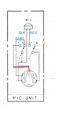
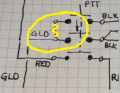
Working on a 1977 Hy-Gain Hy-Range IV 23 channel base CB radio. The original 5-Pin DIN Microphone is FUBAR and my search for a replacement did not find one. However, in my search for one, a vendor sent me a 4-pin microphone by mistake and refunded me without having to return the incorrect microphone. As shown in the schematic the actual microphone is a 4-wire microphone but it is also possible to use a 5-Pin speaker/microphone if desired. So, I cut the 4-pin connector off and replacing with a 5-pin DIN connector. But I'm having difficulties sussing out the wiring. RED & BLK are from the microphone cartridge. Gold is the modulation? Bare is grounded to the chassis among other connections in the schematic. I am assuming the connectors are shown looking at the front side? Any help is appreciated!
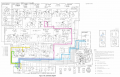
1734539518555.png
 

MisterBill2

Joined Jan 23, 2018
27,258
I am wondering about why the TS is looking at the radio circuit when the actual microphone circuit is clearly shown on the same sheet.
The red wire from the microphone thru the switch
connects to PIN#1, The BLACK wire from the switch connects to pin#3, the shield connects to pin #4.
And one PTT switch contact is CLOSED during receive, to connect the speaker.. The "gold" wire connects to pin #2. So this radio has what is called "electronic PTT switching", which does not use a relay.
BUT, tracing thru the circuit, that is correct.
 

Thread Starter

SamR

Joined Mar 19, 2019
5,473
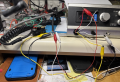
Because it doesn't work! Either directly or mirror imaged. Testing for continuity to Chassis Ground looking at the front of the chassis connector, Pin 1 goes to ground which indicates to me that the image is reversed. Which makes BLK on the right and RED on the left. Yellow is still the middle pin. Then the WHT/BARE wire is to the right of the middle pin. I soldered some leads to a plug body to test with jumpers to be able to quickly change connections if needed. Connected as such, there is a bit of hum from the speaker in receive. PTT does give a signal indication to the dummy load on the meter and the dim bulb tester bulb lights up indicating a current draw but there is a beep coming from the speaker. Also the dial indicator bulb dims and no signal indicated on an external wattmeter. Varying the volume pot the beep frequency increases as the pot is adjust for lower volume. The color markings on the schematic were added by me after tracing the circuit out from the actual microphone. Something is screwy and hence asking for advice...
1734561427934.png
White is connected to the BARE wire in the mic cable.
1734563197480.png
 

MisterBill2

Joined Jan 23, 2018
27,258
Are you able to show us an in-focus view of the circuit boards in the microphone??It may be that the wire colors in the cable to not match the colors in the drawing. Also, the shield connection would usually go to the system common, usually the supply negative. Looking at the circuit schematic drawing, pin #3 is tied to the circuit common. Pin #1 is the microphone audio input, which is the transmit audio input. Pin #3 must connect to pin #5 in the receive mode for speaker audio to be heard. Pin #4 is not used. Pin #2 must connect to pin #3 for the transmit mode to be enabled.

AND SOME REALLY BAD NEWS is that there is no standard color code for CB radio microphone cables. THAT is why we need to see the actual connections in the back of the microphone circuit board.

ALSO, look at the microphone plug connector for the pin numbers. Guessing is a great way to waste a lot of time.

One more thing is that I have never seen a CB transceiver with the supply negative tied to the physical housing. So in every case, "chassis ground" is floating.
 
Last edited:

Thread Starter

SamR

Joined Mar 19, 2019
5,473
AND SOME REALLY BAD NEWS is that there is no standard color code for CB radio microphone cables. THAT is why we need to see the actual connections in the back of the microphone circuit board.
I am going to reverse engineer the microphone handset and draw a new schematic. The only thing really "hidden" is the switch body which is pretty easy to trace out. I'll post it later when I'm done with it. I'd already traced it out and confirmed it against the diagram on the schematic but I'll do it again to confirm and sketch the schematic.
 

MisterBill2

Joined Jan 23, 2018
27,258
It is the color of the wires that I was commenting about. Do you have a meter that will allow you to measure resistance and check continuity??
 

MisterBill2

Joined Jan 23, 2018
27,258
Indeed "B" has it as I see it. Pin #1 is the mic element signal, connected during transmit, open on rec.
Pin #2 is directly connected to pin #3 on transmit.
Pin #3 is the common connection for both T/Rswitching and for the microphone common side connection/shield.
Pin #5 is directly connected to pin #3 for receive.
It may be that one of the conductors in the cord has failed due to whatever damaged the original connector.
THAT is the motivation for the continuity check.
 

Thread Starter

SamR

Joined Mar 19, 2019
5,473
ALSO, look at the microphone plug connector for the pin numbers. Guessing is a great way to waste a lot of time.
There aren't any. I've seen others imprinted on the plastic body holding the pins but not this one.

Of course I have meters, lots of meters from VTVOM type to DMMs. Which is how I determined the pin arrangement.

This is a brand new removed from the box mic that I cut off its 4-Pin connector to replace with the correct gender 5-Pin connector needed.
 

Thread Starter

SamR

Joined Mar 19, 2019
5,473
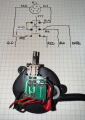
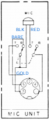
Here is the mic unit and the wiring diagram of it. I have not assigned pin numbers.
1734641137382.png

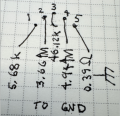
Here are the chassis connector pins measured to Chassis Ground. Arbitrarily labeled 1-5 left to right. Pins 2 & 4 apparently have a capacitor in their circuit as the resistance measurement continuously increased. Pins 1 & 3 go to chassis ground but have ~5kΩ & 46kΩ. Pin 5 is chassis ground!
1734643229206.png
 
Last edited:

MisterBill2

Joined Jan 23, 2018
27,258
Updated post, completed connections information!!

OK, but the switch is undoubtedly not like that inside. It is a DPDT scheme with the commons being the middle terminals. so you can verify that with the ohm meter. ( I asked about meters because it seems half the folks do not own a meter, nor are they able to solder without destroying a PCB.) Also, which has undoubtedly caused problems, the DIN connector pins are not numbered consecutively like you show. That is because the system was created by Europeans who think much differently than others. So the pin connected to the radio common is number 3 It is at one end of the five pins. You call it #5It gets the bare wire, The pin on the opposite end is number one, you call that #1. It gets the gold wire. The pin in the middle is number 2, you call it #3. It gets the red wire. The black wires at the mic switch need to be exchanged, so that the one from the mic cartridge goes to the middle switch terminal with the bare wire, and the black wire from the cable goes to the upper terminal, which is the NC side of the switch that the bare wire is tied to the common of.
The black wire of the cable is connected to the one you call #2, which is really pin5 bythe DIN connector wiring standard.

At this point there is a problem because that microphone internal connections are not the same as the original microphone connections. So the re needs to be something changed. OR the two blacks in the picture may be reversed from the drawing. Now you have the connections colors related to the way you assigned the pin numbers.

When I would create a cable design with multi-pin connectors I would always include a pin layout map, wit the notation "Solder side view of pins connector", or else: "Solder side view of sockets connector." That way there was never any confusion. I would also have the keyway for the connectors shown. Lazy detailers hated it, but the cost of resoldering a32 pin connector was a lot more that a few hours pay for a lazy detailer. (Detailers are the drafters who produce the pretty drawing from the engineer's original sketch. ) And the design engineer always has to check the finished drawing before copies are released.
 
Last edited:

Thread Starter

SamR

Joined Mar 19, 2019
5,473
Yes, just double checked, the blacks on my sketch are reversed! Also, the GLD wire does not tie the 2 terminals together. I drew it that way but the pins are somehow connected inside the switch body. I removed the switch but the body is entirely encapsulated. I can desolder the connecting wires and test the contacts. Not tonight though. Had 2 doctors appointments and a tree removal company came by the house to inspect some of our hurricane damage to give us a removal estimate. Plus another early doctors appointment an hour away in the morning so calling it an eary night.

Each contact pair is Normally OPEN. Looking at the switch terminal plate, there appears to be 6 sets of contacts. The upper not connected 3 pairs have NO internal connectivity and even pushed they remain open so there are ONLY the lower 3 pairs soldered to the board that are active. I am begining to think that the switching in this microphone does not match the info on the schematic. There are NO single pole double throw switches in this mic! What I have drawn matches the microphone I have... If necessary I can open the switch body to confirm. I don't know where the original factory microphone that was on this ~50 years ago disappeared to but it did have an Astatic D-104 on it when it was in use. I have, so far, been unable to find a replacement mic but would think that any 4 wire PTT microphone should work on it. So far, that has NOT been the case...
1734649948533.png
 
Last edited:

Thread Starter

SamR

Joined Mar 19, 2019
5,473
Here I found an other schematic of the mic circuit:
I am using some old info from the CBTricks site. I also have the Sam's Photofacts but it is for an earlier version of this model with significant differences. There are apparently 3 different versions a, b, & c each using a different motherboard and power supply board. Sticker on it says 673B and while most were made in Japan, this one was made in Puerto Rica. There are numerous unpopulated component places on the motherboard suggesting various changes over time. What I have is bits and pieces of the HyGain HY-Range IV manual that includes test points and voltages on the motherboard as well as alignment coils identified and information for both Xmit and Rcv alignment. I am at the point where I need the microphone to test in Xmit mode.
 

MisterBill2

Joined Jan 23, 2018
27,258
That mic switch is most likely a dpdt, with the center terminal being the common , the upper ones in the photo being the NC, and the bottom ones being the NO. At least in the few mics with the slide switch like that, such was the arrangement. I much prefer the radios with an actual relay to switch to transmit.
I updated the post that has tghe descriptions of wha connects where so all four connections are in the same post.


I have worked on a whole bunch of CB radios and the electronic switched ones are the ones i like the least. The most novel one is an in-dash radio: AM, FMstereo, CB, and 8-track, all in the standard radio footprint And the channel display in the microphone. A serious collectable for an old car restorer.
 

Thread Starter

SamR

Joined Mar 19, 2019
5,473
That mic switch is most likely a dpdt, with the center terminal being the common
Just did a quick test on the upper 6 unused pins and you are correct! The switch does NOT operate as I assumed. I had the orientation 90° out of alignment! I'll dig deeper into it when I get back from the Neurologist tomorrow. Thanks Bill!
 
Top