MDB (Multi-Drop Bus) polling request always returns 0x0b while everything else works fine

Thread Starter

ElazarM

Joined Aug 10, 2021
6
I am developing an MDB (Multi-Drop Bus) driver for a coin changer for Arduino ESP32 - MDB Protocol Documentation: PDF Link.

I am testing my code with an MEI CF 7000 Coin Changer.

I have tested all commands, and everything seems to respond correctly (according to the protocols documentation)

However, the only (but necessary) thing I don't understand is that whenever I send a POLL request (0x0b), it always returns 0x0b.
The device returns 0x0b while fully configured and working as expected; it accepts and dispatches coins when asked to.

Question: When sending a POLL command, why does the device always return 0x0b even when it does not seem to be in the reset mode?

I have tested this with two different devices, and both give me the same results!
This means that there is something that I am missing or that I do not understand how the polling request works.
 

Thread Starter

ElazarM

Joined Aug 10, 2021
6
I am developing an MDB (Multi-Drop Bus) driver for a coin changer for Arduino ESP32 - MDB Protocol Documentation: PDF Link.

I am testing my code with an MEI CF 7000 Coin Changer.

I have tested all commands, and everything seems to respond correctly (according to the protocols documentation)

However, the only (but necessary) thing I don't understand is that whenever I send a POLL request (0x0b), it always returns 0x0b.
The device returns 0x0b while fully configured and working as expected; it accepts and dispatches coins when asked to.

Question: When sending a POLL command, why does the device always return 0x0b even when it does not seem to be in the reset mode?

I have tested this with two different devices, and both give me the same results!
This means that there is something that I am missing or that I do not understand how the polling request works.
In the end, I figured it out! The Master didn't send a correct ACK after receiving data from the slave (the coin changer); once I fixed this, it started to work as expected!
 

jiggermole

Joined Jul 29, 2016
185
thank you. there are a number of times ive seen questions im interested in and the original poster has solved it but never came back and let us know that they have. Its good to see it when it does happen.
 

mikeme

Joined Jan 22, 2019
1
Hi ElazarM. I have an undergraduate project with esp32 and MDB bill validator. I can not communicate with the bill validator. I used a logic analyzer to see a working communication, but when I send the same command (0x130 0x30) to bill validator, does not respond. Esp32 and bill validator connect directly RX-TX and TX-RX or do I need to add adapters with an integrated HEX inverter? Can you help me with some tips?
 
Last edited:

si Abdelhak

Joined May 22, 2024
4
Hello,
I'am using a cashless device in MDB version to communicate with an Atmega (Arduino platform) and I am still having the same error like you have and i can't receive any data or response after the poll and i don't know why
I see that you resolved the problem.
Can you help me with some ideas.

void MDB_read() {

MDB_getByte(&MDB_BUFFER[MDB_BUFFER_COUNT]);
MDB_BUFFER_COUNT++;
if (MDB_BUFFER_COUNT == 35){
rcvcomplete = 1;
mdboverflow = 1;
}
if (MDB_BUFFER[MDB_BUFFER_COUNT - 1].mode && MDB_ChecksumValidate()){
rcvcomplete = 1;
}
}
void processresponse(int addr){

mdboverflow = 0;
rcvcomplete = 0;
while (!rcvcomplete){
MDB_read();
}
if ((rcvcomplete) && (!mdboverflow)){
if (MDB_BUFFER_COUNT > 1){
MDB_write(0x00); // Enviar ACK al dispositivo MDB si la respuesta periférica no es solo un *ACK*, de lo contrario, el periférico intentará enviar datos no confirmados con los próximos comandos de "poll"
Serial.print("ACK Enviado");
} else {
if (MDB_BUFFER_COUNT == 1){
// Solo se recibió un *ACK* del dispositivo periférico, no se necesita confirmación
Serial.print("ACK");
}
}
}
for(uint8_t i = 0; i < MDB_BUFFER_COUNT; i++) // Corrección aquí
{
Serial.print("Response Data: ");
Serial.println(MDB_BUFFER.data, HEX);
}
Serial.println();
}

void MDB_Send(byte UART_BUFFER[37],int UART_BUFFER_COUNT){
//command seems valid, let's try to send it to peripheral
struct MDB_Byte AddressByte;
int addrtx = 0;
AddressByte.data = UART_BUFFER[0];
AddressByte.mode = 0x01;
memcpy(&addrtx, &AddressByte, 2);
MDB_write(addrtx);
for (int i = 1; i < UART_BUFFER_COUNT; i++){
MDB_write(UART_BUFFER);
}
processresponse(UART_BUFFER[0] & ADDRESS_MASK);

}

void PollDevice(byte devaddrbyte){
struct MDB_Byte addrbyte;
coin_read_value=true;
rcvcomplete = 0;
int addrtx = 0;
addrbyte.data = devaddrbyte;
addrbyte.mode = 0x01;
memcpy(&addrtx, &addrbyte, 2);
MDB_write(addrtx);
MDB_write(addrbyte.data);
processresponse(addrbyte.data & ADDRESS_MASK);
coin_read_value=false;
}
Thank youuu !
 

Thread Starter

ElazarM

Joined Aug 10, 2021
6
Hi,

We should debug this from the ground up.

1. First, ensure your hardware is correct - see the attached PDF circuit diagram of how it works for me.
- (My controller works with 3.3V, and the MDB circuit works with 5V so I added logic level shifters)

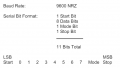
2. Ensure the Serial is correctly configured; see the picture below.
1716446241732.png

As you can see it uses 9 data bits (and the regular Arduino Serial will not work)
Many controllers can be configured to work with 9 data bits. However, the ESP32 can only work with 8 bits, so the best option is to use a Software Serial implementation configured with 9 data bits.

Note: the 9' bit is used to indicate if it's a command or other data.

3. Once the hardware and serial are correctly configured, create a hard-codded "POLL" request and send it every 200 ms. Then, read the response.

The POLL request should be 0x0b, 0x0b (0x0b for the POLL command and then the checksum)
Important: The first byte is a command, so we should set the 9' bit. The checksum 9' bit can be cleared.

I have set and cleared the 9' bit via the parity bit. Basically, I used a regular 8-bit UART with a configurable 9' parity bit, and then I manually set or cleared the parity bit for each byte that I sent.

The coin changer should return ACK or an answer of up to 16 bytes - see the MDB documentation for more details. See link below:
https://www.namanow.org/wp-content/uploads/Multi-Drop-Bus-and-Internal-Communication-Protocol.pdf

Once the coin changer returns a response, you should immediately send an ACK to indicate that you have received it correctly.

Summary:
1. uC sends a POLL command
2. Coin changer responds with an answer or ACK
3. uC sends an ACK (MUST)

We must first get a simple POLL request to work before we can continue with the next steps.

I hope this will help.
 

Attachments

si Abdelhak

Joined May 22, 2024
4
Thank you very much for all the responses, the communication when I send the commands work correctly because I can see the lights on the cashless device that blink correctly after a comand an with the application device I can pay and all the pay steps work correctly.
But the problem when I want see the results in the code(Arduino Serial ) to see how the device reacts, I can't read anything , that's because i don't have a lot of experience with this protocol communication.
For the 9bits setup or the hardware wiring all's good because like I said the payment work correctly, if you want, i will send you all the code functions that has connection with the MDB communication to see the problem :

Code:
#include <Arduino.h>
#include <avr/power.h>
#include <SoftwareSerial.h>

/* CONSTANTES MDB */
#define DOUT  A0
#define CLK  A1
#define OUT4 22
#define BAUD 9600
bool vend_request = false;
uint32_t temp_poll = 0;
uint16_t precio = 0;
SoftwareSerial mySerial(0,1);


#define ADDRESS_MASK      (0xF8)  // section 2.3 - top five bits of address are actually address
#define COMMAND_MASK      (0x07)  // section 2.3 - bottom three bits are command

bool coin_read_value=false;
uint8_t buff_rec_cm[8];

#include <util/setbaud.h>

struct MDB_Byte {
  byte data;
  byte mode;
};


//array of *POLL* commands for every device type.
//Añado la dirección de POLL del lector (0x12)
byte POLL_ADDRESS[3]{0x0B, 0x33, 0x12};

byte EXT_UART_BUFFER[37]; //incoming buffer for receive data from VMC
struct MDB_Byte MDB_BUFFER[37]; //incoming buffer for receive data from MDB peripheral
int EXT_UART_BUFFER_COUNT;
volatile int MDB_BUFFER_COUNT;

//MDB receiving flags
int rcvcomplete;  //MDB message receive completed flag
int mdboverflow;  //MDB message receive error flag


void MDB_Setup() {
  // Set baud rate with setbaud.h
  UBRR0H = UBRRH_VALUE;
  UBRR0L = UBRRL_VALUE;
  // Disable USART rate doubler (arduino bootloader leaves it enabled...)
  UCSR0A &= ~(1 << U2X0);
  // Set 9600-9-N-1 UART mode
  UCSR0C = (0<<UMSEL01)|(0<<UMSEL00)|(0<<UPM01)|(0<<UPM00)|(0<<USBS0)|(1<<UCSZ01)|(1<<UCSZ00);
  UCSR0B |= (1<<UCSZ02); // 9bit
  // Enable rx/tx
  UCSR0B |= (1<<RXEN0)|(1<<TXEN0);
}

void write_9bit(struct MDB_Byte mdbb) {
  while ( !( UCSR0A & (1<<UDRE0)));
  if (mdbb.mode) {
     //turn on bit 9
    UCSR0B |= (1<<TXB80);
  } else {
     //turn off bit 9
    UCSR0B &= ~(1<<TXB80);
  }
  UDR0 = mdbb.data;
}

void MDB_write(int data) {
  struct MDB_Byte b;
  memcpy(&b, &data, 2);
  write_9bit(b);
}

void MDBFlush(){
  MDB_BUFFER_COUNT = 0;
  Serial.flush();
}

int MDB_Receive() {
  unsigned char resh, resl;
  char tmpstr[64];
  int rtr = 0;
  // Wait for data to be received
  while ((!(UCSR0A & (1<<RXC0))) and rtr < 50) {
    delay(1);
    rtr++;
  }
  if (rtr == 50){
    mdboverflow = 1;
    rcvcomplete = 1;
  }
  // Get 9th bit, then data from buffer
  resh = UCSR0B;
  resl = UDR0;
  // Filter the 9th bit, then return only data w\o mode bit
  resh = (resh >> 1) & 0x01;
  return ((resh << 8) | resl);
}

void MDB_getByte(struct MDB_Byte* mdbb) {
  int b;
  b = 0;
  b = MDB_Receive();
  memcpy (mdbb, &b, 2); 
}

byte MDB_ChecksumValidate() {
  int sum = 0;
  for (int i=0; i < (MDB_BUFFER_COUNT-1); i++)
    sum += MDB_BUFFER[i].data;
  if (MDB_BUFFER[MDB_BUFFER_COUNT-1].data == (sum & 0xFF))
    return 1;
  else
    return 0;
}

void MDB_read() {

  MDB_getByte(&MDB_BUFFER[MDB_BUFFER_COUNT]);
  MDB_BUFFER_COUNT++;
  if (MDB_BUFFER_COUNT == 35){
    rcvcomplete = 1;
    mdboverflow = 1;
  }
  if (MDB_BUFFER[MDB_BUFFER_COUNT - 1].mode && MDB_ChecksumValidate()){
    rcvcomplete = 1;
  }
}

void processresponse(int addr){
  mdboverflow = 0;
  rcvcomplete = 0;
  while (!rcvcomplete){
    MDB_read();
  }
  if ((rcvcomplete) && (!mdboverflow)){
    if (MDB_BUFFER_COUNT > 1){
      MDB_write(0x00); // Enviar ACK al dispositivo MDB si la respuesta periférica no es solo un *ACK*, de lo contrario, el periférico intentará enviar datos no confirmados con los próximos comandos de "poll"
      Serial.print("ACK Sent");
    } else {
      if (MDB_BUFFER_COUNT == 1){
        // Solo se recibió un *ACK* del dispositivo periférico, no se necesita confirmación
        Serial.print("ACK");
      }
    }
  }
  for(uint8_t i = 0; i < MDB_BUFFER_COUNT; i++) // Corrección aquí
  {
    Serial.print("Response Data: ");
    Serial.println(MDB_BUFFER[i].data, HEX);
  }
  Serial.println();
}


void MDB_Send(byte UART_BUFFER[37],int UART_BUFFER_COUNT){
  //command seems valid, let's try to send it to peripheral
  struct MDB_Byte AddressByte;
  int addrtx = 0;
  AddressByte.data = UART_BUFFER[0];
  AddressByte.mode = 0x01;
  memcpy(&addrtx, &AddressByte, 2);
  MDB_write(addrtx);
  for (int i = 1; i < UART_BUFFER_COUNT; i++){
    MDB_write(UART_BUFFER[i]);
  }
  processresponse(UART_BUFFER[0] & ADDRESS_MASK);
 
}


//Reset:
void Reset_Cashless()
{
  EXT_UART_BUFFER[0]=0x10;
  EXT_UART_BUFFER[1]=0x10;
  //EXT_UART_BUFFER[1]=0x10;
  MDB_Send(EXT_UART_BUFFER,2);
  MDBFlush(); 
}

//Setup:
void Setup_Config()
{
  EXT_UART_BUFFER[0]=0x11;
  EXT_UART_BUFFER[1]=0x00;
  EXT_UART_BUFFER[2]=0x03;
  EXT_UART_BUFFER[3]=0x00;
  EXT_UART_BUFFER[4]=0x00;
  EXT_UART_BUFFER[5]=0x02;

  uint8_t checksum = 0;
  for (uint8_t i = 0; i < 6; i++)
  {
    checksum += EXT_UART_BUFFER[i];
  }

  EXT_UART_BUFFER[6]=checksum;

  MDB_Send(EXT_UART_BUFFER,7);
  MDBFlush();
}

void Setup_Prices()
{
  EXT_UART_BUFFER[0]=0x11;
  EXT_UART_BUFFER[1]=0x01;
  EXT_UART_BUFFER[2]=0xFF;
  EXT_UART_BUFFER[3]=0xFF;
  EXT_UART_BUFFER[4]=0x00;
  EXT_UART_BUFFER[5]=0x00;

  uint8_t checksum = 0;
  for (uint8_t i = 0; i < 6; i++)
  {
    checksum += EXT_UART_BUFFER[i];
  }
  EXT_UART_BUFFER[6]=checksum;

  MDB_Send(EXT_UART_BUFFER,7);
  MDBFlush();
}

//Poll:
void PollDevice(byte devaddrbyte){
  struct MDB_Byte addrbyte;
  coin_read_value=true;
  rcvcomplete = 0;
  int addrtx = 0;
  addrbyte.data = devaddrbyte;
  addrbyte.mode = 0x01;
  memcpy(&addrtx, &addrbyte, 2);
  MDB_write(addrtx);
  MDB_write(addrbyte.data);
  processresponse(addrbyte.data & ADDRESS_MASK);
  coin_read_value=false;
}

//Función para solicitar una venta.
void Vend_Request(uint16_t precio)
{
  vend_request = true;
  uint8_t precio_enviado[2];
 
  precio_enviado[0] = precio;
  precio_enviado[1] = (precio >> 8) & 0xFF;

  EXT_UART_BUFFER[0]=0x13;
  EXT_UART_BUFFER[1]=0x00;
  EXT_UART_BUFFER[2]=precio_enviado[1];
  EXT_UART_BUFFER[3]=precio_enviado[0];
  EXT_UART_BUFFER[4]=0xFF;
  EXT_UART_BUFFER[5]=0xFF;

  uint8_t checksum = 0;
  for (uint8_t i = 0; i < 6; i++)
  {
    checksum += EXT_UART_BUFFER[i];
  }

  EXT_UART_BUFFER[6]=checksum;

  MDB_Send(EXT_UART_BUFFER,7);
  MDBFlush();
}

void Vend_Cancel()
{
  EXT_UART_BUFFER[0]=0x13;
  EXT_UART_BUFFER[1]=0x01;

  uint8_t checksum = 0;
  for (uint8_t i = 0; i < 2; i++)
  {
    checksum += EXT_UART_BUFFER[i];
  }

  EXT_UART_BUFFER[2]=checksum;

  MDB_Send(EXT_UART_BUFFER,3);
  MDBFlush();
}

void Vend_Success()
{
  EXT_UART_BUFFER[0]=0x13;
  EXT_UART_BUFFER[1]=0x02;
  EXT_UART_BUFFER[2]=0xFF;
  EXT_UART_BUFFER[3]=0xFF;

  uint8_t checksum = 0;
  for (uint8_t i = 0; i < 4; i++)
  {
    checksum += EXT_UART_BUFFER[i];
  }

  EXT_UART_BUFFER[4]=checksum;

  MDB_Send(EXT_UART_BUFFER,5);
  MDBFlush();
}

void Vend_Fail()
{
  EXT_UART_BUFFER[0]=0x13;
  EXT_UART_BUFFER[1]=0x03;

  uint8_t checksum = 0;
  for (uint8_t i = 0; i < 2; i++)
  {
    checksum += EXT_UART_BUFFER[i];
  }

  EXT_UART_BUFFER[2]=checksum;

  MDB_Send(EXT_UART_BUFFER,3);
  MDBFlush();
}

void Session_Complete()
{
  EXT_UART_BUFFER[0]=0x13;
  EXT_UART_BUFFER[1]=0x04;

  uint8_t checksum = 0;
  for (uint8_t i = 0; i < 2; i++)
  {
    checksum += EXT_UART_BUFFER[i];
  }

  EXT_UART_BUFFER[2]=checksum;

  MDB_Send(EXT_UART_BUFFER,3);
  MDBFlush();
}

void Reader_Enable()
{
  EXT_UART_BUFFER[0]=0x14;
  EXT_UART_BUFFER[1]=0x01;

  uint8_t checksum = 0;
  for (uint8_t i = 0; i < 2; i++)
  {
    checksum += EXT_UART_BUFFER[i];
  }

  EXT_UART_BUFFER[2]=checksum;
  MDB_Send(EXT_UART_BUFFER,3);
  MDBFlush();
}

void Expansion_ID()
{
  EXT_UART_BUFFER[0]=0x17;
  for (uint8_t i = 1; i < 31; i++)
  {
    EXT_UART_BUFFER[i]=0x00;
  }
  EXT_UART_BUFFER[31]=0x17;
  MDB_Send(EXT_UART_BUFFER,32);
  MDBFlush(); 
}

void AlwaysIdle_Reader()
{
  EXT_UART_BUFFER[0]=0x17;
  EXT_UART_BUFFER[1]=0x04;
  EXT_UART_BUFFER[2]=0x00;
  EXT_UART_BUFFER[3]=0x00;
  EXT_UART_BUFFER[4]=0x00;
  EXT_UART_BUFFER[5]=0x20;

  uint8_t checksum = 0;
  for (uint8_t i = 0; i < 6; i++)
  {
    checksum += EXT_UART_BUFFER[i];
  }

  EXT_UART_BUFFER[6]=checksum;

  MDB_Send(EXT_UART_BUFFER,7);
  MDBFlush();
}

void AlwaysIdle_Reader_2()
{
  EXT_UART_BUFFER[0]=0x17;
  EXT_UART_BUFFER[1]=0x04;
  EXT_UART_BUFFER[2]=0x04;
  EXT_UART_BUFFER[3]=0x00;
  EXT_UART_BUFFER[4]=0x00;
  EXT_UART_BUFFER[5]=0x00;

  uint8_t checksum = 0;
  for (uint8_t i = 0; i < 6; i++)
  {
    checksum += EXT_UART_BUFFER[i];
  }

  EXT_UART_BUFFER[6]=checksum;
  MDB_Send(EXT_UART_BUFFER,7);
  MDBFlush();
}


void Cashless_Device()
{
  if (millis() - temp_poll > 150)
  {
    temp_poll = millis();
    PollDevice(0x12);
    MDBFlush();
  }
}

void setup() {

  #if F_CPU == 8000000
    delay(100);
    clock_prescale_set(clock_div_1);
  #endif
 
  // Configuro comunicación con Compute Module:
  Serial.begin(9600);
  //mySerial.begin(9600);

  // Configuro comunicación con dispositivo MDB
  MDB_Setup();
}


void loop() {
  Cashless_Device();
  Serial.println("Listenning to the Buffer");
  Serial.print("MDB_BUFFER[0].data : ");
  Serial.println(MDB_BUFFER[0].data);
  Serial.print("MDB_BUFFER[1].data : ");
  Serial.println(MDB_BUFFER[1].data);
 
  delay(1000);
  if(vend_request)
  {
    vend_request = false;
    if((5 == MDB_BUFFER[0].data))
    {
      Serial.println("Vent approved !");
      Vend_Success();
    }
    else if(6 == MDB_BUFFER[0].data && 6 == MDB_BUFFER[1].data)
    {
      Serial.println("Vent denied!");
      Session_Complete();
    }
    delay(2000);
    }
 
   else if (Serial.available() > 0)
  {
    Serial.readBytes(buff_rec_cm,2);
    //Serial1.println("OK");
    if(buff_rec_cm[0] == 'A')
    {
      Reset_Cashless();
    } else if (buff_rec_cm[0] == 'B') {
      PollDevice(POLL_ADDRESS[2]);
    } else if (buff_rec_cm[0] == 'C') {
      Setup_Config();
    } else if (buff_rec_cm[0] == 'D') {
      Setup_Prices();
    } else if (buff_rec_cm[0] == 'E') {
      Expansion_ID();
    } else if (buff_rec_cm[0] == 'F') {
      AlwaysIdle_Reader();
    } else if (buff_rec_cm[0] == 'G') {
      Reader_Enable();
    } else if (buff_rec_cm[0] == 'H') {
      Vend_Request(1);
    } else if (buff_rec_cm[0] == 'I') {
      Vend_Success();
    } else if (buff_rec_cm[0] == 'J') {
      Vend_Cancel();
    } else if (buff_rec_cm[0] == 'K') {
      Vend_Fail();
    } else if (buff_rec_cm[0] == 'L') {
      AlwaysIdle_Reader_2();
    } else if (buff_rec_cm[0] == 'M') {
      Session_Complete();
    }
  }
 
}
 

Thread Starter

ElazarM

Joined Aug 10, 2021
6
I see in your code that you use the ATmega328P hardware UART peripheral for the MDB (which is great)
However, the ATmega328P only has one UART peripheral, so if you manually configure it, it will not work anymore for the Arduino Serial.print("");

Try using for the print outs a software serial (there are many Arduino libraries for that)
 

si Abdelhak

Joined May 22, 2024
4
Yes i will add this :

#include <SoftwareSerial.h>

SoftwareSerial mySerial(0,1);
mySerial.begin(9600);
About the pines, I use the arduino oins 0 and 1 for th UART communication to send the commands to the device it's means that I should set the software serial pins also as the same.
Now, when I read the poll requests I see in the output that there are some spaces, that's means ther's something in the output but i can't read it correctly I suppose, that's the problem.
That's an example for the output :

Code:
   We are in the poll request and we pass to the processresponse
**********************************************************
          We are in the poll request and we pass to the processresponse
**********************************************************
 We are in the poll request and we pass to the processresponse
**********************************************************
 

Thread Starter

ElazarM

Joined Aug 10, 2021
6
What?
You can't use the same pins for the two different UART connections.
You should configure the Software UART to other pins and use a UART to USB converter module to read it to your PC.
 

si Abdelhak

Joined May 22, 2024
4
Okeey....just to clarify the things..
I'm using the pin 0 & 1 to send the commands to the device okey and that's the setup for that :

Code:
byte POLL_ADDRESS[3]{0x0B, 0x33, 0x12};

byte EXT_UART_BUFFER[37]; //incoming buffer for receive data from VMC
struct MDB_Byte MDB_BUFFER[37]; //incoming buffer for receive data from MDB peripheral
int EXT_UART_BUFFER_COUNT;
volatile int MDB_BUFFER_COUNT;

//MDB receiving flags
int rcvcomplete;  //MDB message receive completed flag
int mdboverflow;  //MDB message receive error flag


void MDB_Setup() {
  // Set baud rate with setbaud.h
  UBRR0H = UBRRH_VALUE;
  UBRR0L = UBRRL_VALUE;
  // Disable USART rate doubler (arduino bootloader leaves it enabled...)
  UCSR0A &= ~(1 << U2X0);
  // Set 9600-9-N-1 UART mode
  UCSR0C = (0<<UMSEL01)|(0<<UMSEL00)|(0<<UPM01)|(0<<UPM00)|(0<<USBS0)|(1<<UCSZ01)|(1<<UCSZ00);
  UCSR0B |= (1<<UCSZ02); // 9bit
  // Enable rx/tx
  UCSR0B |= (1<<RXEN0)|(1<<TXEN0);
}

In other hand the cashless can get mycommands correctly and reacts like it should be. When I want to read the poll responses from the device and using the SoftwareSerial I m forced to use other pins okeey (10 and 11 for example ).
But in this case I have already attached the UART device pins in 0 and 1, how can I get the responses on the pins 10 and 11 ?
 
Top