MASTER and SLAVE PICs using SPI in Oshonsoft

Thread Starter

camerart

Joined Feb 25, 2013
3,842
hi C,
Send Vlad a Bug report, your loading looks OK to me.
E
Hi E,
Since my post, I copied and pasted the same program into a new program, saved and then it opened and compiled ok?? I'll see if it happens again, as I'm copying and pasting, which may cause problems.
Cheers, C
 

Thread Starter

camerart

Joined Feb 25, 2013
3,842
Hi,
The intermittent UART fault has re-appeared, so any DATA isn't always sent to the computer terminal, so I can read it.

I asked Vladimir, and he confirmed that the UART on this device is not supported yet :(

Is there a way round it please?
C
 

Attachments

ericgibbs

Joined Jan 29, 2010
21,463
hi C,
Clip from my revised OSH Manual.
Try a test program with just the Software UART as listed below.

Software UART implementation . Index
On all supported PIC devices software serial communication can be implemented with SEROUT and SERIN statements.

The first argument of both statements must be one of the microcontroller's pins, and
the second argument is baud rate: 300, 600, 1200, 2400, 4800, 9600 or 19200.

Using higher baud rates with low clock frequency could cause framing errors.

For SEROUT statement then follows the list of arguments to be sent to serial port.
You can use strings, LF keyword for Line Feed character or CRLF keyword for Carriage Return - Line Feed sequence,
constants and variables.

If '#' sign is used before the name of a variable, then its decimal representation is sent to the serial port.

SEROUT statement uses SEROUT_DELAYUS parameter that can be set by DEFINE directive and has default value of 1000 microseconds.

This defines the delay interval before a character is actually sent to the port, and it is used to increase the reliability of the software SEROUT routine.

For SERIN statement then follows the list of Byte and Word variables to be loaded with the values received on the serial port.

This statement will wait until the required number of bytes is received on serial port.

For serial interface with inverted logic levels, there are SERININV and SEROUTINV statements available.

Some examples:

DEFINE SEROUT_DELAYUS = 5000

SEROUT PORTC.6, 1200, "Hello world!", CrLf
DIM I AS BYTE loop:
SERIN PORTC.7, 9600, I
SEROUT PORTC.6, 9600, "Number: ", #I, CrLf
GOTO loop
 

Thread Starter

camerart

Joined Feb 25, 2013
3,842
hi C,
Clip from my revised OSH Manual.
Try a test program with just the Software UART as listed below.

Software UART implementation . Index
On all supported PIC devices software serial communication can be implemented with SEROUT and SERIN statements.

The first argument of both statements must be one of the microcontroller's pins, and
the second argument is baud rate: 300, 600, 1200, 2400, 4800, 9600 or 19200.

Using higher baud rates with low clock frequency could cause framing errors.

For SEROUT statement then follows the list of arguments to be sent to serial port.
You can use strings, LF keyword for Line Feed character or CRLF keyword for Carriage Return - Line Feed sequence,
constants and variables.

If '#' sign is used before the name of a variable, then its decimal representation is sent to the serial port.

SEROUT statement uses SEROUT_DELAYUS parameter that can be set by DEFINE directive and has default value of 1000 microseconds.

This defines the delay interval before a character is actually sent to the port, and it is used to increase the reliability of the software SEROUT routine.

For SERIN statement then follows the list of Byte and Word variables to be loaded with the values received on the serial port.

This statement will wait until the required number of bytes is received on serial port.

For serial interface with inverted logic levels, there are SERININV and SEROUTINV statements available.

Some examples:

DEFINE SEROUT_DELAYUS = 5000

SEROUT PORTC.6, 1200, "Hello world!", CrLf
DIM I AS BYTE loop:
SERIN PORTC.7, 9600, I
SEROUT PORTC.6, 9600, "Number: ", #I, CrLf
GOTO loop
Hi E,
First, can I clarify the terminology.
When Vlad says " UART Module is not currently simulated for the 18F46K20 device. "
Does this also mean that it won't work in the Simulator but it will compile and be able to be used 'live'?
C
 

ericgibbs

Joined Jan 29, 2010
21,463
When Vlad says " UART Module is not currently simulated for the 18F46K20 device. "
Does this also mean that it won't work in the Simulator but it will compile and be able to be used 'live'?
hi,
It will program and work in the real world, but not be 'emulated' in the IDE simulator.

Please try and let me know how the simple Software test goes.
E
 

ericgibbs

Joined Jan 29, 2010
21,463
hi,
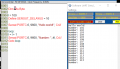
It works for me.
E
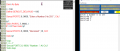
Dim I As Byte

I = 100
Define SEROUT_DELAYUS = 10

Serout PORTC.6, 9600, "Hello world!", CrLf

loop:
I = I + 1
Serout PORTC.6, 9600, "Number: ", #I, CrLf
Goto loop

EG 1122.png
 

Thread Starter

camerart

Joined Feb 25, 2013
3,842
hi,
It works for me.
E
Dim I As Byte

I = 100
Define SEROUT_DELAYUS = 10

Serout PORTC.6, 9600, "Hello world!", CrLf

loop:
I = I + 1
Serout PORTC.6, 9600, "Number: ", #I, CrLf
Goto loop

View attachment 254865
Hi E,
But not for me.
I've updated OSH recently, so perhaps that's the problem.
As mentioned as long as it works 'live' I can carry on. Do you think this is the case?
C
 

Attachments

Thread Starter

camerart

Joined Feb 25, 2013
3,842
Hi E,
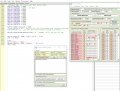
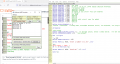
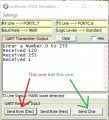
I'm on an old laptop, and this looks promising, although I'm confused about the Received numbers.
C
Hi E,
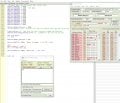
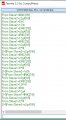
I'm back on my 'new' computer, and it looks different.
Can you clarify what this is please [ DIM ? as BYTE ] I've tried 1, i, I, l and L.

My eyes are glazing over, can you proof read it please?
C
 

Attachments

ericgibbs

Joined Jan 29, 2010
21,463
hi,
It works for.
I have now changed to'X'
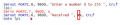
Copy and Paste this code into a blank Basic window,
Do not edit it.

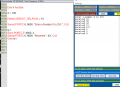
Dim X As Byte
X = 100

Define SEROUT_DELAYUS = 10

Serout PORTC.6, 9600, "Enter a Number 0 to 255 ", CrLf
lp1:
Serin PORTC.7, 9600, X
Serout PORTC.6, 9600, "Received ", #X, CrLf
Goto lp1


1639227591439.png
 

Thread Starter

camerart

Joined Feb 25, 2013
3,842
X = 100

Define SEROUT_DELAYUS = 10

Serout PORTC.6, 9600, "Enter a Number 0 to 255 ", CrLf
lp1:
Serin PORTC.7, 9600, X
Serout PORTC.6, 9600, "Received ", #X, CrLf
Goto lp1
Hi E,

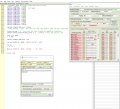
I'm now on a third computer, with recent OSH, here's the result :)although I'm a bit puzzled by the strange numbers, are they asci or similar? or is it the way I entered the numbers?
C
 

Attachments

ericgibbs

Joined Jan 29, 2010
21,463
Hi C,
It would help other users if you could confirm that the features of the Oshonsoft Software UART work correctly in the IDE, for the PIC's which have no IDE HW UART option.
A simple demo basic program, with the images. :)
E
Vlad should add that finding to the 'manual'.
 

Thread Starter

camerart

Joined Feb 25, 2013
3,842
Hi C,
It would help other users if you could confirm that the features of the Oshonsoft Software UART work correctly in the IDE, for the PIC's which have no IDE HW UART option.
A simple demo basic program, with the images. :)
E
Vlad should add that finding to the 'manual'.
Hi E,
I don't feel qualified to post anything for the manual, because I'm not sure of the timing difference between SW and HW.
E,G, for my application, I need a serial output for me to read the receiving terminal on the computer. Hopefully you have solved this above. However, I think it will break when used live for RC control, becuase of latency. I may be wrong??

If 'say' a UART routine was added into the program, would this be work. Would it be in ASM? (I can't speak ASM!)
C
 
Top