
LT Spice question

Thread Starter

bwater

Joined Apr 17, 2020
3
Hi,

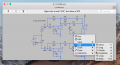
I've downloaded LT Spice so that I can modify and simulate an analogue crossover network for audio, using a pre-existing design. I'm using a Mac running OS 10.13.6. Everything working okay, I can get simulations working, but when I try to modify component values to try and change crossover slopes I get this:
Screen Shot 2020-04-18 at 12.12.41 PM.png

Nothing I can do allows me to actually modify the values.

Any assistance gratefully received!

Thanks,

Bolke
 

Papabravo

Joined Feb 24, 2006
22,082
Are you left clicking on R12? Does your mouse have 1 button or 2 buttons? If it has 2 buttons try right clicking. If it only has 1 button try click on the instruction bar where it says Right click to edit "475" How did you enter the values originally? I suppose you could use a text editor to edit the .asc file directly.
 

Thread Starter

bwater

Joined Apr 17, 2020
3
Are you left clicking on R12? Does your mouse have 1 button or 2 buttons? If it has 2 buttons try right clicking. If it only has 1 button try click on the instruction bar where it says Right click to edit "475" How did you enter the values originally? I suppose you could use a text editor to edit the .asc file directly.
Thanks for you help. No luck, sorry. My mouse is one click (Apple mouse), using a keyboard command to right click. Clicking the instruction bar doesn't work. The file is not mine - it's a download, so I've never entered values. What is curious is that I can get to an edit menu; but then I'm not given any edit options... I'll try the text edit method next.
 

Thread Starter

bwater

Joined Apr 17, 2020
3
Thanks for you help. No luck, sorry. My mouse is one click (Apple mouse), using a keyboard command to right click. Clicking the instruction bar doesn't work. The file is not mine - it's a download, so I've never entered values. What is curious is that I can get to an edit menu; but then I'm not given any edit options... I'll try the text edit method next.
... and that doesn't work either. Hmmmm.
 
Top




