Looking help to design First PCB

Thread Starter

aspirea5745

Joined Apr 17, 2019
106
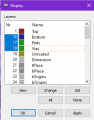
Use the Display button to select the metal layer you want to view, plus pads, vias, and, maybe, Dimension.

When you print, make sure select the Style options you want (e.g. Black, Solid, and, maybe Mirror). Select scale factor (usually 1). If you set page limit too low, printout might get scaled.
.
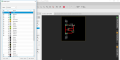
I don't see the metal layer option

upload_2019-6-5_20-23-0.png


When you print, make sure select the Style options you want (e.g. Black, Solid, and, maybe Mirror). Select scale factor (usually 1). If you set page limit too low, printout might get scaled.
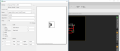
Print options
upload_2019-6-5_20-23-54.png
 

Thread Starter

aspirea5745

Joined Apr 17, 2019
106
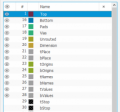
They're called Top and Bottom.
@dl324
1) We can select only one Top or bottom Which one needs to select Top or bottom 16?

2) Which option need to select in printing option

I have a selected black, solid and caption but still showing upper part of design as a posted image before
 

dl324

Joined Mar 30, 2015
18,326
1) We can select only one Top or bottom Which one needs to select Top or bottom 16?
If you're printing to review or make your own board, you'll only print one metal layer at a time.
2) Which option need to select in printing option

I have a selected black, solid and caption but still showing upper part of design as a posted image before
You need to turn off the layers you don't want to view/print.

The thing on the left looks to be an eye; not sure because the newest version of Eagle I've used is 7.5.0. I don't like the changes they've made so I'm sticking with older versions.
upload_2019-6-5_8-17-36.png

This is what 7.5.0 looks like with Bottom, Pads, and Vias selected:
upload_2019-6-5_8-19-22.png
 

Berzerker

Joined Jul 29, 2018
624
If you are just worried about printing it out why not use the "Snipping tool", save and print (?)
Don't know if you need it to scale... maybe for printing your own DIY PCB ?

Brzrkr
 

Thread Starter

aspirea5745

Joined Apr 17, 2019
106
If you're printing to review or make your own board, you'll only print one metal layer at a time.
You need to turn off the layers you don't want to view/print.
I think I have done it for a single layer PCB

upload_2019-6-5_21-6-7.png
If I have two images would this enough to make simple PCB board?

Now I would start to make power supply
 

dl324

Joined Mar 30, 2015
18,326
If I have two images would this enough to make simple PCB board?
How do you plan to make the board? Hand draw with etch resist, toner transfer, UV exposure, point to point, PCB fab house?

I've used Eagle to do layouts that I wired point to point. Laying it out gave me a wiring diagram and minimizing wire crossings let me use bare wire.
 

Berzerker

Joined Jul 29, 2018
624
I thought about doing my own PCB when I first started but after looking at the headache of all the things to buy, chemicals, putting in your own vias, drilling, ironing, etc. I changed my mind! If I were you I would just let a PCB fab house do it like dl324 mentioned.

Brzrkr
 
Last edited:

Thread Starter

aspirea5745

Joined Apr 17, 2019
106
How do you plan to make the board?
.
I want to Eagle to do layouts only
I thought about doing my own PCB when I first started but after looking at the headache of all the things to buy, chemicals, putting in your own vias, drilling, ironing, etc. I changed my mind! If I were you I would just let a PCB fab house like dl324 mentioned.
Brzrkr
I don't have the necessary things as you both mentioned. I would send the PCB layout fab house. I am focusing only on layout design
 

dl324

Joined Mar 30, 2015
18,326
If I were you I would just let a PCB fab house like dl324 mentioned.
Notice that was the last of my suggestions. I prefer to make my own boards using toner transfer. It takes time, but I'm retired and have plenty of discretionary time. Once I finalize a layout, I can have a board ready for drilling in half an hour.

I did some layouts for counters using discrete flip flops and decided to just do point to point wiring. The board layout gave me something to mark up as I wired things.
 

dl324

Joined Mar 30, 2015
18,326
I don't have the necessary things as you both mentioned. I would send the PCB layout fab house. I am focusing only on layout design
In that case, the PCB fabricator will need more information. You should also run DRC and ERC checks to make sure you don't have anything that exceeds the capabilities of whoever you pick. You should also make sure your circuits works as desired before sending it off.

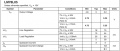
You don't give any specs for your input voltage or the value filter cap, so no one can comment on whether the cap is okay. 78L05 aren't guaranteed to regulate with no load current:
upload_2019-6-5_9-7-23.png
 

Berzerker

Joined Jul 29, 2018
624
dl324 said:
Notice that was the last of my suggestions. I prefer to make my own boards using toner transfer. It takes time, but I'm retired and have plenty of discretionary time. Once I finalize a layout, I can have a board ready for drilling in half an hour.
Not saying in the future I wouldn't mind learning how to do this myself but for now I felt safer leaving it to the Pros. They turned out great! I haven't got around to soldering things in yet and testing.... (YET)
aspirea5745 said:
I don't have the necessary things as you both mentioned. I would send the PCB layout fab house. I am focusing only on layout design
Then maybe I'm not understanding why you would want to print it out :confused: Never printed a thing when I done mine.
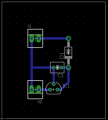
I used these guys
https://www.4pcb.com/4pcb-monthly-specials.html
$33 a piece (a special they had running) + tax and shipping = about $125 total for 3 boards.

Brzrkr
 

Thread Starter

aspirea5745

Joined Apr 17, 2019
106
You don't give any specs for your input voltage or the value filter cap, so no one can comment on whether the cap is okay. 78L05 aren't guaranteed to regulate with no load current:
Then maybe I'm not understanding why you would want to print it out :confused: Never printed a thing when I done mine.
My goal is to learn PCB layout design. I found that most of the people's work's on Eagle. I am getting hands-on Eagle software so I can make the PCB layout. I just started with a simple circuit. I feel difficulty in routing. I will post a mine circuit diagram with the specification. but before I want to know more about Eagle

let's say I have this terminal block connector http://shop.rabtron.co.za/catalog/cmm5-terminal-block-screw-pitch-p-2080.htmland I want to mount this on my PCB board

How do you pick the required component in the library?
 
Last edited:

dl324

Joined Mar 30, 2015
18,326
I feel difficulty in routing
Good component placement facilitates clean routing. Since PCB cost is proportional to area, we generally try to make things as small as possible; barring other considerations.

Your layout could be smaller with simpler routing:
upload_2019-6-5_10-3-0.png

Some find a board more aesthetically pleasing if components are aligned.
 

Berzerker

Joined Jul 29, 2018
624
aspirea5745 said:
I found that most of the people's work's on Eagle.
Berzerker said:
I asked here about PCB design programs too. I downloaded eagle because I am very good with AutoCad and used it for years. But found it hard to navigate without looking at a bunch of tutorials :rolleyes:
So I downloaded Diptrace and have never looked back.... Much easier to work with.
This is why I picked Diptrace. Now don't take what I'm saying bad BUT Just because "MOST" people use it doesn't mean it's the right software to start with and learn on. Diptrace will allow you to learn the basics without all the bloat. Eagle is a much bigger and more powerful program and can do a lot of things but Diptrace is built just for PCB design. I think once you learn it the transfer to Eagle would be much easier.

Again Download it and give it a try

Brzrkr
 

djsfantasi

Joined Apr 11, 2010
9,237
In that case, the PCB fabricator will need more information. You should also run DRC and ERC checks to make sure you don't have anything that exceeds the capabilities of whoever you pick. You should also make sure your circuits works as desired before sending it off.

You don't give any specs for your input voltage or the value filter cap, so no one can comment on whether the cap is okay. 78L05 aren't guaranteed to regulate with no load current:
View attachment 179083
Pay attention to dl324’s about running DRC and ETC checks. You’ll skip that step just once. And it will be on a large order right when you are overconfident. Ask me how I know :confused:
 

Berzerker

Joined Jul 29, 2018
624
djsfantasi said:
Ask me how I know :confused:
:)
Now that's funny!
I'm still worried about mine blowing up when I wire it up to all the other things that's needed to make it work.

Brzrkr
 
Last edited:
Top