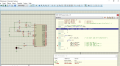
Why does that routine have to return anything?I have fixed it warning was line (120): warning C173: missing return-expression. I have just replaced statement return with return 0; now there is no error and no warnings
I was searching way to set breakpoints in proutes simulator. I will take time to understand to set breakpoints. as soon as possible I will try to set break pointAgain I ask, can you set breakpoints and step through the code in your sim? I believe the sim supports that kind of debugging if you know how to do it?
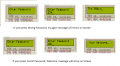
There are the some issues like when I press button "1" it doesn't display quickly on screen. any button number display after some specific delay time. during this time if I press any buttons it will show on screen but after that if I press any button it doesn't show on screen. so I think there is delay problemAlso, a quick look at the display output shows me:
You are getting 4 buttons reported so the get password routine is probably working (it got 4 of something).
You have at least a partial 'Try Again' message so the check password routine and test is probably working (3333 is not the password).
Why you are getting all of those '3's is probably because you haven't initialized the return value in CheckSwitches.
Is this fixed?Why you are getting all of those '3's is probably because you haven't initialized the return value in CheckSwitches.
Need an answer on this.Why does that routine have to return anything?
I was trying to set break point in proteus simulator I have checked this two video https://www.google.co.in/search?q=how+to+set+break+point+proutes+&ie=utf-8&oe=utf-8&client=firefox-b&gfe_rd=cr&dcr=0&ei=pO3DWfXRLeGK8QfWxLeYBwIs this fixed?
Need an answer on this.
Breakpoints are usually set by clicking in the source code window when you are preparing to run. When you run the code, it will stop at the breakpoint. You then can single-step the code through a routine to see how each step is working. You also can open a 'Watch' window (or whatever it's called) and specify variables to 'watch'. After each step, the watches will be updated and you can see how the data moves around in your program. Learning to use these tools is vital if you are going to go anywhere in embedded programming. Otherwise, when something does not work, you are left guessing..
OK I do some modification and try to fix issues and let you knowIs this fixed?
Delays:
I don't see anywhere where you have determined how long a delay is for a count value. I would consider (again) using the Delay routine that is in the LCD code. It seems to be calibrated.
I have done long search to know that weather my simulator set break point or not. I found that simulator support that type of debugging but it need .cof file but my compiler does not generate this file so that is reason I can't set break point in simulator. so I have two choice, either I choose another compiler or do test manually. means try with different type of approach until i get the successAgain I ask, can you set breakpoints and step through the code in your sim? I believe the sim supports that kind of debugging if you know how to do it?
I think you should finish the password project first. You need to demonstrate that you can drill down into problems and fix them in a timely, organized manner AND acquire some debugging tools and skills on something you know before proceeding on to anything else. Otherwise, you will wind up in the same place with half-written code that you don't understand how to fix. I personally don't want to do that.I know moving on another topic without completing first one is bad thing but If you don't mind can we start with interrupt. flow chart is already made. I am just asking you will you continue with interrupt?
Note : still I am working on password project. once I get success I will let you know. I think I have learned lot from this project. I know some things left in program but belive me I will do it as soon as possible
I think you should finish the password project first. You need to demonstrate that you can drill down into problems and fix them in a timely, organized manner AND acquire some debugging tools and skills on something you know before proceeding on to anything else. Otherwise, you will wind up in the same place with half-written code that you don't understand how to fix. I personally don't want to do that.
OK I will follow your advice. I had some issues regarding compiler and simulator. I was trying to solve them one by one. so that's why I took so much time to reply.Parth, John is right. A very important part of people's education is not just knowing stuff, but rather developing one's sense of discipline. I strongly suggest you finish each step of your project first, and thoroughly give it its finishing touches, before moving on to the next stage.
That way you will also have a lot less debugging and testing to do when you assemble each component and routine at the very end.
#include<reg51.h>
void cct_init(void);
void InitTimer0(void);
int main(void)
{
cct_init(); // Make all ports zero
InitTimer0(); // Start Timer0
while(1) // Rest is done in Timer0 interrupt
{
}
}
void cct_init(void)
{
P0 = 0x00;
P1 = 0x00;
P2 = 0x00;
P3 = 0x00;
}
void InitTimer0(void)
{
TMOD &= 0xF0; // Clear 4bit field for timer0
TMOD |= 0x02; // Set timer0 in mode 2
TH0 = 0x05; // 250 usec reloading time
TL0 = 0x05; // First time value
ET0 = 1; // Enable Timer0 interrupts
EA = 1; // Global interrupt enable
TR0 = 1; // Start Timer 0
}
void Timer0_ISR (void) interrupt 1 // It is called after every 250usec
{
Out = ~Out; // Toggle Out pin
TF0 = 0; // Clear the interrupt flag
}
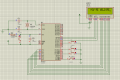
Excellent... but the last screen should be spelled "YOU'RE WELCOME"Everything was fine but there was mistake in my delay routine. Now I have corrected my mistake. Now I am able to see what I want to do
View attachment 136010
Note: I couldn't capture screen shot of four number because delay time was very short.
There was problem in my delay routine and had some other issuesLooks good. What was the problem?
Post the code so we can see how you did it.
FWIW, 'YOUR' is not used correctly. It should be you're, a contraction of 'you are'. But in this context, I would just say 'Welcome'. Spelling and grammar are important in a user interface. Don't feel bad, a depressingly high percent1age of native English speakers do not use 'your' correctly either.
Do those things then post the problem statement and flow chart for the interrupt stuff.

#include <REG51.h>
/*Data pins connected to port P1 of 8051 */
#define Data_Port_Pins (P1)
#define Switch_Pressed (1)
#define Switch_Not_Pressed (0)
sbit Switch_1 = P2^4;
sbit Switch_2 = P3^0;
sbit Switch_3 = P3^3;
sbit Switch_4 = P3^7;
sbit Register_Select_Pin = P2^0; /* Register Pin of LCD connected to Pin 0 of Port P2 */
sbit Read_Write_Pin = P2^1; /* Read/Write Pin of LCD connected to Pin 1 of Port P2 */
sbit Enable_Pin = P2^2; /* EN pin connected to pin 2 of port P2 */
/* Function for creating delay in milliseconds */
void Debounce_time(unsigned int n)
{
unsigned y;
for (y=0; y<n; y++);
}
bit check_Switch_1(void)
{
if(Switch_1 == 0) /* Switch is pressed */
{
Debounce_time(22000); /* wait 22 msec */
if(Switch_1 == 0) /* check switch again */
return Switch_Pressed; /* switch is really pressed */
}
return Switch_Not_Pressed;
}
bit check_Switch_2(void)
{
if(Switch_2 == 0) /* Switch is pressed */
{
Debounce_time(22000); /* wait 22 msec */
if(Switch_2 == 0) /* check switch again */
return Switch_Pressed; /* switch is really pressed */
}
return Switch_Not_Pressed;
}
bit check_Switch_3(void)
{
if(Switch_3 == 0) /* Switch is pressed */
{
Debounce_time(22000); /* wait 22 msec */
if(Switch_3 == 0) /* check switch again */
return Switch_Pressed; /* switch is really pressed */
}
return Switch_Not_Pressed;
}
bit check_Switch_4(void)
{
if(Switch_4 == 0) /* Switch is pressed */
{
Debounce_time(22000); /* wait 20 msec */
if(Switch_4 == 0) /* check switch again */
return Switch_Pressed; /* switch is really pressed */
}
return Switch_Not_Pressed;
}
/* check switches */
unsigned char Check_Switches(void)
{
unsigned char ReturnValue;
ReturnValue = 0;
if (check_Switch_1()== Switch_Pressed )
{
ReturnValue = '1' ;
}
else if (check_Switch_2()== Switch_Pressed)
{
ReturnValue = '2';
}
else if (check_Switch_3()== Switch_Pressed)
{
ReturnValue = '3';
}
else if (check_Switch_4()== Switch_Pressed)
{
ReturnValue = '4';
}
return ReturnValue;
}
unsigned int wait_for_a_switch(void)
{
unsigned int Switch_Number = 0; /* start with 'no switch'*/
while (Switch_Number == 0)
{
Switch_Number = Check_Switches(); /*and loop until you get some non zero value (switch pushed)*/
}
return Switch_Number; /* then return that value */
}
unsigned int wait_for_no_switches(void)
{
unsigned int Switch_Number = 0; // start with 'no switch'
while (Switch_Number != 0)
{
Switch_Number = Check_Switches();
}
return Switch_Number ;
}
/* Function to send command instruction to LCD */
void LCD_Command (unsigned char command)
{
Data_Port_Pins = command;
Register_Select_Pin =0;
Read_Write_Pin=0;
Enable_Pin =1;
Debounce_time(1000);
Enable_Pin =0;
}
/* Function to send display data to LCD */
void LCD_Data (unsigned char Data)
{
Data_Port_Pins = Data;
Register_Select_Pin=1;
Read_Write_Pin=0;
Enable_Pin =1;
Debounce_time(2000);
Enable_Pin =0;
}
/* Function to prepare the LCD and get it ready */
void LCD_Initialization()
{
LCD_Command (0x38);
LCD_Command (0x0e);
LCD_Command (0x01);
LCD_Command (0x81);
}
unsigned char password[4]={'4','3','1','2'};
unsigned char input[4];
void Get_Password (void)
{
unsigned char index;
for(index=0; index<4; index++)
{
wait_for_no_switches();
input[index]=wait_for_a_switch();
LCD_Data(input[index]);
}
}
bit Check_Password(void)
{
unsigned char index;
for(index=0; index<4; index++)
{
if(input[index] != password[index]) /* check each input character against the password chars */
return 0; /*return FALSE on the first mismatch */
}
return 1; // it got through 4 matches so input matches password - return TRUE
}
/* Function to send string to LCD */
void LCD_String (unsigned char *string)
{
int x=0;
while(string[x]!='\0')
{
LCD_Data(string[x]);
x++;
Debounce_time(10000);
}
return;
}
void main(void)
{
/*initSYSTEM */
unsigned char string1[]= "Enter Password";
unsigned char string2[] =" YOU'RE WELCOME";
unsigned char string3[] ="Try Again";
LCD_Initialization();
while(1)
{
LCD_String (string1);
LCD_Command (0xc0);
Get_Password();
if(Check_Password()) /* returns TRUE if password and input matches - show result */
{
LCD_Command (0x01);
LCD_String (string2);
}
else
{
LCD_Command (0x01);
LCD_String (string3);
Debounce_time(40000);
LCD_Command (0x01);
}
Debounce_time(100); /* wait to display result message, */
}
}
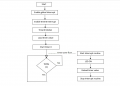
I have made this flow chart for timer interruptDo those things then post the problem statement and flow chart for the interrupt stuff.

When interrupt occur, then tells the processor to stop what it is doing, and handle a task first. After the interrupt i, the processor goes back to whatever it was doing before. and timers are used to generate time delaysOK! On to the interrupts. So first, what is it supposed to do?
One timer tick take = 1.085uSAnd let's use the real 8051 timer. I don't want to spend time on hypothetical hardware that isn't like any real hardware.
To compute the timer settings you will need to know
1) the interrupt period (time between interrupts)
2) which timer you want to use
3) the basic input frequency to the timer. In a standard 8051, I think that is Fosc/12.
From those values you can calculate how many timer ticks there are between interrupts and from that, what to set the timer to on each interrupt.
Neither TH0 nor TL0 can be greater than 255. Total timing in cycles is determined by 256*TH0 + TL0When interrupt occur, then tells the processor to stop what it is doing, and handle a task first. After the interrupt i, the processor goes back to whatever it was doing before. and timers are used to generate time delays
One timer tick take = 1.085uS
Total count by 16 bit counter = 65,536 ticks
Timer ticks * 1.085uS = Desired time
Suppose I need 40 ms delay
40ms = 40,000 uS
Timer ticks = 40,000/1.085 = 36, 866
assume its high value of counter
Than low value = 65,535-36,866 = 28, 669
interrupt period = 40 ms
TH0 = 36,866
TL0 = 28,669
Does this value give 40 ms delay ?
Parth, I know what an interrupt is - I want to know what this program is supposed to do. Flash an LED? If so at what rate?When interrupt occur, then tells the processor to stop what it is doing, and handle a task first. After the interrupt i, the processor goes back to whatever it was doing before. and timers are used to generate time delays