Windows 10 tiny computer, This computer does not have much hard drive. Fills up with videos very fast. I need to delete some files automatically when they age to 3 days old. An old dog trying to learn new tricks.
Help?
Create a "Job" in Windows-Task-Manager.
Have it run a "Batch-File" on a Schedule.
I can't tell You how to create that Batch-File off hand,
but I'm reasonably sure that it can be made to select
Files based on Creation Date / Time, and/or, only in a particular Folder,
and/or, with a particular File-Type-Extension.
Do a search for "Windows Batch-File options", and, "Windows Schedule a Task"
.
.
.
Create a "Job" in Windows-Task-Manager.
Have it run a "Batch-File" on a Schedule.
I can't tell You how to create that Batch-File off hand,
but I'm reasonably sure that it can be made to select
Files based on Creation Date / Time, and/or, only in a particular Folder,
and/or, with a particular File-Type-Extension.
Do a search for "Windows Batch-File options", and, "Windows Schedule a Task"
.
.
.
Wendy, I like this idea. I suck at batch files but years ago I liked playing with Visual Basic Scripting (.vbs files) so I tried it. Seems to work. Here is what I suggest you try as an experiment. Copy and paste this code into Notepad.
Delete Files in a Folder:
' Delete All Files in a Folder

set objFSO = createobject("Scripting.FileSystemObject")
set objFolder = objFSO.GetFolder("C:\Junk")

for each folder in objFolder.SubFolders
objFSO.DeleteFolder folder.path, True
next

for each file in objFolder.Files
objFSO.DeleteFile file.path, True
next
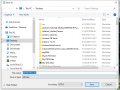
Create a folder on your C:\ drive and name it Junk. You can see in the above code the file path to the C:\Junk folder. Later you can edit the code in Notepad to your folder you want the files deleted in. Once you have the code sample copied and pasted into notepad from File choose save as and name the file. I just called it Delete Files and saved it to my desktop for convenience. Now when saving the file do not save it as a text file choose All Files. Here is an image which should help.
File Name : Delete Files.vbs and make sure you add the .vbs extension.
Save as type: All Files
Next just have the Microsoft Scheduler run that file as often as you like. Windows 10 Scheduler .
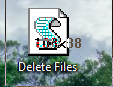
Edit: Before I forget, once you save the script file if you just double click on it, the script will run. To edit the script Right click on the script and choose edit. Remember if you click on it, it will run. The .vbs file should look like this when correctly saved.
There are ways to set this up so a script will automatically run every X hours, days or weeks but I have forgotten how to do it. This is why I used the Windows Task Scheduler.
Are there specific directories and file extensions that you want to delete? Do you have PERL installed on your computer?
I have a script that cleans up .tmp files created by some browser I used on WinXP. It accepts the file age in days as an argument, but I run it in the directory I want to clean up.
Code:
C:\utils\XPutils\utils>perl cleantmp.pl -h

Clean files in . older than 1 days, matching .tmp.

Usage: cleantmp [-d] [-day] [-h] [-l] [-v]
-d      Enable debug mode.
-day    Specify TMP file age in days, default = 1.
-h      Display this text and exit.
-l      List files that would be deleted, without deleting.
-v      Enable verbose output.
Windows 10 tiny computer, This computer does not have much hard drive. Fills up with videos very fast. I need to delete some files automatically when they age to 3 days old. An old dog trying to learn new tricks.
Help?
The other suggestions here are good I think BUT be careful, jobs or services that delete data are not to be taken lightly, any kind of slip up and you could lose valuable data.
You would save the file in note pad but as I mentioned earlier save it with the .bat file extension. In the above .bat file when run it will remove files 3 days old or older. You can use Windows Task Scheduler to run it daily. In this example I just created a folder on my C drive and named it Temp.
Since I have not seen Wendy return to the thread I have no clue if she still plans to pursue this. Beats me.
I'm sorry I haven't responded Sooner, I need something that will run at midnight every day.
As I understand this bat file will only run once when run?
ForFiles /p "C:\Temp" /s /d -3 /c "cmd /c del @file"
I'm sorry I haven't responded Sooner, I need something that will run at midnight every day.
As I understand this bat file will only run once when run?
ForFiles /p "C:\Temp" /s /d -3 /c "cmd /c del @file"
Yep, when run the batch file runs once. I have been using it and it works fine on my Windows 10 system. Every day I have been adding 3 files to my folder C:\Temp and every day the batch file removes anything 3 days old (or older if I forget to run it for a day or two).
Just remember to replace C:\ with your folder. You would save the file the same way I mentioned saving a .vbs file extension but use .bat verse .vbs.
Have the Windows Task Scheduler run the file daily at your choice of time from the location you save the .bat file to.
On Windows 10, the Task Scheduler lets you create and run tasks automatically, and in this guide, I'll outline the steps to complete the process. Typically, the operating system and certain apps use the scheduler to automate maintenance tasks (such as disk defragmentation, disk cleanup, and updates). However, you can use it to automate your own tasks. For example, you can launch programs, run commands, and execute scripts at a specific time or trigger tasks when a specific event occurs.
OK, so I create a batch file:
The command is: ForFiles /p “C:\path\to\folder” /s /d -30 /c “cmd /c del /q @file”
So what do I change to delete any files older than 3 days?
The command is: ForFiles /p “C:\path\to\folder” /s /d -3 /c “cmd /c del /q @*.mkv”
Would this work?
1. The commands ForFiles and CMD, each have options named "C" these are not the same despite them both being /C.
2. @FILE becomes the name of the file that the ForFiles command passes to the embedded CMD command.
3. In this example the time since last modified, for the files, is 3 days ago.
Of course you'll need to test this and so that means be VERY Careful or you could delete important stuff by mistake.
If there are multiple folders involved you'd need to run two separate ForFiles:
As I said, test this, I may have made an error, I have never used thus feature myself (but have worked as a programmer on Windows for over thirty years).
The CMD command basically creates another command window, and the text in the quotes is then passed to that, mush as if you opened a command window yourself and typed the command in that appears between the quotes.
The /S option is not needed unless you want the operation to automatically include sub folders - that's something you may or may not want.
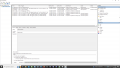
I tried setting it up today on the small computer, I then took a screenshot of the directory to see if anything is missing tomorrow. Here is what the task manager looked like after I set it up. While I was about it I put the task manager on my taskbar.

 Facebook
 Google
 GitHub
 Linkedin




 This is why I used the Windows Task Scheduler.