Picard: Mr. LaForge, have you had any success with your attempts at finding a weakness in the Borg?
And Mr. Data, have you been able to access their command pathways? Geordi: Yes, Captain. In fact, we found the answer by searching through our archives on late Twentieth-century computing technology.
Geordi presses a key, and a logo appears on the computer screen. Riker [looks puzzled]: What the hell is 'Microsoft'? Data [turns around to answer]: Allow me to explain. We will send this program, for some reason called Windows, through the Borg command pathways.
Once inside their root command unit, it will begin consuming system resources at an unstoppable rate. Picard: But the Borg have the ability to adapt. Won't they alter their processing systems to increase their storage capacity? Data: Yes, Captain. But when 'Windows' detects this, it creates a new version of itself known as an 'upgrade'. The use of resources increases exponentially with each iteration. The Borg will not be able to adapt quickly enough. Eventually all of their processing ability will be taken over and none will be available for their normal operational functions. Picard: Excellent work. This is even better than that 'unsolvable geometric shape' idea.
.. . . 15 Minutes Later . . . Data: Captain, We have successfully installed the 'Windows' in the command unit and as expected it immediately consumed 85% of all resources.
We however have not received any confirmation of the expected 'upgrade'. Geordi: Our scanners have picked up an increase in Borg storage and CPU capacity to compensate, but we still have no indication of an 'upgrade' to compensate for their increase. Picard: Data, scan the history banks again and determine if their is something we have missed. Data: Sir, I believe there is a reason for the failure in the 'upgrade'.
Appearently the Borg have circumvented that part of the plan by not sending in their registration cards. Riker: Captain we have no choice. Requesting permission to begin emergency escape sequence 3F . . . Geordi [excited]: Wait, Captain I just detected their CPU capacity has suddenly dropped to 0%! Picard: Data, what do your scanners show? Data: Appearently the Borg have found the internal 'Windows' module named 'Solitaire' and it has used up all the CPU capacity. Picard: Let's wait and see how long this 'solitaire' can reduce their functionality.
.. . . Two Hours Pass . . . Riker: Geordi what's the status on the Borg? Geordi: As expected the Borg are attempting to re-engineer to compensate for increased CPU and storage demands, but each time they successfully increase resources I have set up our closest deep space monitor beacon to transmit more 'windows' modules from something called the 'Microsoft fun-pack'. Picard: How much time will that buy us? Data: Current Borg solution rates allow me to predicate an interest time span of 6 more hours. Geordi: Captain, another vessel has entered our sector. Picard: Identify! Data: It appears to have markings very similar to the 'Microsoft' logo ... Over the speakers: THIS IS ADMIRAL BILL GATES OF THE MICROSOFT FLAGSHIP MONOPOLY. WE HAVE POSITIVE CONFIRMATION OF UNREGISTERED SOFTWARE IN THIS SECTOR. SURRENDER ALL ASSETS AND WE CAN AVOID ANY TROUBLE. YOU HAVE 10 SECONDS! Data: The alien ship has just opened its forward hatches and released thousands of humanoid shaped objects. Picard: Magnify forward viewer on the alien craft. Riker: Good God captain! Those are humans floating straight toward the Borg ship with no life support suits ! How can they survive the tortures of deep space?! Data: I don't believe that those are humans, Sir. If you will look closer I believe you will see that they are carrying something recognized by twenty-first century man as doe skin leather briefcases, and wearing Armani suits. Riker and Picard together [horrified]: Lawyers!!! Geordi: It can't be. All the Lawyers were rounded up and sent hurtling into the sun in 2017 during the Great Awakening. Data: True, but appearently some must have survived. Riker: They have surrounded the Borg ship and are covering it with all types of papers. Data: I believe that is known in ancient venacular as 'red tape' it often proves fatal. Riker: They're tearing the Borg to pieces! Picard: Turn off the monitors. I can't stand to watch, not even the Borg deserve that.
The benefit is that only the VPN server needs to be exposed to the internet. All the other servers and VMs work behind the VPN, regardless of location.
Dumb question, but I want to hear the answer from those in the know. Is Linux a truly deterministic OS? ... More to the point, can it be reliably be trusted to control complex machinery in real time?
Dumb question, but I want to hear the answer from those in the know. Is Linux a truly deterministic OS? ... More to the point, can it be reliably be trusted to control complex machinery in real time?
Yes. Assuming you use a realtime kernel (like Debian's RT kernel, for example) and properly develop for realtime application. I haven't used Linux RT for quite a while but it was good enough for a project in a research lab when I did and it's only gotten better.
I am partial to Debian but it isn't the only choice.
Dumb question, but I want to hear the answer from those in the know. Is Linux a truly deterministic OS? ... More to the point, can it be reliably be trusted to control complex machinery in real time?
Yes and no .
Any OS , even a real time one , code can be written that breaks the real time part.
Real Time control is at the hands of the SW developer. A RT os provides the hooks to allow you to write deterministic code .
Then again , it depends upon what level of "real time" you want
If it's that a pump must start to run when X happens within say 10ms , then a RT is is probably ok.
If you want the pump to start to run within us , then that might be pushing limits.
If pump must run , say a nuclear reactor needs it , you probably want a lot more hardware solution and backups.
Linux RT is are a lot more predictable than the windows derived ones,
But if you want real real time , you tend to not want things like audio and video drivers and all the overhead even a minimalist Linux has , and you end up writing your own state machine code ! .
As often , it all depends on what degree one requires , engineering decisions. ..
Real-Time Operating System (RTOS) as a compilation option has been in the mainline kernel since about 6.12 as PREEMT_RT. Most of my hard realtime code (microseconds of response times deadlines) still runs on bare-metal state machine driven microcontrollers with message passing to a custom Linux kernel via kernel mode drivers.
While there has been mainline Linux kernel support for real-time (RT) on x86/x86_64, ARM64 (AArch64), and RISC-V since Linux 6.12 and LoongArch RT since Linux 6.13, only now is the ARM (non-ARM64/AArch64) support for older SoCs seeing mainline real-time support with Linux 7.1.
The ARM support for real-time had continued to be carried by the few remaining out-of-tree RT patches but for Linux 7.1 the final hurdles have been overcome to get all the necessary bits in mainline. Prior to the Linux 7.1-rc1 release this past weekend, this Git merge happened that cleaned up the ARM fault handling and in turn allowing PREEMPT_RT to work for mainline ARM Linux builds.
What this doesn't mean
Being mainline doesn't mean PREEMPT_RT becomes the kernel's default preemption model, or that most users will ever set CONFIG_PREEMPT_RT=y. It's still an explicit, EXPERT-gated build-time choice, because it trades throughput for worst-case latency — a tradeoff most general-purpose systems don't want. See the Real-Time Linux Tuning Guide for what actually configuring and running an RT kernel involves once you've built one, and RT Scheduler: SCHED_FIFO and SCHED_RR for the scheduling side that RT workloads typically pair with PREEMPT_RT.
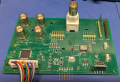
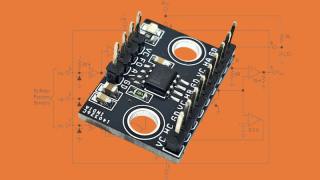
Using serial ports in a kernel module for serially interfaced hardware. Here it will be used (with the actual driver when it's done) with the PIC32AK DAQ/IMU board.
My prototype board. https://elinux.org/images/0/0e/Serdev-elce-2017-2.pdf
[ 1741.657326] Serial Device opened.
[ 1741.660893] rcv_buff called:
Len: 12
Value:Hello World.
[ 3172.957831] Serial Device Closed.
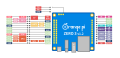
On the Orange PI board the device tree files need to be modified and recompile so the bus devices are created at boot time. Using uart5 on the board.
Uboot config file: orangepiEnv.txt
The sun50i-h616-ph-uart5 and sun50i-h616-ser_dev overlay files create the serial device. First with the sun50i-h616-ph-uart5 file, we enable the port and give it physical pins.
sun50i-h616-ph-uart5
Physical address on the SoC, the RX/TX pin names and the PH pins (uart5_ph_pins added to the SoC include file for use here).
Section of the /boot/dtb/allwinner/sun50i-h616.dtsi
If all is good you see something like this on the uart diagnostic port uart0
Found U-Boot script /boot/boot.scr
3636 bytes read in 2 ms (1.7 MiB/s)
## Executing script at 4fc00000
U-boot loaded from SD
Boot script loaded from mmc
306 bytes read in 1 ms (298.8 KiB/s)
30384 bytes read in 10 ms (2.9 MiB/s)
Working FDT set to 4fa00000
222 bytes read in 21 ms (9.8 KiB/s)
Applying kernel provided DT overlay sun50i-h616-gpu.dtbo
641 bytes read in 3 ms (208 KiB/s)
Applying user provided DT overlay sun50i-h616-spi1-spibmc.dtbo
462 bytes read in 3 ms (150.4 KiB/s)
Applying user provided DT overlay sun50i-h616-ph-uart5.dtbo
343 bytes read in 3 ms (111.3 KiB/s)
Applying user provided DT overlay sun50i-h616-ser_dev.dtbo
4203 bytes read in 22 ms (186.5 KiB/s)
Applying kernel provided DT fixup script (sun50i-h616-fixup.scr)
## Executing script at 45000000

 Facebook
 Google
 GitHub
 Linkedin