LEDs: Forward Current and Voltage

Thread Starter

brightnight1

Joined Jan 13, 2018
97
My understanding of how LEDs work is incorrect and I'd appreciate help clearing it up. I had believed that once you get over the forward voltage of an LED, the only changes you see in brightness are a result of changes in current through the LED. However, a recent experience left me confused.

I was lighting this LED (Vf=2.2V) with a power supply set to 3V and current limited to 500mA:
https://www.digikey.com/en/products...TCBcDaIBoAUCiAhAggWQLQBkCMWADMYUYQGyF4gC6AvkA

I assumed I could set the power supply to any voltage above the Vf (2.2V) and the LED would turn on fully. I had limited the supply to 400mA and thought that once I connected the LED, as long as the power supply stayed above the forward voltage of the LED, varying the current would be the only thing that would change the LED brightness. At 3V the current the LED was pulling was only ~300mA. I had expected the LED to act like a short, pulling as much current as it could up until what the power supply was limited to (400mA), so I was surprised to see it pulling less than the limit. I increased the voltage from 3V to 5V and the LED became brighter. How can increasing the voltage above Vf change the LED brightness and why wasn't the LED pulling as much current as it could from the power supply?
 

MisterBill2

Joined Jan 23, 2018
27,363
an LED is a DIODE, and as a diode the applied voltage /current ratio is very much variable. And as the applied voltage is increased the current will also increase.But the relationship is vastly non-linear. In addition, the voltage/current ratio is affected by the junction temperature, also i anon-linear manner. And, by the way, power dissipated in the diode does raise the temperature.
 

dcbingaman

Joined Jun 30, 2021
1,065
My understanding of how LEDs work is incorrect and I'd appreciate help clearing it up. I had believed that once you get over the forward voltage of an LED, the only changes you see in brightness are a result of changes in current through the LED. However, a recent experience left me confused.

I was lighting this LED (Vf=2.2V) with a power supply set to 3V and current limited to 500mA:
https://www.digikey.com/en/products...TCBcDaIBoAUCiAhAggWQLQBkCMWADMYUYQGyF4gC6AvkA

I assumed I could set the power supply to any voltage above the Vf (2.2V) and the LED would turn on fully. I had limited the supply to 400mA and thought that once I connected the LED, as long as the power supply stayed above the forward voltage of the LED, varying the current would be the only thing that would change the LED brightness. At 3V the current the LED was pulling was only ~300mA. I had expected the LED to act like a short, pulling as much current as it could up until what the power supply was limited to (400mA), so I was surprised to see it pulling less than the limit. I increased the voltage from 3V to 5V and the LED became brighter. How can increasing the voltage above Vf change the LED brightness and why wasn't the LED pulling as much current as it could from the power supply?
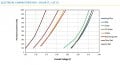
What you are observing makes sense if you look at this graph from the datasheet:
1675822235097.png
I am not sure what color you are working with but as you can see the diode current is still a function of voltage. Also, the V/I curve of each diode even in the same part number will vary somewhat. This is standard behavior for any diode. Also like MisterBill2 said, this is highly non-linear, note none of the graphs are straight lines and none of the lines have a y=mx+b intercept of zero even when you approximate them as straight lines.

ok, according to your link you are using the Amber color? If that is the case, at 3V forward voltage it is over 1500mA (off the chart). I would expect some variation but not that much. If you are using 'PC Amber' it makes sense on the graph.
 
Last edited:

BobTPH

Joined Jun 5, 2013
11,489
The forward voltage is the voltage at a specified current. Higher voltages result in higher currents. Lower voltages result in lower currents.

Do you know how your power supply works when you set it to 5V and 400 mA? You seem to have a misconception about that as well. It will supply 5V to any load that draws 400 mA or less. If a load would draw more than 400 mA at 5V, it reduces the voltage so that it draws only 400 mA.
 

WBahn

Joined Mar 31, 2012
32,777
My understanding of how LEDs work is incorrect and I'd appreciate help clearing it up. I had believed that once you get over the forward voltage of an LED, the only changes you see in brightness are a result of changes in current through the LED. However, a recent experience left me confused.

I was lighting this LED (Vf=2.2V) with a power supply set to 3V and current limited to 500mA:
https://www.digikey.com/en/products...TCBcDaIBoAUCiAhAggWQLQBkCMWADMYUYQGyF4gC6AvkA

I assumed I could set the power supply to any voltage above the Vf (2.2V) and the LED would turn on fully. I had limited the supply to 400mA and thought that once I connected the LED, as long as the power supply stayed above the forward voltage of the LED, varying the current would be the only thing that would change the LED brightness. At 3V the current the LED was pulling was only ~300mA. I had expected the LED to act like a short, pulling as much current as it could up until what the power supply was limited to (400mA), so I was surprised to see it pulling less than the limit. I increased the voltage from 3V to 5V and the LED became brighter. How can increasing the voltage above Vf change the LED brightness and why wasn't the LED pulling as much current as it could from the power supply?
Your link is to a datasheet for a whole family of LEDs. Which part, specifically, were you working with? As best I can tell, you were using a red/orange LED from Performance Group C. Is that a good guess?

If so, parts in that group have a Vf between 2.0 V and 2.25 V at 350 mA (probably at room temperature, the table doesn't say, but that information is probably there somewhere).

Sounds like you've only taken a couple of data points and they were not very complete.

Go back and do the following experiment:

Set your current limit at, say, 500 mA and then monitor both the current in the LED and the voltage across the LED as you slowly increase the voltage in small steps, say 100 mV. Record the voltage and current at each step and also make note of your perceived increase in the light output from the prior step (this will be a qualitative assessment).

Another way to do it, a better way, is to set the voltage for 5 V and turn the current limit way down and then increase the current limit in small increments, say 25 mA, and take the same measurements.

One thing that will affect your data is that the LED is going to heat up quite a bit at these currents. You can get a feel for this impact a couple of ways.

If you have at least two of these devices, set them up in two different circuits. One of them can be set for a fixed current of, say, 350 mA, using a constant voltage source and a resistor. The higher the voltage, the more constant the current. Put a switch in this one so that you can turn it on briefly to compare to the other one and then turn it back off to let it cool back to room temperature.

Now adjust the other one, using the current limit, to 350 mA and then turn on the other one and see if they look like the same brightness. If not, turn the current up or down on the other one until they do. Again, don't leave the reference LED on for more than a second or so at a time, just long enough for your mind to conclude if one is brighter than the other.

Once you have the current limit set, turn them both off to cool. Then turn the test one on and leave it on, noting the voltage across it every few seconds. You will probably see this go down a bit with time until it stabilizes. Now turn on the reference LED and see if they still look the same -- they should be close.

Next, set the current limit up quite a bit (perhaps 700 mA) and turn the voltage down. Then adjust it (as quick as you can) to give whatever current you ended up using previously to get it to match the reference LED visually. Don't leave it on for more than a couple seconds while you do this. When you think you've got it set, turn it on at that voltage and record the current every few seconds. You should see it go up until it either stabilized or hits the current limit. Once that happens, turn on the reference LED and you will likely notice that the test LED is noticeably brighter.

These should convince you that the brightness is primarily a function of the current, that the current is a very strong function of the voltage, and that temperature plays a significant role, particularly in higher-power LEDs.
 

Alec_t

Joined Sep 17, 2013
15,112
Something else to consider is that the eye's response to light intensity is also non-linear, so doubling the LED current, for example, wouldn't result in doubling of the perceived brightness by the eye.
 

MisterBill2

Joined Jan 23, 2018
27,363
For some rather strange LED behavior, We have a winter decorative figure that is illuminated by a series string of LEDs. Originally it had several series strings, each 36 white LEDS, all i parallel. It failed in a rather strange manner, which was the LEDs would only light when it was rained on, or when I sprayed it with the hose. And only the wet LEDs would light. So they were replaced with other LEDs, except for one string that continued to light. I experimented with that string because it had a fullwave bridge supply straight from the mains, no current limiter. I used an adjustable supply and found that it illuminated at about 62 volts and got brighter as the voltage increased. Now it has been working for over a month with the bridge-rectified 120 volt mains applied directly to the string of 36.
My point being that it seems there is a wide span of voltage that will produce illumination from LED devices. 60 volts up to 120 volts. Unfiltered, rectified, mains voltage.
 

Thread Starter

brightnight1

Joined Jan 13, 2018
97
Thanks you for the explanations, I think I’m starting to get it. Basically the LED operates like a FET. The more you turn it on, the more current can flow. One part I’m still confused on from the bench and that is:

In the characteristics chart for each color it shows that a green LED will draw about 400mA at 2.8V. However, at 2.8V the green LED only pulls 40mA and it isn’t until 4V that the green LED pulls 400mA. Am I reading this chart wrong or is there just a big difference between the LED performance and the datasheet?
 

Attachments

djsfantasi

Joined Apr 11, 2010
9,237
Thanks you for the explanations, I think I’m starting to get it. Basically the LED operates like a FET. The more you turn it on, the more current can flow. One part I’m still confused on from the bench and that is:

In the characteristics chart for each color it shows that a green LED will draw about 400mA at 2.8V. However, at 2.8V the green LED only pulls 40mA and it isn’t until 4V that the green LED pulls 400mA. Am I reading this chart wrong or is there just a big difference between the LED performance and the datasheet?
This particular chart, all of the current figures seem to be shifted upward by a factor of 10. Without seeing more of the datasheet, I can’t explain. But I am suspicious because 20 mA is a rule of thumb value for operating small LEDs
 

dcbingaman

Joined Jun 30, 2021
1,065
Thanks you for the explanations, I think I’m starting to get it. Basically the LED operates like a FET. The more you turn it on, the more current can flow. One part I’m still confused on from the bench and that is:

In the characteristics chart for each color it shows that a green LED will draw about 400mA at 2.8V. However, at 2.8V the green LED only pulls 40mA and it isn’t until 4V that the green LED pulls 400mA. Am I reading this chart wrong or is there just a big difference between the LED performance and the datasheet?
You are reading the chart correctly. I am not sure why you are observing only 40mA when it should be closer to 400mA if it is a green LED in this family. If it was the PC Amber that the part number on the link you supplied, then 40mA might make more sense. What type of power supply are you using? Can you place a DMM inline and verify the current on the power supply matches the DMM?
 

dcbingaman

Joined Jun 30, 2021
1,065
This particular chart, all of the current figures seem to be shifted upward by a factor of 10. Without seeing more of the datasheet, I can’t explain. But I am suspicious because 20 mA is a rule of thumb value for operating small LEDs
It is mysterious to me as well, here is the link to the datasheet, maybe someone else on the forum will see something I am missing:
https://assets.cree-led.com/a/ds/x/XLamp-XPE2.pdf
 

WBahn

Joined Mar 31, 2012
32,777
Thanks you for the explanations, I think I’m starting to get it. Basically the LED operates like a FET. The more you turn it on, the more current can flow. One part I’m still confused on from the bench and that is:

In the characteristics chart for each color it shows that a green LED will draw about 400mA at 2.8V. However, at 2.8V the green LED only pulls 40mA and it isn’t until 4V that the green LED pulls 400mA. Am I reading this chart wrong or is there just a big difference between the LED performance and the datasheet?
The data sheet is for a particular part (family of parts) and is NOT a general-purpose chart that applies to random LEDs found on the street corner.

This LED that you are using -- is it the specific LED that is covered by that data sheet?
 

Thread Starter

brightnight1

Joined Jan 13, 2018
97

dcbingaman

Joined Jun 30, 2021
1,065
Yes, I am using part number XPEBGR-L1-0000-00C01 (green LED) and that is the correct datasheet. It's also a neew power supply, I have no reason to believe the supply current reading is off but good thought. I'm seeing on the bench with other LEDs makes sense, it's just these green LEDs are way off on forward voltage:
https://www.digikey.com/en/products/detail/cree-inc/XPEBGR-L1-0000-00C01/4177277
If the power supply voltage and current is accurate being it is a new supply, I have no idea what would be causing the issue with the green LED. You may have to talk to the manufacturer. If all the other ones make sense then obviously the power supply is fine. In that case I have no idea why the green LED is operating that way.
 

dcbingaman

Joined Jun 30, 2021
1,065
Yes, I am using part number XPEBGR-L1-0000-00C01 (green LED) and that is the correct datasheet. It's also a neew power supply, I have no reason to believe the supply current reading is off but good thought. I'm seeing on the bench with other LEDs makes sense, it's just these green LEDs are way off on forward voltage:
https://www.digikey.com/en/products/detail/cree-inc/XPEBGR-L1-0000-00C01/4177277
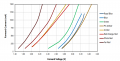
Another interesting thing to note: Red is toward the left on the graph, lower voltage and blue towards the right that is higher voltage, both for a given current, that makes sense as from physics:

1675905006801.png

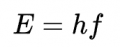
Blue is shorter wavelength (higher frequency) than red thus more energy per photon for blue thus more voltage for blue.
So the chart makes sense.
But green is sitting in the middle, thus again the chart makes sense being green wavelength is between blue and red. If all the other colors are giving you expected voltage to current numbers according to the chart it is even more mysterious why green would not be between red and blue in voltage. More reason maybe to talk to the manufacturer.
 

MisterBill2

Joined Jan 23, 2018
27,363
This particular chart, all of the current figures seem to be shifted upward by a factor of 10. Without seeing more of the datasheet, I can’t explain. But I am suspicious because 20 mA is a rule of thumb value for operating small LEDs
The 20 mA current was standard in 1970, and it is applicable to SMALL LEDs, mostly.
IT DOES NOT APPLY TO HIGH POWER LEDs
Thus, reading the data sheet is the only way to know.
 

djsfantasi

Joined Apr 11, 2010
9,237
The 20 mA current was standard in 1970, and it is applicable to SMALL LEDs, mostly.
IT DOES NOT APPLY TO HIGH POWER LEDs
Thus, reading the data sheet is the only way to know.
I forgot. My mind sometimes has a 70s flashback. Too much partying back then. Also, I’m currently using tiny SMD LEDs thst illuminate sufficiently at 2mA
 
Top