LED Sequence Help Needed

Thread Starter

P4 Modeller

Joined Apr 7, 2013
10
Hi,

Firstly i am a complete novice at electronics which will probably account for why i am struggling to make my idea a reality.. so here i am begging cap in hand after some assistance.

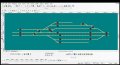
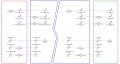
My project is to construct this
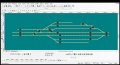
Eridge Control all Leds.jpg

Which thankfully is 95% sorted

However as part of a much larger control panel I need to build 3 separate "sequence panels" that will enable the operators to know what is happening elsewhere.

So i need to accomplish the following

Operation 1 :- 1 x push button (switch 1) to illuminate 2x LED's (amber)
Operation 2 :- 1 x push button (switch 2) to illuminate 2x LED's (green)
Operation 3 :- 1 x push button (switch 3) to illuminate 1x LED (green)[seperate LED]

The hard bit is they need to be sequenced such that

(a) Switch 1 cancels Switch 2, illuminates 2 Amber LED's

(b) Switch 2 cancels Switch 1, illuminates 2 Green LED's extinguishes 2 Amber LED's

(c) Switch 3 illuminates Single Green LED and extinguishes all others LED's.


The rest of the control panel works on 12v dc and i am using 3mm LED Forward Voltage (V) : 2.0 ~ 2.2, Reverse Current (uA) : <=30.

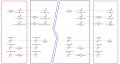
I am currently using this circuit elsewhere on the panel and it was wondering if it could be adapted to achieve the above requirements
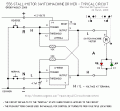
556Stall08Typical.GIF

If not then i have the ability to construct a newly designed PCB to meet these requirements

Thank You for looking and in advance for the responses

Mark


Thread Starter

P4 Modeller

Joined Apr 7, 2013
10
Ok Time to Bump My Post... NO Solutions Yet :eek:

I've come up with one though not entirely as i want but ...


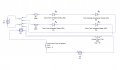
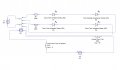
With Switch 1 (push to make) pressed, the relay is energized and the relay sets a path for the Amber LED's (D1 & D2) to illuminate :)
 

Attachments

Thread Starter

P4 Modeller

Joined Apr 7, 2013
10
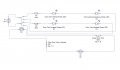
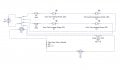
When Switch 2 (Push to break) is pressed the relay de-energizes and the Amber LED's Extinguish and the Green LED's (D3 & D4) illuminate


Sorry no way to make relay contacts move in circuit above :(

Problem is how do i achieve this with 2x Momentary SPST Push button switches OFF (ON)??????


Attachments

ErnieM

Joined Apr 24, 2011
8,415
Hi Mark. I read your posts and I'm confused in what you are trying to accomplish. Let's forget colors, just talk about outputs where any output can have any bulbs, LEDs, buzzers, whatever wired to it.

Does your system just need 3 outputs?

Is there a condition where all outputs are off? (I'm counting "states.")

Are there 3 separate push buttons?

Are all the buttons located together or at different stations?

You have an a,b,c where switch 1, then 2, then 3 are pressed. What if they are pressed in different orders?

I don't think you have a very complex sort of problem. If we can understand what you need we should have tons of suggestions.
 

Thread Starter

P4 Modeller

Joined Apr 7, 2013
10
Hi Ernie,


Sorry to confuse you, i tried to simplify the problem by splitting the requirements to the bear minimum but it turns out i have done the opposite so i will start again.

It may help to know there are 3 operators, each controlling one section (up fiddle, main and down fiddle) . Always driving the train towards them (end to end layout) There are two distinct running lines in each section (up and down)

There will be 3 control stations now labelled Up Control Station ,Main Control Station and Down Control Station. The Main control station is then divided into 2 further mini control stations, for my ease i have labelled these with Identifiers starting B or C )

Up Control Station

Switch AA controls output 1 (Down Train Ready) (Amber LED's)
Switch AB controls output 10 (Up Train Accept)(Green LED's)
Switch AC controls output 12 (Up Fiddle yard Road Clear) (Green LED)


Main Control Station

Switch BB controls output 2 (Down Train Accept)(Green LED's)
Switch BC controls output 4 (Down Mainline Ready for Next Service)
(Green LED)
Switch BD control output 9 (Up train ready) (Amber LED's)


Switch CC controls output 3 (Down Train Ready) (Amber LED's)
Switch CD controls output 8 (Up Train Accept) (Green LED's)
Switch CE controls output 11 (Up Mainline Ready for next service)
(Green LED)


Down Control Station

Switch DD controls output 5 (Down Train Accept)(Green LED's)
Switch DE controls output 6 ( Down Fiddle Yard Road Clear)
(Green LED)
Switch DF controls output 7 (Up Train Ready)(Amber LED)


Outputs 1-6 relate to Down Line
Outputs 7-12 relate to Up Line
 

Thread Starter

P4 Modeller

Joined Apr 7, 2013
10
Hi Mark. I read your posts and I'm confused in what you are trying to accomplish. Let's forget colors, just talk about outputs where any output can have any bulbs, LEDs, buzzers, whatever wired to it.

Does your system just need 3 outputs?

No, tried to simplify the problem but looks like i've added confusion

Is there a condition where all outputs are off? (I'm counting "states.")

Start up / Reset ???

Are there 3 separate push buttons?

NO

Are all the buttons located together or at different stations?

Different Stations

You have an a,b,c where switch 1, then 2, then 3 are pressed. What if they are pressed in different orders?

Be nice if possible to have it so the sequence prevents an incorrect button press from changing the states

I don't think you have a very complex sort of problem. If we can understand what you need we should have tons of suggestions.
 

Thread Starter

P4 Modeller

Joined Apr 7, 2013
10
Down Train Sequence

1.
Push Switch AA (Output 1)
2. Push Switch BB (Output 2 : Cancels Output 1)

Either

3.
Push Switch BC (Output 4 ; Cancels Output 1 & 2)
restart sequence 1, 2 then to 4

Or

4.
Push Switch CC (Output 3)
5. Push Switch DD (Output 5 ; Cancels Output 3 & 6)[output 6 pre requiste for Switch DD]
6. Push Switch DE ( Output 6 ; Cancels Output 3 & 5)

I'd like this to happen without having to re-visit a switch to cancel the selection


Thread Starter

P4 Modeller

Joined Apr 7, 2013
10
UP Train Sequence (actually a mirror of the above in opposite direction)


1.
Push Switch DF (Output 7)
2. Push Switch CD (Output 8 ; Cancels Output 7)

Either


3. Push Switch CE (Output 11 ; Cancels Output 7 & 8)
restart sequence 1,2 then to 4

Or

4. Push Switch BD (Output 9)
5. Push Switch AB (Output 10 ; Cancels Output 9)[output 12 pre requiste for Switch AB]
6. Push Switch AC (Output 12; Cancels Output 9 &10 )

I'd like this to happen without having to re-visit a switch to cancel the selection
 

bertus

Joined Apr 5, 2008
22,923
Hello,

I see a lot of broken images in all of your posts.
If you want to show images, please upload them to this forum.

Attachments and Images

How do I attach a file to a post?

To attach a file to your post, you need to be using the main 'New Post' or 'New Thread' page and not 'Quick Reply'. To use the main 'New Post' page, click the 'Post Reply' button in the relevant thread.

On this page, below the message box, you will find a button labelled 'Manage Attachments'. Clicking this button will open a new window for uploading attachments. You can upload an attachment either from your computer or from another URL by using the appropriate box on this page. Alternatively you can click the Attachment Icon to open this page.

To upload a file from your computer, click the 'Browse' button and locate the file. To upload a file from another URL, enter the full URL for the file in the second box on this page. Once you have completed one of the boxes, click 'Upload'.

Once the upload is completed the file name will appear below the input boxes in this window. You can then close the window to return to the new post screen.

What files types can I use? How large can attachments be?

In the attachment window you will find a list of the allowed file types and their maximum sizes. Files that are larger than these sizes will be rejected. There may also be an overall quota limit to the number of attachments you can post to the board.

How do I add an image to a post?

If you have uploaded an image as an attachment, you can click the arrow next to the 'Attachment Icon' and select it from the list. This will be inserted into your post and can be located where you want it displayed.

To include an image that is not uploaded as an attachment and is located on another website, you can do so by copying the full URL to the image, (not the page on which the image is located), and either pressing the 'Insert Image' icon or by typing [img] before the URL and [/img] after it, ensuring that you do not have any spaces before or after the URL of the image. You can insert pictures from your albums (?) in this way too.
Bertus
 
Top