Implementing horizontal scrolling will be easier if you strobe columns. When I implemented scrolling, I built the entire message in an array, then I slid a 5x7 window over the array to display the message.
Scrolling vertically would be easier with row strobing. I'm using a Raspberry Pi Zero W to display the message, so I just constructed the message array to make it easier to implement vertical scrolling.
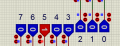
I just made the modification. I didnt made the code since I had to re-wire everything. Now is counting through each of the 5 Columns.
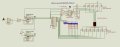
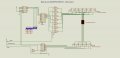
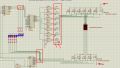
Here is the hidef modified circuit:
Now it is like yours mister @dl324
to mister @Ian Rogers ... I included the updated save proteus file. Check it out (but with the previeous bin file before I inverted the matrix)
I'd just have the EPROM outputs drive the rows through buffers.
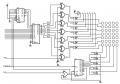
I added XOR gates to give an option to invert the EPROM outputs.
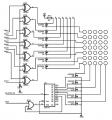
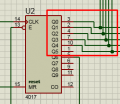
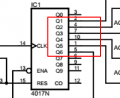
I used a CD4017 to select columns. This is easily cascaded to more than 5 columns. You reset the counter when you first start displaying a character. After that, the counter will reset itself. I didn't use the 0 output so the display will be off when the counter resets.
I chose to drive the LEDs at about 100mA so that the average current will be close to the maximum continuous current allowed by the LEDs (20mA). Old LEDs from the 70's had peak currents on the order of 1A. Newer LEDs in T-1 and T-1 3/4 are significantly lower. BTW, T-1 means 1/8" diameter (T-1 3/4 = 7/32").
I showed a resistor network, but those 33 ohm resistors need to be 1W.
Maximum drain current for AO3400/1 is on the order of several amps. They're logic level devices, so will be fully on when operated from 5V.
Each time the CD4017 is incremented, you need to change A0-2 on the EPROM.
Since only 1 OR gate is used, you could replace it with 2 signal diodes.
I added the EPROM and the counter to cycle through the 3 low order bits. I used a CD4516 binary counter before I realized that I'd be using the reset from the CD4017 to reset it.
I still don't know if the EPROM is going to just be a character generator, or if it will have the bit pattern for the entire message you want to display. I also haven't thought about how to scroll in hardware. I did it in software and it was straightforward. So this will only work for flashing characters (with circuitry to do appropriate pauses added). Also didn't think about ghosting issues that would require column blanking.
EDIT: This also requires the column data to be at addresses xxx001-xxx101.
The A3-11 lines go to a binary counter that cycles through the data. I still don't know how you plan to construct the message. Putting the character generator in the EPROM is what would typically be done, but you can put the bitmap for the entire message in the device. You need to add circuitry to pause between characters.
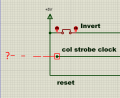
Invert goes to a switch to Vcc if you need to invert the EPROM outputs.
Col strobe clock controls the data and rate that columns are strobed.
Reset should be taken HIGH to initialize the counters.
EDIT: Also note that I assumed that the row data would be on bits 1-7, so bit 0 is unused.
im not making a message. Im making only the characters of the alphabet.
This is how it should function: When I press a button, 1 character will be displayed. After I press the same button, the next character from the alphabet in order, it will come on display, and so on. Thats it. No monkey bizniz.
This is how it should function: When I press a button, 1 character will be displayed. After I press the same button, the next character from the alphabet in order, it will come on display, and so on. Thats it. No monkey bizniz.
So this circuit will serve no purpose other than to learn how to multiplex the LEDs.
In that case, you need a switch to single step the binary counter that drives the address lines above A2. You'll want to debounce it or use a 555 timer based one-shot.
If you program the EPROM with 1's representing LEDs that are to be on, you need to invert the outputs because the P channel MOSFETs require a LOW to turn them on.
Hidef render of mister dl324 circuit :
Now I am thinking where to put those manual 'LogicState' (the blue ones) to actually control the thing and figure out the code.
Check it please and tell me if you spot any errors. I kind of rush it.
Because this simulator is not supporting or not capable of creating tristate transistors. I tried them already and they always stay either High or Low but not gray, in between like a disconnected wire.
I had to inverse the power , +5V down and gnd up, because this led matrix I have in this simulator, it matters the polarity. So to resemble your circuit as close as possible, I have to make some necessary tweaks for it to actually work.
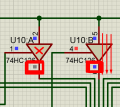
Ive also added the NOT gates to positively control those buffers (they are actually replacements for transistors here in the sim).
And connected the LogicState for manual control.
So far I get a random 3 leds ON every logical switch I make. But at least is ON and alive. - Its alive !!!
Are you sure your circuit is correct?
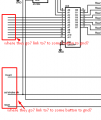
I found some irregularities. while in your circuit:
Now, with my correction, starting from Q0 and not from Q1, I can actually navigate each column correctly.
All I get is random 3 leds around when I change the addreses.
I assumed that when A0-2 was 0, no valid data would be present. That way when the CD4017 is reset, nothing will be displayed. Outputs 1-5 would activate the corresponding column.

 Facebook
 Google
 GitHub
 Linkedin