LED glow when switch turn off

Status
Not open for further replies.

Thread Starter

libra

Joined Jul 27, 2012
62
Hello everyone,

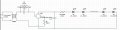
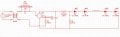
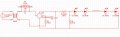
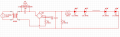
I have made LED BULB Circuit with turn on the 40 LED. Problem i am facing is that after turning OFF the the LED are glowing slightly which can seen in morning also. The Capacitor C2 is not discharged. I am post the schematics of the circuit.

Diode= 1N4007 are used as bridge rectifier.

Transformer is 220V to 12V

Thank you.
 

Attachments

Last edited:

bertus

Joined Apr 5, 2008
22,922
Hello,

You have stated that you are using a transformer of 230 to 12 Volts.
Then you CAN NOT have 60 volts on the leds.
The maximum voltage would be 12 * 1.414 = 17 Volts.
There MUST be something different than you have given.

Bertus
 

Thread Starter

libra

Joined Jul 27, 2012
62
Hello,

You have stated that you are using a transformer of 230 to 12 Volts.
Then you CAN NOT have 60 volts on the leds.
The maximum voltage would be 12 * 1.414 = 17 Volts.
There MUST be something different than you have given.

Bertus
Bertus please see the schematics. In cricuit is have put the capacitor of 250v. Thats why i am getting 60V. The capacitor is not discharged that why the led glows.
 

bertus

Joined Apr 5, 2008
22,922
Hello,

Even with a 250 Volts capacitor, it is NOT possible to have more than 17 Volts on it using a 230 to 12 Volts transformer.

There MUST be something with the circuit , that you do not tell us.

Bertus
 

Thread Starter

libra

Joined Jul 27, 2012
62
Hello,

Even with a 250 Volts capacitor, it is NOT possible to have more than 17 Volts on it using a 230 to 12 Volts transformer.

There MUST be something with the circuit , that you do not tell us.

Bertus
Hi,

I have posted the schematics that i used. Before installation of transformer i check the circuit. Thats the only reason, and i do not discharge the capacitor. Other then that their is nothing i am hiding.

Libra
 

bertus

Joined Apr 5, 2008
22,922
Hello,

What do you mean with " Before installation of transformer i check the circuit. "

Do you NOT have a transformer now?
Then you are on a dangerous path.

Bertus
 

Thread Starter

libra

Joined Jul 27, 2012
62
HI,
"What do you mean with " Before installation of transformer i check the circuit. "" .This means that i check the circuit is working, and the bridge i made is working or not. I have the transformer and i install in the circuit. if you did not trust me i will post the picture of circuit.


Libra
 
Last edited:

Wendy

Joined Mar 24, 2008
23,798
Thing is, you can not have 60 V with a 12VDC transformer in the circuit. LEDs off mains is not allowed here. This is what Bertus is / has been saying. It is one of our major rules, and will not be violated lightly.

C1 / R1 / R5 are only needed if you are trying to run this off of mains. I have to conclude that you are indeed trying to run this mess off of mains, and are trying to get around our TOS, and this thread will shortly be closed for violation of TOS. I'll give you a chance to convince us otherwise, then this subject is closed, and can not be opened in another thread.

To the other members, please do not continue this until the OP comes clean. A transformer is not optional. If you want to redo the schematic to reflect a true transformer type setup we can continue, otherwise this thread will be closed.

To be blunt, trying to get around our TOS deliberately is a major violation, and will be handled accordingly.
 

Thread Starter

libra

Joined Jul 27, 2012
62
yes i am using 1uf of capacitor.

Bill_Marsden as told Bertus that i check the circuit before install a transformer because i made the circuit on veroboard, i have burned one transformer to make that circuit.About C1/R1 i am controlling the amps C1 is of 10V. It is not 400V or 300V capacitor in my case, i write in schematic wrong. R5 is used to reduce the current more because i do not need much light. My logic is this that if we are getting less current from the bridge i do not have to insert more resistor, that's why i used C1/R1/R5.
 
Last edited:
Status
Not open for further replies.
Top