Learning to Write Professional Software Code Style

Ya’akov

Joined Jan 27, 2019
10,234
A very useful exercise prior to writing any code is to use a lightweight version of Use Case Methodology.

The basic idea—and you don't have to sweat the specifics*—is to write down what it will ok like to the user to operate the system. This means all classes of users (e.g.: customers [ordinary users], administrators, security personnel(?), *c.).

These narratives should explain the desired functions of the system and use organic naming, that is, names actually used by the people using the system. For example, don't call "doors", "egress points" or "unlocked". "desecured" or any other artificial nonsense.

Naming of functions and variables plays a critical role in proper modularization of your code. A properly named subroutine/function will tell you what should and should not be included. Same with variables—proper naming leads so natural normalization, that is, using the variable to contain only one piece of data not requiring later manipulation to extract what is needed.

In your case a speculative set of names might be:

Enroll (for adding a user)
Remove (for removing any object e.g.: user, token, door)
Door (a door)
Reader (a reader)
Schedule (an access schedule)
&c

Once you understand the objects (this does not require OOP, though that can be helpful) involved and they have names that most closely represent their encapsulated reality, you can move on to defining functions, again, based on this same idea. Real world analogies are very helpful. Overly abstract—or literal—functions will lead to confusion when new functionality is requested while well chosen abstractions will ofter already support that functionality requiring little or no change to make it available.

Naming is more important that a neophyte programmer is likely to grasp, but my most successful projects have also tracked my most success design efforts—especially naming.
 

Ya’akov

Joined Jan 27, 2019
10,234
Another example is to use action verbs for processes, for example,
doSecurityCheck,
and a question for boolean variable, for example,
isValidUser
I also emphasize the interface to functions and have it defined before writing code (subject to refinement when actually implementing it). It is my personal style to include comments for each function like this:

// REQUIRES someScalar, someArrary
// ACCEPTS someOptionalScalar
// RETURNS someInteger, someArray
// Validates Access List, returns user status in someInteger and permitted list in SomeArray

This allows for self documentation and scope bounding when writing the function. If something is outside this definition, it needs to be put somewhere else or justified in the design documents.
 

DickCappels

Joined Aug 21, 2008
10,661
Get your hands on professionally written code for a CPU with which you are familiar. Read it and understand it.

The next level would be to get a job alongside professional software engineers and learn from them. There is a large gap to be jumped between the two, but it will be worth it.
 

Thread Starter

Embededd

Joined Jun 4, 2025
153
I’m honestly not sure where to start. it feels a bit overwhelming, like too many things are happening at the same time. I think it would really help if someone could guide me through the planning, so I know what to focus on step by step. Maybe it makes sense to first decide what needs to be done, and in what order, before jumping in.
 

MrChips

Joined Oct 2, 2009
34,807
Like developing proficiency at any skill, it takes practice, practice, and practice.

Write code, and lots of code. When your next project becomes very large you will learn what style works and what doesn’t work for you.

Write code for an ARM processor. Eventually, you will have to use library routines and will have to read their header files. Learn how very large libraries are written and documented.
 

BobTPH

Joined Jun 5, 2013
11,514
I’m honestly not sure where to start. it feels a bit overwhelming, like too many things are happening at the same time
That feeling is perfectly valid. I had not weighed in before because, in my opinion, there is not much we could do on this forum to help you they way you want. It takes years to learn how to be a professional programmer. There is no short cut that will get you there in a month or two.

People have mentioned coding standards. This is a necessity in large projects with many developers. Not so much for an individual, as long as he is self consistent. Coding standards are the classic mistake of form over function. I have seen perfectly compliant code that is awful throughout my career. In fact, I suspect there is actually a negative correlation, i.e. a good programmer is one who knows when to break the rules.

Writing good code has many aspects that can only be learned by experience. Heed @MrChips advice in the post above.
 

Thread Starter

Embededd

Joined Jun 4, 2025
153
Write code, and lots of code.
I have to start somewhere, so I’m posting the code I use to test my LCD module, just to check if data is showing up correctly on the display. I’d like to include this test code in my project for troubleshooting, in case the LCD ever has an issue.

Maybe you folks can point out what’s missing/wrong in this code. To me, it looks like it’s working fine and seems pretty decent, but I want to hear your thoughts.

LCD Software code
C:
/*
* LCD_Test.c
* Purpose:
* This code is used to test whether the LCD is working correctly
* with the ATmega8A in 4-bit mode by displaying the text "LCD Test".
* ATmel Studio
* C language
* Created: 28-09-2025 17:12:04
* Author : Developer
*/

#include <avr/io.h>
#define F_CPU 12000000UL
#include <util/delay.h>

// Control pin mapping kept separate from data lines
#define RS PC0
#define EN PC1

// Data and control ports
#define LCD_PORT PORTD
#define LCD_DDR  DDRD
#define CTRL_PORT PORTC
#define CTRL_DDR  DDRC

// Function prototypes
void LCD_CMD(unsigned char Command);
void LCD_DATA(unsigned char Data);
void LCD_INIT(void);
void LCD_PULSE(void);
void LCD_Message(char *str);

int main(void)
{
    char Name[] = {"LCD Test"};

    // Only PD2–PD5 are used for LCD data lines, so DDR mask = 0x3C
    LCD_DDR = 0x3C;
    // RS and EN configured as output bits
    CTRL_DDR |= (1 << RS) | (1 << EN);

    _delay_ms(50);              // allow LCD power-up settling

    LCD_INIT();

    // Print first line
    LCD_Message(Name);

    while (1);
}

// LCD initialization sequence for 4-bit mode
void LCD_INIT(void) {
    _delay_ms(50);              // LCD datasheet requires >40 ms after VCC rises
    LCD_CMD(0x33);              // init sequence (force into 8-bit mode first)
    _delay_ms(5);
    LCD_CMD(0x32);              // then switch to 4-bit mode
    _delay_ms(5);
    LCD_CMD(0x28);              // 4-bit, 2-line, 5x8 font
    LCD_CMD(0x0C);              // display ON, cursor OFF
    LCD_CMD(0x06);              // entry mode: auto-increment
    LCD_CMD(0x01);              // clear display
    _delay_ms(5);
}

// Send command nibble-wise
void LCD_CMD(unsigned char cmd) {
    // Keep non-LCD bits of PORTD untouched (mask 0xC3),
    // shift high nibble into PD2–PD5
    LCD_PORT = (LCD_PORT & 0xC3) | ((cmd & 0xF0) >> 2);
    CTRL_PORT &= ~(1 << RS);    // RS=0  command
    LCD_PULSE();

    // send low nibble
    LCD_PORT = (LCD_PORT & 0xC3) | ((cmd & 0x0F) << 2);
    CTRL_PORT &= ~(1 << RS);
    LCD_PULSE();
}

// Send data nibble-wise
void LCD_DATA(unsigned char data) {
    LCD_PORT = (LCD_PORT & 0xC3) | ((data & 0xF0) >> 2);
    CTRL_PORT |= (1 << RS);     // RS=1  data
    LCD_PULSE();

    LCD_PORT = (LCD_PORT & 0xC3) | ((data & 0x0F) << 2);
    CTRL_PORT |= (1 << RS);
    LCD_PULSE();
}

// Generate enable pulse
void LCD_PULSE(void) {
    CTRL_PORT |= (1 << EN);
    _delay_us(1);               // LCD requires >450 ns enable pulse
    CTRL_PORT &= ~(1 << EN);
    _delay_us(50);              // allow LCD to latch data
}

// Print a string from RAM
void LCD_Message(char *ptr)
{

    for (int i = 0; ptr[i] != '\0'; i++)
    {
        LCD_DATA(ptr[i]);
    }
}
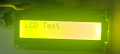
I am attaching image of LCD Display

1759062202835.png
 
Last edited:

MrChips

Joined Oct 2, 2009
34,807
LCD_PORT = (LCD_PORT & 0xC3) | ((cmd & 0x0F) << 2);

I never like to see code like this. Try to make it more clear.
Don’t use literal constants.

Also, here is a more direct way to access the elements in an array.
C:
void LCD_Message(char *ptr)
{
   while (*ptr) LCD_DATA(*ptr++);
}
 

Thread Starter

Embededd

Joined Jun 4, 2025
153
Also, here is a more direct way to access the elements in an array.
I tried both versions and they both work.
So functionally they do the same thing. Could you explain why your pointer-based version is considered better than the indexed one? Is it mainly about readability, or just cleaner C style?
 

Thread Starter

Embededd

Joined Jun 4, 2025
153
LCD_PORT = (LCD_PORT & 0xC3) | ((cmd & 0x0F) << 2);

I never like to see code like this. Try to make it more clear.
Don’t use literal constants.
Can you explain what exactly is the problem with this line?

I understand you don’t like to see code like this and mentioned not to use literal constants, but I want to be clear, Is the main issue that 0xC3 is a magic number and makes the code harder to read, or is there something functionally wrong too?
 

drjohsmith

Joined Dec 13, 2021
1,601
good question @Embededd

there are the general methods taught,

top down
bottom up

controversial, both in isolation are wrong !

if you dont know how the interface at the bottom to the user / hardware is going to work, cumming down from the top , can lead to a wonderfull system that can not meet say the timming requirements of the bottom,

conversely, if you dont know what the top level system needs, then no matter what wonderfull low level you do , the top might not need the info it needs.

a recent example ,
worked on a system, that needed to talk to a set of 9df sensors.
system spec written by sw team who spent ages on making and testing a sencor fusion between the magnatometer and the ring gyro. Then we spent ages turning off all these functions built into the chips , and we could notbthen use the low-level drivers supplied with the chips .

in conclusion,

the old rules still apply.

a. follow the rules, but be aware of when to break them !
b. write clear code , spaces are free
c. if your writing something a certain way because its "clever" , think about otheres who might have to pick this apart in many years time
d. document... as you go, and update ..
e. compartmentalise but with conscience! code over thousands of lines is un readable, so is code that is made out of 100 files of 20 lines each.
 

drjohsmith

Joined Dec 13, 2021
1,601
Can you explain what exactly is the problem with this line?

I understand you don’t like to see code like this and mentioned not to use literal constants, but I want to be clear, Is the main issue that 0xC3 is a magic number and makes the code harder to read, or is there something functionally wrong too?
magic numberes will bite you in the rear sooner or later, or if your lucky after you've left someone else gets to curse you.
 

Futurist

Joined Apr 8, 2025
748
Dear experts,

I want to learn how to write professional-quality code starting from my hobby projects. I’ve some components like an ATmega 8 MCU, EM-18 RFID reader, RTC DS1307, displays 16 *2 , relays, buzzer, red/green LEDs, push buttons, EEPROM, etc.

My idea is to combine these into a door access control system project. I can already program microcontrollers in C using Atmel Studio, and I’ve written some code before, but it’s mostly been in the “just get it working” style.

Now I’d like to learn how to structure things more like a professional embedded developer would splitting code into proper modules, writing drivers separately, organizing application logic, and following best practices.

I’m specifically looking for someone who can assist me here. point me in the right direction, review my approach, and help me understand how to do this step by step. I’m not asking for ready-made code. I want to learn the process and improve.

Any guidance, tips would be super appreciated.
Get a job programming, even a part time job and even with technologies unrelated to MCU development. Working with other programmers will expose you to situations and issues that you simply will never encounter working alone as a hobbyist.

Participating in meetings, seeing non-programming issues that impact teams, seeing the kinds of challenges teams and managers face daily, all of these are hugely useful things to get exposed to.
 

Thread Starter

Embededd

Joined Jun 4, 2025
153
magic numberes will bite you in the rear sooner or later, or if your lucky after you've left someone else gets to curse you.
I have replaced the magic numbers with defined names for the LCD.

Do you find the code easier to read and follow now?

C:
/*
* LCD_Test.c
* Purpose:
* This code is used to test whether the LCD is working correctly
* with the ATmega8A in 4-bit mode by displaying the text "LCD Test".
*
* Created: 28-09-2025 17:12:04
* Author : Developer
*/

#include <avr/io.h>
#define F_CPU 12000000UL
#include <util/delay.h>

// Control pin mapping
#define RS PC0
#define EN PC1

// Data and control ports
#define LCD_PORT   PORTD
#define LCD_DDR    DDRD
#define CTRL_PORT  PORTC
#define CTRL_DDR   DDRC

/* LCD Data Line Mapping
   D4 → PD2
   D5 → PD3
   D6 → PD4
   D7 → PD5
*/
#define LCD_DATA_SHIFT   2
#define LCD_DATA_MASK    (0x0F << LCD_DATA_SHIFT)
#define LCD_PORT_MASK    (~LCD_DATA_MASK)          // keep non-LCD bits

/* Nibble masks */
#define LCD_HIGH_NIBBLE  0xF0
#define LCD_LOW_NIBBLE   0x0F

/* LCD Commands */
#define CLEAR_DISPLAY    0x01
#define RETURN_HOME      0x02
#define DISPLAY_ON       0x0C
#define DISPLAY_OFF      0x08
#define CURSOR_ON        0x0E
#define CURSOR_OFF       0x0C
#define BLINK_ON         0x0D
#define BLINK_OFF        0x0C
#define SHIFT_CUR_LEFT   0x10
#define SHIFT_CUR_RIGHT  0x14
#define SHIFT_DISP_LEFT  0x18
#define SHIFT_DISP_RIGHT 0x1C
#define FOUR_BIT_MODE    0x28
#define EIGHT_BIT_MODE   0x38
#define ENTRY_MODE       0x06

/* LCD Initialization sequence commands */
#define INIT_8BIT_MODE   0x33
#define INIT_4BIT_MODE   0x32

/* Start address of each line */
#define LINE_ONE 0x00
#define LINE_TWO 0x40

// Function prototypes
void LCD_CMD(unsigned char Command);
void LCD_DATA(unsigned char Data);
void LCD_INIT(void);
void LCD_PULSE(void);
void LCD_Message(char *str);

int main(void)
{
    char Name[] = {"LCD Test"};

    // Set PD2–PD5 as outputs for LCD data lines
    LCD_DDR |= LCD_DATA_MASK;
    // Set RS and EN as outputs
    CTRL_DDR |= (1 << RS) | (1 << EN);

    _delay_ms(50); // allow LCD power-up settling

    LCD_INIT();
    LCD_Message(Name);

    while (1);
}

// LCD initialization sequence for 4-bit mode
void LCD_INIT(void) {
    _delay_ms(50);            
    LCD_CMD(INIT_8BIT_MODE);    // force into 8-bit mode
    _delay_ms(5);
    LCD_CMD(INIT_4BIT_MODE);    // switch to 4-bit mode
    _delay_ms(5);
    LCD_CMD(FOUR_BIT_MODE);     // 4-bit, 2-line, 5x8 font
    LCD_CMD(DISPLAY_ON);        // display ON, cursor OFF
    LCD_CMD(ENTRY_MODE);        // entry mode: auto-increment
    LCD_CMD(CLEAR_DISPLAY);     // clear display
    _delay_ms(5);
}

// Send command nibble-wise
void LCD_CMD(unsigned char cmd) {
    // high nibble
    LCD_PORT = (LCD_PORT & LCD_PORT_MASK) |
               ((cmd & LCD_HIGH_NIBBLE) >> (4 - LCD_DATA_SHIFT));
    CTRL_PORT &= ~(1 << RS);  
    LCD_PULSE();

    // low nibble
    LCD_PORT = (LCD_PORT & LCD_PORT_MASK) |
               ((cmd & LCD_LOW_NIBBLE) << LCD_DATA_SHIFT);
    CTRL_PORT &= ~(1 << RS);
    LCD_PULSE();
}

// Send data nibble-wise
void LCD_DATA(unsigned char data) {
    LCD_PORT = (LCD_PORT & LCD_PORT_MASK) |
               ((data & LCD_HIGH_NIBBLE) >> (4 - LCD_DATA_SHIFT));
    CTRL_PORT |= (1 << RS);    
    LCD_PULSE();

    LCD_PORT = (LCD_PORT & LCD_PORT_MASK) |
               ((data & LCD_LOW_NIBBLE) << LCD_DATA_SHIFT);
    CTRL_PORT |= (1 << RS);
    LCD_PULSE();
}

// Generate enable pulse
void LCD_PULSE(void) {
    CTRL_PORT |= (1 << EN);
    _delay_us(1);              
    CTRL_PORT &= ~(1 << EN);
    _delay_us(50);            
}

// Print a string from RAM
void LCD_Message(char *ptr)
{
    while (*ptr)
    {
        LCD_DATA(*ptr++);
    }
}
 

Thread Starter

Embededd

Joined Jun 4, 2025
153
I don’t understand what’s wrong with this line
Code:
char Name[] = {"LCD Test"};
With this version, the LCD only shows 'Test' and skips 'LCD'. But if I remove the braces and write
Code:
char Name[] = "LCD Test";
it displays the full message LCD Test .

When I write c programs on my PC I always prefer the char Name[] = {"LCD Test"}; style and never had an issue. Why is it behaving differently here?
 

Futurist

Joined Apr 8, 2025
748
I don’t understand what’s wrong with this line
Code:
char Name[] = {"LCD Test"};
With this version, the LCD only shows 'Test' and skips 'LCD'. But if I remove the braces and write
Code:
char Name[] = "LCD Test";
it displays the full message LCD Test .

When I write c programs on my PC I always prefer the char Name[] = {"LCD Test"}; style and never had an issue. Why is it behaving differently here?
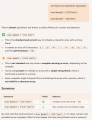
Let's ask Copilot...

1759080064635.png

You can also write this:

C:
char * Name = "LCD Test";
Whichever way you choose, an important principle is to be consistent, always declare string constants the same way, no exceptions. Having a consistent style is one of the things a pro will do habitually.

When I used C a lot, every day for years, in finance and systems software, we had typedefs for pointers that led to far fewer stars * littering the code:

C:
typedef char * char_ptr;

char_ptr ca_ptr, cb_ptr;

char_ptr Name = "LCD Test";
Having policies like this is what makes pro code "better" than amateur code, the consistency means any member of the team can always understand code written by any other member of the team.
 
Last edited:

WBahn

Joined Mar 31, 2012
32,823
I have replaced the magic numbers with defined names for the LCD.

Do you find the code easier to read and follow now?

C:
#define LCD_DATA_SHIFT   2
#define LCD_DATA_MASK    (0x0F << LCD_DATA_SHIFT)
#define LCD_PORT_MASK    (~LCD_DATA_MASK)          // keep non-LCD bits
While you put parens around macro definitions that have embedded expressions, I would recommend putting parens around any macro definition that is an expression, even if that expression is a constant. I would also recommend putting parens around macro names when they are used. So

C:
#define LCD_DATA_SHIFT   (2)
#define LCD_DATA_MASK    (0x0F << (LCD_DATA_SHIFT))
#define LCD_PORT_MASK    (~(LCD_DATA_MASK))          // keep non-LCD bits
This is to bulletproof your code against goof where you forget to put the parens around an expression or, more likely, you or someone else later modifies a macro definition that was previously just a constant into one that is now an expression without putting in the guard parens.
 

WBahn

Joined Mar 31, 2012
32,823
Better yet, let's ask the C language standard:

ISO/IEC 9899:2023 (aka, N3096) Section 6.7.10 - Initialization

Paragraph 15:
An array of character type may be initialized by a character string literal or UTF-8 string literal, optionally enclosed in braces. Successive bytes of the string literal (including the terminating null character if there is room or if the array is of unknown size) initialize the elements of the array.

So, by the C language standard, they are equivalent.
 

Futurist

Joined Apr 8, 2025
748
Better yet, let's ask the C language standard:
Which one?

ISO/IEC 9899:2023 (aka, N3096) Section 6.7.10 - Initialization

Paragraph 15:
An array of character type may be initialized by a character string literal or UTF-8 string literal, optionally enclosed in braces. Successive bytes of the string literal (including the terminating null character if there is room or if the array is of unknown size) initialize the elements of the array.

So, by the C language standard, they are equivalent.
There is no "the" C language standard though, only many (about six I think) "a" language standards. Do you know if every C standard has always treated these two forms as equivalent?
 
Last edited:
Top